
AZ-600試験無料問題集「Microsoft Configuring and Operating a Hybrid Cloud with Microsoft Azure Stack Hub 認定」
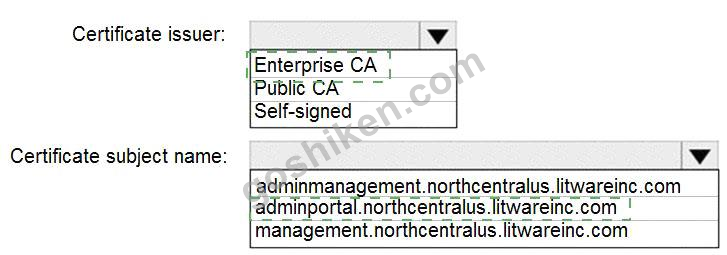
You need to identify the certificate for the integrated system in Chicago. The solution must meet the technical requirements.
What should you identify? To answer, select the appropriate options in the answer area.
NOTE: Each correct selection is worth one point.

What should you identify? To answer, select the appropriate options in the answer area.
NOTE: Each correct selection is worth one point.
正解:
Explanation
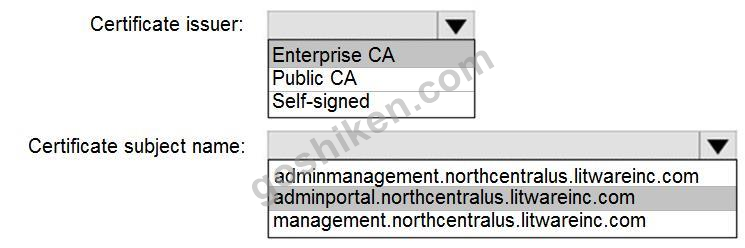
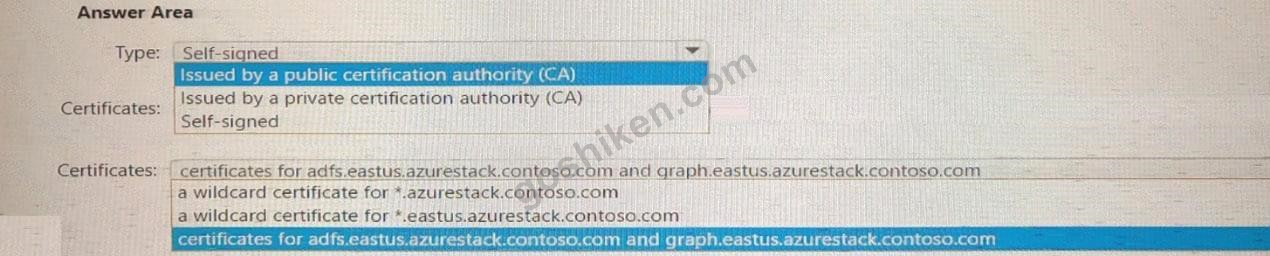
When deploying Azure Stack Hub in disconnected mode it is recommended to use certificates issued by an enterprise certificate authority. This is important because clients accessing Azure Stack Hub endpoints must be able to contact the certificate revocation list (CRL).
Reference:
https://docs.microsoft.com/en-us/azure-stack/operator/azure-stack-pki-certs?view=azs-2008
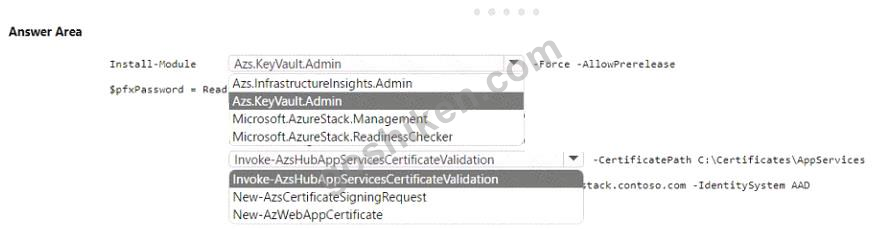
You have an Azure Stack Hub integrated system. That uses the Azure App Service resource provider.
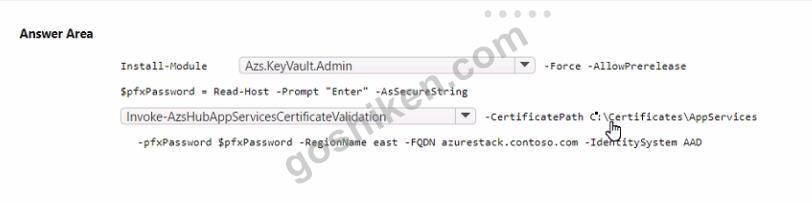
You plan to rotate the App Service certificates. The new certificates are stored in a folder named c:\certificates\Appservices.
You need to validate the new certificates.
How should you complete the script? To answer, select the appropriate options in the answer area.
NOTE Each correct selection is worth one point.
You plan to rotate the App Service certificates. The new certificates are stored in a folder named c:\certificates\Appservices.
You need to validate the new certificates.
How should you complete the script? To answer, select the appropriate options in the answer area.
NOTE Each correct selection is worth one point.
正解:

Explanation
Note: This question is part of a series of questions that present the same scenario. Each question in the series contains a unique solution that might meet the stated goals. Some question sets might have more than one correct solution, while others might not have a correct solution.
After you answer a question in this section, you will NOT be able to return to it. As a result, these questions will not appear in the review screen.
You deploy a disconnected Azure Stack Hub integrated system.
You need to identify the IP address of the privileged endpoint (PEP).
Solution: From the administrator portal of Azure Stack Hub, you review the Region management blade.
Does this meet the goal?
After you answer a question in this section, you will NOT be able to return to it. As a result, these questions will not appear in the review screen.
You deploy a disconnected Azure Stack Hub integrated system.
You need to identify the IP address of the privileged endpoint (PEP).
Solution: From the administrator portal of Azure Stack Hub, you review the Region management blade.
Does this meet the goal?
正解:B
解答を投票する
解説: (GoShiken メンバーにのみ表示されます)
You plan to deploy a disconnected Azure Stack Hub integrated system named eastus.azurestack.contoso.com.
Azure Stack Hub clients will be isolated from the internet.
You need to identify which certificates and certificate type to use for the deployment.
What should you identify? To answer, select the appropriate options in the answer area.
NOTE: Each correct selection is worth one point.
Azure Stack Hub clients will be isolated from the internet.
You need to identify which certificates and certificate type to use for the deployment.
What should you identify? To answer, select the appropriate options in the answer area.
NOTE: Each correct selection is worth one point.
正解:

Explanation
D:\mudassar\Untitled.jpg

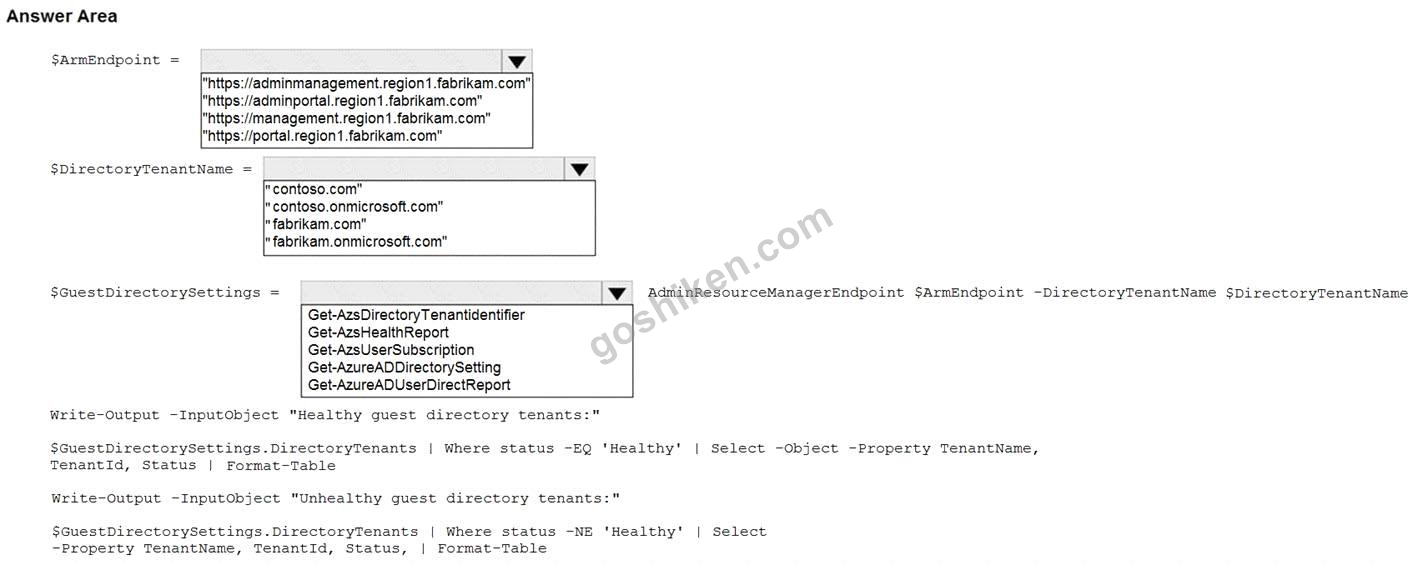
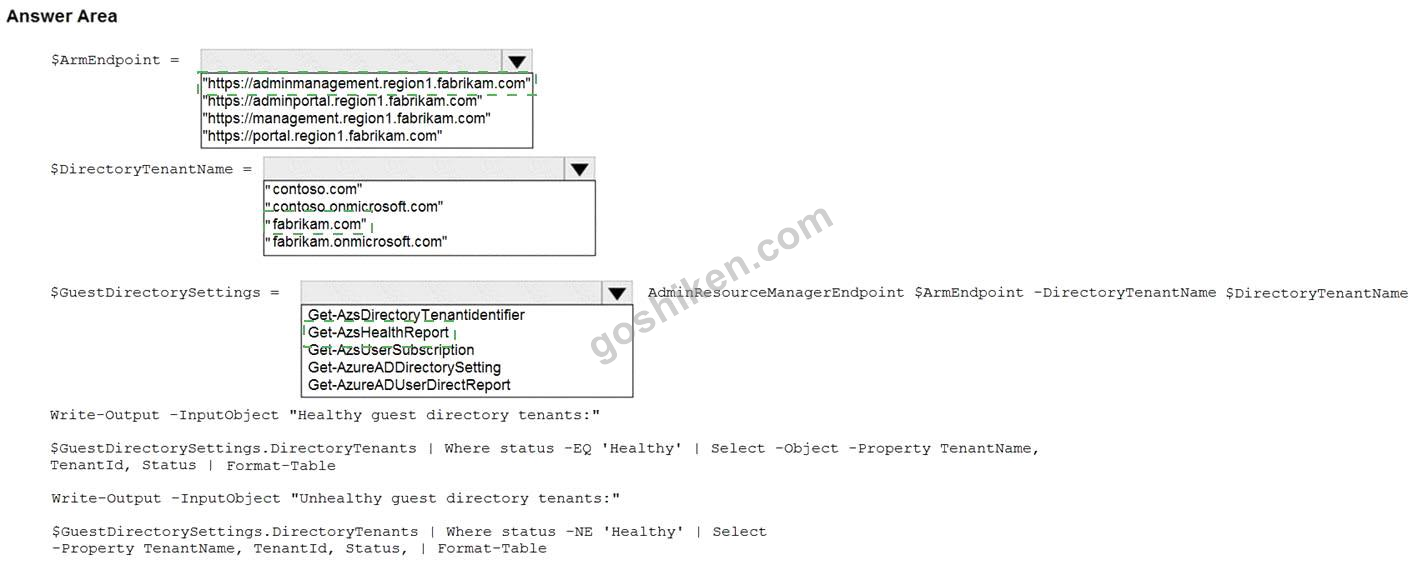
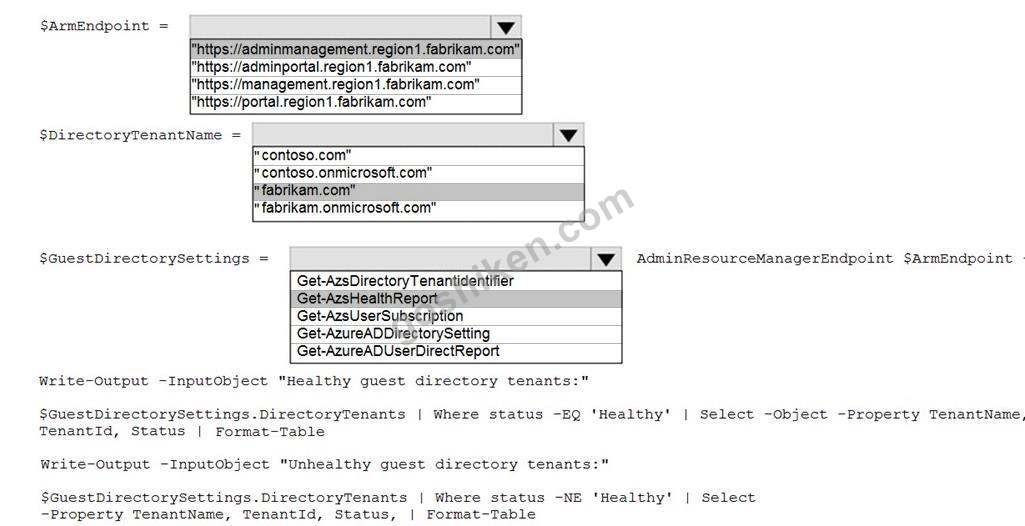
You have an Azure Stack Hub integrated system that is enabled for multitenancy and uses an Azure Active Directory (Azure AD) tenant named fabrikam.com as an identity provider.
The integrated system has the following guest directory tenants onboarded and enabled for multitenancy:
com
onmicrosoft.com
onmicrosoft.com
You need to verify whether all the guest directory tenants are registered properly.
How should you complete the PowerShell script? To answer, drag the appropriate cmdlet to the correct targets.
Each cmdlet may be used once, more than once, or not at all. You may need to drag the split bar between panes or scroll to view content.
NOTE: Each correct selection is worth one point.
The integrated system has the following guest directory tenants onboarded and enabled for multitenancy:
com
onmicrosoft.com
onmicrosoft.com
You need to verify whether all the guest directory tenants are registered properly.
How should you complete the PowerShell script? To answer, drag the appropriate cmdlet to the correct targets.
Each cmdlet may be used once, more than once, or not at all. You may need to drag the split bar between panes or scroll to view content.
NOTE: Each correct selection is worth one point.
正解:
Explanation
Reference:
https://docs.microsoft.com/en-us/azure-stack/operator/azure-stack-enable-multitenancy?view=azs-2008
You have a connected Azure Stack Hub integrated system.
You perform the following tasks:
* On a server named SERVER1. you create a file share named AzSHLogs.
* You create a PowerShell remoting session to the privileged endpoint (PEP) of the integrated system.
* In a variable named $Session, you store a reference to the session.
* In a variable named $AdHinCredentials. you store a reference to the credentials required to write to AzSHLogs.
You need to collect the Hyper-V event logs for all the cluster hosts and copy the logs to the AzSHLogs share.
How should you complete the PowerShell script? To answer, select the appropriate options in the answer area.

You perform the following tasks:
* On a server named SERVER1. you create a file share named AzSHLogs.
* You create a PowerShell remoting session to the privileged endpoint (PEP) of the integrated system.
* In a variable named $Session, you store a reference to the session.
* In a variable named $AdHinCredentials. you store a reference to the credentials required to write to AzSHLogs.
You need to collect the Hyper-V event logs for all the cluster hosts and copy the logs to the AzSHLogs share.
How should you complete the PowerShell script? To answer, select the appropriate options in the answer area.
正解:

Explanation

Box 1: $using:AdminCredentials
Box 2: Storage
Send Azure Stack Hub diagnostic logs by using the privileged endpoint (PEP) To run Get-AzureStackLog on an integrated system, you need to have access to the privileged endpoint (PEP).
Here's an example script you can run using the PEP to collect logs.
$ipAddress = "<IP ADDRESS OF THE PEP VM>" # You can also use the machine name instead of IP here.
$password = ConvertTo-SecureString "<CLOUD ADMIN PASSWORD>" -AsPlainText -Force
$cred = New-Object -TypeName System.Management.Automation.PSCredential ("<DOMAIN NAME>\CloudAdmin", $password)
$shareCred = Get-Credential
$session = New-PSSession -ComputerName $ipAddress -ConfigurationName PrivilegedEndpoint -Credential
$cred -SessionOption (New-PSSessionOption -Culture en-US -UICulture en-US)
$fromDate = (Get-Date).AddHours(-8)
$toDate = (Get-Date).AddHours(-2) # Provide the time that includes the period for your issue Invoke-Command -Session $session { Get-AzureStackLog -OutputSharePath "<EXTERNAL SHARE ADDRESS>" -OutputShareCredential $using:shareCred -FilterByRole Storage -FromDate $using:fromDate
-ToDate $using:toDate}
if ($session) {
Remove-PSSession -Session $session
}
Reference:
https://learn.microsoft.com/en-us/azure-stack/operator/azure-stack-get-azurestacklog
Note: This question is part of a series of questions that present the same scenario. Each question in the series contains a unique solution that might meet the stated goals. Some question sets might have more than one correct solution, while others might not have a correct solution.
After you answer a question in this section, you will NOT be able to return to it. As a result, these questions will not appear in the review screen.
You deploy a disconnected Azure Stack Hub integrated system.
You need to identify the IP address of the privileged endpoint (PEP).
Solution: You run the Azure Stack Hub Readiness checker tool.
Does this meet the goal?
After you answer a question in this section, you will NOT be able to return to it. As a result, these questions will not appear in the review screen.
You deploy a disconnected Azure Stack Hub integrated system.
You need to identify the IP address of the privileged endpoint (PEP).
Solution: You run the Azure Stack Hub Readiness checker tool.
Does this meet the goal?
正解:A
解答を投票する
You have an Azure Stack Hub integrated system. The current VIP pool uses a subnet of 192.168.203.0/24 and has routing configured to use BGP.
In the administrator portal, you receive an alert that the public IP addresses are at 95 percent utilization.
You need to add 192.168.204.0/24 to the public IP address pool.
Which three actions should you perform in sequence? To answer, move the appropriate actions from the list of actions to the answer area and arrange them in the correct order.
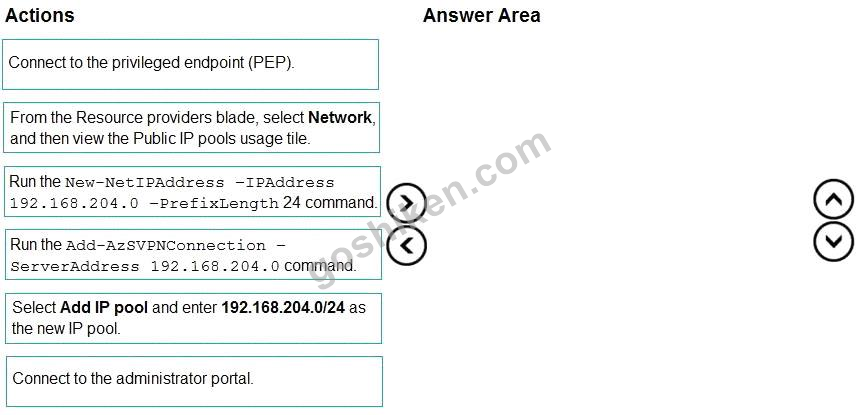
In the administrator portal, you receive an alert that the public IP addresses are at 95 percent utilization.
You need to add 192.168.204.0/24 to the public IP address pool.
Which three actions should you perform in sequence? To answer, move the appropriate actions from the list of actions to the answer area and arrange them in the correct order.
正解:
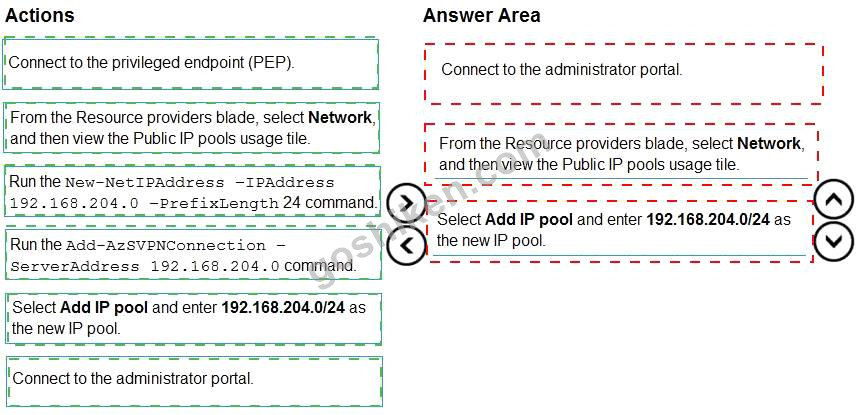
Explanation
Graphical user interface, text Description automatically generated
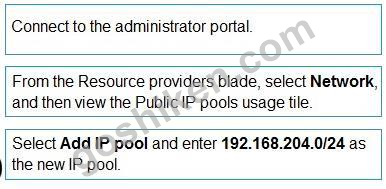
Add public IP addresses
Add the IP address range to Azure Stack Hub
In a browser, go to your administrator portal dashboard. For this example, we'll use
https://adminportal.local.azurestack.external.
Sign in to the Azure Stack Hub administrator portal as a cloud operator. (Step 1) On the default dashboard, find the Region management list and select the region you want to manage.
For this example, we use local.
Find the Resource providers tile and click on the network resource provider. (Step 2) Click on the Public IP pools usage tile. (Step 2) Click on the Add IP pool button. (Step 3) Provide a name for the IP pool. The name you choose helps you easily identify the IP pool. You can't use a special character like "/" in this field. It's a good practice to make the name the same as the address range, but that isn't required.
Enter the address block you want to add in CIDR notation. For example: 192.168.203.0/24 When you provide a valid CIDR range in the Address range (CIDR block) field the Start IP address, End IP address and Available IP addresses fields will automatically populate. They're read-only and automatically generated so you can't change these fields without modifying the value in the Address range field.
After you review the info on the blade and confirm that everything looks correct, select Ok to commit the change and add the address range to Azure Stack Hub.
Reference:
https://learn.microsoft.com/en-us/azure-stack/operator/azure-stack-add-ips
You plan to deploy an Azure Stack Hub integrated system to a datacenter.
You need to connect the top-of-rack (ToR) switches to the existing border devices. The solution must ensure that routes propagate dynamically between the ToR switches and the border devices.
What should you include in the solution? To answer, select the appropriate options in the answer area.
NOTE: Each correct selection is worth one point.
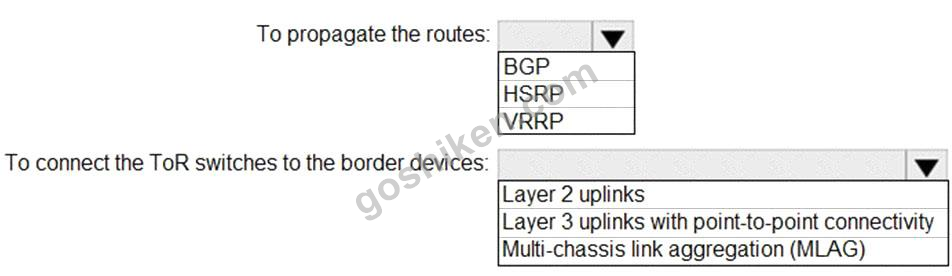
You need to connect the top-of-rack (ToR) switches to the existing border devices. The solution must ensure that routes propagate dynamically between the ToR switches and the border devices.
What should you include in the solution? To answer, select the appropriate options in the answer area.
NOTE: Each correct selection is worth one point.
正解:

Explanation
Box 1: BGP
BGP routing
Using a dynamic routing protocol like BGP guarantees that your system is always aware of network changes and facilitates administration. For enhanced security, a password may be set on the BGP peering between the TOR and the Border.
Box 2: Layer 3 uplinks with point-to-point connectivity
To integrate Azure Stack Hub to the network it requires uplinks from the Top-of-Rack switches (ToR) to the nearest switch or router, which on this documentation is referred as Border. The ToRs can be uplinked to a single or a pair of Borders.
The top of rack (TOR) switches require Layer 3 uplinks with Point-to-Point IPs (/30 networks) configured on the physical interfaces. Layer 2 uplinks with TOR switches supporting Azure Stack Hub operations isn't supported Reference:
https://learn.microsoft.com/en-us/azure-stack/operator/azure-stack-border-connectivity
https://learn.microsoft.com/en-us/azure-stack/operator/azure-stack-network