
SC-401試験無料問題集「Microsoft Administering Information Security in Microsoft 365 認定」
Hotspot Question
You have a Microsoft 365 E5 subscription that uses Microsoft Purview.
You need to deploy a compliance solution that will detect the accidental oversharing of information outside of an organization. The solution must minimize administrative effort.
What should you use? To answer, select the appropriate options in the answer area.
NOTE: Each correct selection is worth one point.

You have a Microsoft 365 E5 subscription that uses Microsoft Purview.
You need to deploy a compliance solution that will detect the accidental oversharing of information outside of an organization. The solution must minimize administrative effort.
What should you use? To answer, select the appropriate options in the answer area.
NOTE: Each correct selection is worth one point.
正解:

Explanation:
Box 1: Data leaks
When using a Data leaks template, you can assign a DLP policy to trigger indicators in the insider risk policy for high severity alerts in your organization. Whenever a high severity alert is generated by a DLP policy rule is added to the Office 365 audit log, insider risk policies created with this template automatically examine the high severity DLP alert. If the alert contains an in- scope user defined in the insider risk policy, the alert is processed by the insider risk policy as a new alert and assigned an insider risk severity and risk score. You can also choose to assign selected indicators as triggering events for a policy. This flexibility and customization helps scope the policy to only the activities covered by the indicators. This policy allows you to evaluate this alert in context with other activities included in the case.
Box 2: A data loss prevention (DLP) policy
Note: Data leaks
Protecting data and preventing data leaks is a constant challenge for most organizations, particularly with the rapid growth of new data created by users, devices, and services. Users are empowered to create, store, and share information across services and devices that make managing data leaks increasingly more complex and difficult. Data leaks can include *accidental oversharing of information outside your organization* or data theft with malicious intent. With an assigned Microsoft Purview Data Loss Prevention (DLP) policy, built-in, or customizable triggering events, this template starts scoring real-time detections of suspicious SharePoint Online data downloads, file and folder sharing, printing files, and copying data to personal cloud messaging and storage services.
Reference:
https://learn.microsoft.com/en-us/purview/insider-risk-management-policy-templates
You are planning a data loss prevention (DLP) solution that will apply to Windows Client computers.
You need to ensure that when users attempt to copy a file that contains sensitive information to a USB storage device, the following requirements are met:
If the users are members of a group named Group1, the users must be allowed to copy the file, and an event must be recorded in the audit log.
All other users must be blocked from copying the file.
What should you create?
You need to ensure that when users attempt to copy a file that contains sensitive information to a USB storage device, the following requirements are met:
If the users are members of a group named Group1, the users must be allowed to copy the file, and an event must be recorded in the audit log.
All other users must be blocked from copying the file.
What should you create?
正解:C
解答を投票する
解説: (GoShiken メンバーにのみ表示されます)
Note: This question is part of a series of questions that present the same scenario. Each question in the series contains a unique solution that might meet the stated goals. Some question sets might have more than one correct solution, while others might not have a correct solution.
After you answer a question in this section, you will NOT be able to return to it. As a result, these questions will not appear in the review screen.
You implement Microsoft 365 Endpoint data loss prevention (Endpoint DLP).
You have computers that run Windows 11 and have Microsoft 365 Apps installed. The computers are joined to a Microsoft Entra tenant.
You need to ensure that Endpoint DLP policies can protect content on the computers.
Solution: You onboard the computers to Microsoft Defender for Endpoint.
Does this meet the goal?
After you answer a question in this section, you will NOT be able to return to it. As a result, these questions will not appear in the review screen.
You implement Microsoft 365 Endpoint data loss prevention (Endpoint DLP).
You have computers that run Windows 11 and have Microsoft 365 Apps installed. The computers are joined to a Microsoft Entra tenant.
You need to ensure that Endpoint DLP policies can protect content on the computers.
Solution: You onboard the computers to Microsoft Defender for Endpoint.
Does this meet the goal?
正解:B
解答を投票する
解説: (GoShiken メンバーにのみ表示されます)
Hotspot Question
You have a Microsoft 365 subscription that uses Microsoft Purview.
You need to investigate the following events:
- Events that occurred two months ago
- Events in which users accessed encrypted email by using a one-time
passcode (OTP)
Which Microsoft Purview solution should you use, and which type of record should you query? To answer, select the appropriate options in the answer area.
NOTE: Each correct selection is worth one point.

You have a Microsoft 365 subscription that uses Microsoft Purview.
You need to investigate the following events:
- Events that occurred two months ago
- Events in which users accessed encrypted email by using a one-time
passcode (OTP)
Which Microsoft Purview solution should you use, and which type of record should you query? To answer, select the appropriate options in the answer area.
NOTE: Each correct selection is worth one point.
正解:

Explanation:
To investigate events where external users accessed encrypted email using a one-time passcode (OTP), you must use the following configuration in your query:
Microsoft Purview Feature: Audit (Standard) or Audit (Premium) (using the Audit log search tool) Record Type: OMEPortal Box 1: Audit The Audit search feature in the Microsoft Purview compliance portal tracks all user and administrator activities across Microsoft 365 services. Since the default retention period for Microsoft Purview Audit (Standard) is 180 days, it fully supports investigating events that occurred two months ago.
Box 2: OMEPortal
When a recipient signs into the Office 365 Message Encryption portal via a one-time passcode (OTP), the event is recorded under a specific schema.The required record type filter for the query is OMEPortal.This records operations such as external user authentication methods, message views, and attachment downloads.
Reference:
https://learn.microsoft.com/en-us/purview/audit-log-activities
https://learn.microsoft.com/en-us/office/office-365-management-api/omeportal
Drag and Drop Question
You have a Microsoft 365 subscription that contains 20 data loss prevention (DLP) policies.
You need to identify the following:
- Rules that are applied without triggering a policy alert
- The top 10 files that have matched DLP policies
- Alerts that are miscategorized
Which report should you use for each requirement? To answer, drag the appropriate reports to the correct requirements. Each report may be used once, more than once, or not at all. You may need to drag the split bar between panes or scroll to view content.
NOTE: Each correct selection is worth one point.
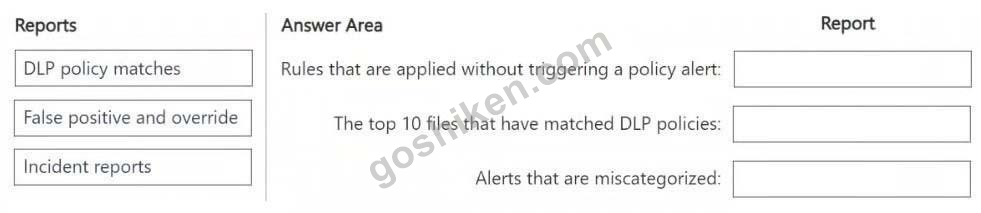
You have a Microsoft 365 subscription that contains 20 data loss prevention (DLP) policies.
You need to identify the following:
- Rules that are applied without triggering a policy alert
- The top 10 files that have matched DLP policies
- Alerts that are miscategorized
Which report should you use for each requirement? To answer, drag the appropriate reports to the correct requirements. Each report may be used once, more than once, or not at all. You may need to drag the split bar between panes or scroll to view content.
NOTE: Each correct selection is worth one point.
正解:

Hotspot Question
You have a Microsoft 365 E5 subscription that contains a Microsoft SharePoint Online site named Site1 and a sensitivity label named Label1.
The external sharing settings for Site1 are configured as shown in the Site1 exhibit. (Click the Site1 tab.)

The external sharing settings for Label1 are configured as shown in the Label1 exhibit. (Click the Label1 tab.)

Label1 is applied to Site1.
For each of the following statements, select Yes if the statement is true. Otherwise, select No.
NOTE: Each correct selection is worth one point.

You have a Microsoft 365 E5 subscription that contains a Microsoft SharePoint Online site named Site1 and a sensitivity label named Label1.
The external sharing settings for Site1 are configured as shown in the Site1 exhibit. (Click the Site1 tab.)
The external sharing settings for Label1 are configured as shown in the Label1 exhibit. (Click the Label1 tab.)
Label1 is applied to Site1.
For each of the following statements, select Yes if the statement is true. Otherwise, select No.
NOTE: Each correct selection is worth one point.
正解:

Hotspot Question
You have a Microsoft 365 5 subscription that contains the devices shown in the following table.

You publish Microsoft Purview Information Protection sensitivity labels.
You plan to deploy the information protection client to the devices. The solution must ensure that the labels can be applied to sensitive images and documents.
On which devices can you install the information protection client, and what should users use to apply labels? To answer, select the appropriate options in the answer area.
NOTE: Each correct selection is worth one point.

You have a Microsoft 365 5 subscription that contains the devices shown in the following table.
You publish Microsoft Purview Information Protection sensitivity labels.
You plan to deploy the information protection client to the devices. The solution must ensure that the labels can be applied to sensitive images and documents.
On which devices can you install the information protection client, and what should users use to apply labels? To answer, select the appropriate options in the answer area.
NOTE: Each correct selection is worth one point.
正解:

Explanation:
Box 1: Device1 and Device3 only
Requirements for deploying the information protection client
To use the Microsoft Purview Information Protection client, install this client on Windows computers where you want to use the client components.
Box 2: File Explorer
The Microsoft Purview Information Protection client can be installed and used with File Explorer in Windows. You can apply sensitivity labels and protection to files directly within File Explorer.
Reference:
https://learn.microsoft.com/en-us/purview/information-protection-client
Hotspot Question
You have a Microsoft 365 E5 subscription that contains the users shown in the following table.

The subscription contains the groups shown in the following table.

You plan to create a priority user group named Priority1.
You need to identify the following:
- Which users and groups can be added to Priority1?
- Which users can be enabled to view alerts that involve the members of Priority1?
What should you identify? To answer, select the appropriate options in the answer area.

You have a Microsoft 365 E5 subscription that contains the users shown in the following table.
The subscription contains the groups shown in the following table.
You plan to create a priority user group named Priority1.
You need to identify the following:
- Which users and groups can be added to Priority1?
- Which users can be enabled to view alerts that involve the members of Priority1?
What should you identify? To answer, select the appropriate options in the answer area.
正解:

Explanation:
Box 1: User1, User2, and User3 only
* User1 - Yes
User1 is Global Administrator.
A Global Administrator in Microsoft 365 can be added to a priority user group.
Priority User Groups:
These groups are often used to grant specific access or prioritize certain users. Global Administrators can add themselves or other users to these groups.
* User2 - Yes
An Insider Risk Management Analyst can be added to a priority user group.
* User3 - Yes
Insider Risk Management Investigations can be associated with or scoped to a Priority User Group (PUG).
* Group1 - No
You cannot directly add a security group as a member of a priority user group.
* Group2 - No
Box 2: User2 and User3 only
* User1 - No
* User2 - Yes, User3 - Yes
Instead of being open to review by all analysts and investigators, priority user groups might also need to restrict review activities to specific users or insider risk role groups. You can choose to assign individual users and role groups to review users, alerts, cases, and reports for each priority user group. Priority user groups can have review permissions assigned to the built-in Insider Risk Management, Insider Risk Management Analysts, and Insider Risk Management Investigators role groups, one or more of these role groups, or to a custom selection of users.
Reference:
https://learn.microsoft.com/en-us/purview/insider-risk-management-settings-priority-user-groups
You have a Microsoft 365 E5 subscription that contains the resources shown in the following table.

You have a retention label configured as shown in the following exhibit.

You publish the retention label and set the scope as shown in the following exhibit.

You apply the label to the resources.
Which items can you delete?
You have a retention label configured as shown in the following exhibit.
You publish the retention label and set the scope as shown in the following exhibit.
You apply the label to the resources.
Which items can you delete?
正解:E
解答を投票する
解説: (GoShiken メンバーにのみ表示されます)