

最新の2026年最新の実際に出ると確認されたFCP_FCT_AD-7.4問題集で100%無料FCP_FCT_AD-7.4試験問題集
無料提供中で2026年最新のに更新されたFortinet FCP_FCT_AD-7.4試験問題と解答
質問 # 34
Which two VPNtypes can a FortiClientendpoint user inmate from the Windows command prompt? (Choose two)
- A. IPSec
- B. SSL VPN
- C. PPTP
- D. L2TP
正解:A、B
解説:
FortiClient supports initiating the following VPN types from the Windows command prompt:
* IPSec VPN:FortiClient can establish IPSec VPN connections using command line instructions.
* SSL VPN:FortiClient also supports initiating SSL VPN connections from the Windows command prompt.
These two VPN types can be configured and initiated using specific command line parameters provided by FortiClient.
References
* FortiClient EMS 7.2 Study Guide, VPN Configuration Section
* Fortinet Documentation on Command Line Options for FortiClient VPN
質問 # 35
Which statement about FortiClient enterprise management server is true?
- A. lt provides centralized management of multiple endpoints running FortiClient software.
- B. It provides centralized management of Chromebooks running real-time protection
- C. It provides centralized management of FortiClient Android endpoints only.
- D. It provides centralized management of FortiGate devices.
正解:A
解説:
FortiClient EMS is designed to provide centralized management and control of multiple endpoints running FortiClient software. It serves as a central management server that allows administrators to efficiently manage and configure a large number of FortiClient installations across the network.
質問 # 36
A company must integrate the FortiClient EMS with their existing identity management infrastructure for user authentication, and implement and enforce administrative access with multi-factor authentication (MFA).
Which two authentication methods can they use in this scenario? (Choose two answers)
- A. RADIUS
- B. TACACS
- C. SAML
- D. LDAPS
正解:A、C
解説:
According to theFortiClient EMS 7.4 Administration Guide, for an organization to integrate with an identity management infrastructure while enforcing administrative access with Multi-Factor Authentication (MFA), the primary supported methods for remote administrator authentication areRADIUSandSAML.
1. RADIUS (Answer B)
* Identity Integration:FortiClient EMS allows administrators to addRADIUS serversas an authentication source under theAdministration > Authentication Serverssection.
* MFA Support:RADIUS is a standard protocol for enforcing MFA. In this scenario, FortiClient EMS acts as a RADIUS client to an external MFA provider (such as FortiAuthenticator, RSA Authentication Manager, or Duo).
* Workflow:When an administrator attempts to log in to the EMS console, EMS sends an Access- Request to the RADIUS server. If the provider requires MFA, it can challenge the user (via push notification or token code) before sending an Access-Accept back to EMS.
2. SAML (Answer D)
* Modern Identity Management:SAML (Security Assertion Markup Language) is the preferred method for integrating with modern cloud and on-premises Identity Providers (IdPs) likeMicrosoft Entra ID (formerly Azure AD),Okta,AD FS, orFortiAuthenticator.
* Native MFA Enforcement:By using SAML SSO, the authentication and MFA process are handled entirely by the IdP. The EMS server acts as the Service Provider (SP). When an admin logs in, they are redirected to the IdP, where the company's existing MFA policies (Conditional Access, etc.) are enforced before the user is granted access back to the EMS console.
* EMS Configuration:The curriculum details specific SAML SSO configurations for various IdPs under theSAML SSOsection of the Administration Guide.
3. Why Other Options are Incorrect/Insufficient
* A. LDAPS:While FortiClient EMS supports importing users fromActive Directory (ADDS)via LDAP
/LDAPS for endpoint management and basic admin login, standard LDAPS does not natively support or enforce an MFA challenge-response workflow in the same integrated way that RADIUS or SAML does for administrative console access.
* C. TACACS:TACACS+ is primarily used for device administration on networking equipment (like FortiGate) and is not a listed or standard method for administrative authentication within the FortiClient EMS software documentation.
質問 # 37
Refer to the exhibit.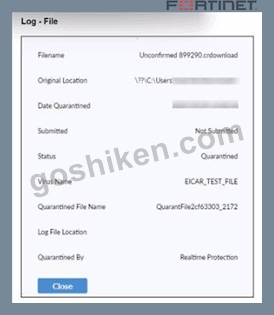
Based on the FortiClient tog details shown in the exhibit, which two statements ace true? (Choose two.)
- A. The filename Is Unconfirmed 899290.crdovnload.
- B. The file status is Quarantined
- C. The file location is \??\D:\Users\.
- D. The filename is sent to FortiSandbox for further inspection.
正解:A、B
質問 # 38
Refer to the exhibit, which shows the output of the ZTNA traffic log on FortiGate.
What can you conclude from the log message?
- A. The remote user connection does not match the ZTNA rule configuration.
- B. The remote user connection does not match the ZTNA server configuration.
- C. The remote user connection does not match the local-in policy.
- D. The remote user connection does not match the ZTNA firewall policy.
正解:A
解説:
* Observation of ZTNA Traffic Log:
* The log message indicates that the remote user connection was denied due to failure to match a proxy policy.
* Evaluating Log Message:
* The message suggests that the connection does not match the existing ZTNA rule configuration, leading to the denial.
* Conclusion:
* The correct conclusion from the log message is that the remote user connection does not match the ZTNA rule configuration (B).
References:
ZTNA traffic log analysis and configuration documentation from the study guides.
質問 # 39
Refer to the exhibit.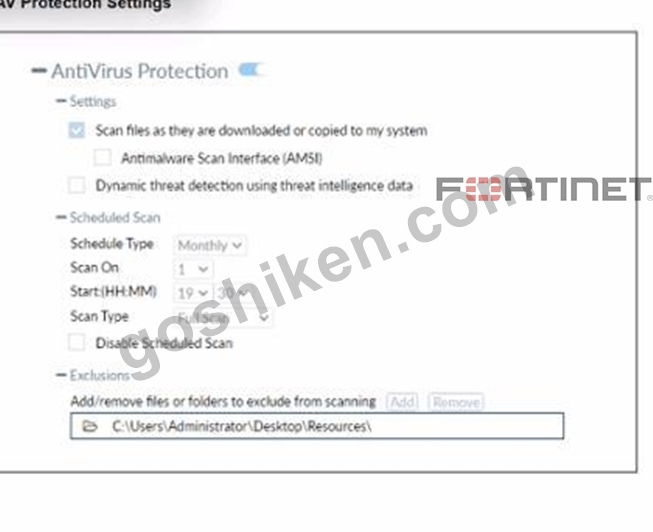
Based on The settings shown in The exhibit, which statement about FortiClient behaviour is Hue?
- A. FortiClient blocks and deletes infected files after scanning them.
- B. FortiClient copies infected files to the Resources folder without scanning them.
- C. FortiClient scans infected files when the user copies files to the Resources folder.
- D. FortiClient quarantines infected ties and reviews later, after scanning them.
正解:C
解説:
Based on the settings shown in the exhibit, FortiClient is configured to scan files as they are downloaded or copied to the system. This means that if a user copies files to the "Resources" folder, which is not listed under exclusions, FortiClient will scan these files for infections. The exclusion path mentioned in the settings, "C:
\Users\Administrator\Desktop\Resources", indicates that any files copied to this specific folder will not be scanned, but since the question implies that the "Resources" folder is not the same as the excluded path, FortiClient will indeed scan the files for infections.
質問 # 40
Refer to the exhibit.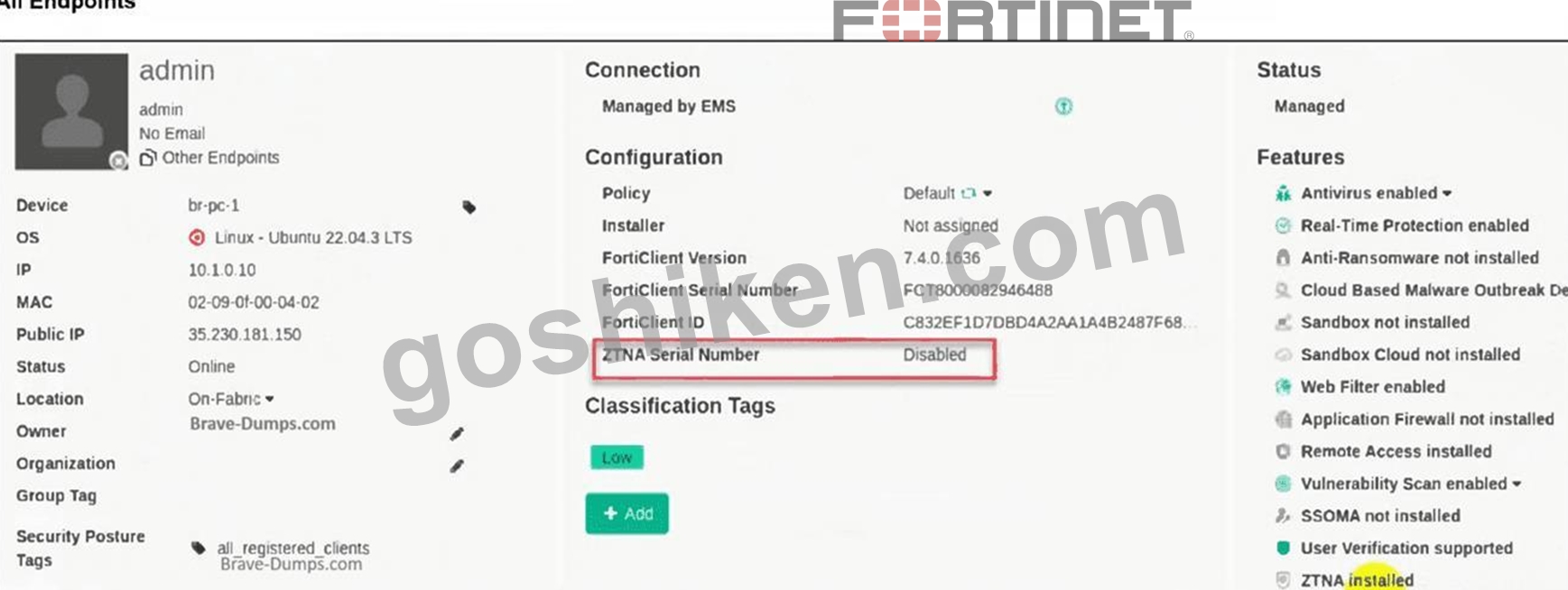
The zero trust network access (ZTNA) serial number on endpoint br-pc-1 is in a disabled state.
What is causing the problem? (Choose one answer)
- A. The ZTNA destinations endpoint profile is disabled.
- B. The ZTNA is disabled due to FortiClient disconnected from FortiClient EMS.
- C. The ZTNA feature is not installed on FortiClient.
- D. The ZTNA certificate has been revoked by administrator.
正解:A
解説:
Based on theFortiClient EMS 7.2/7.4 Study Guidesand the visual evidence provided in the exhibit, here is the verified breakdown of why theZTNA Serial Numberis showing asDisabled:
1. Analysis of the Exhibit
* Operating System:The endpoint is runningLinux (Ubuntu 22.04.3 LTS).
* Connection Status:The endpoint status isOnlineandManaged by EMS. This immediately eliminates Option C, as the device is actively communicating with the EMS server.
* Features List:At the bottom right of the "Features" column, it explicitly states"ZTNA installed". This eliminatesOption A, confirming the software component is present on the endpoint.
* ZTNA Serial Number Field:The field is highlighted in red and shows"Disabled".
2. Identifying the Root Cause (Option B)
In the FortiClient EMS curriculum regardingZTNA (Zero Trust Network Access), the ZTNA Serial Number (also known as the ZTNA Tagging or Client Certificate UID) is generated and activated based on the assigned Endpoint Profile.
* Profile Dependency:For FortiClient to generate a ZTNA serial number/certificate and participate in ZTNA, the administrator must enable and configure theZTNA Destinations(or ZTNA Connection) profile within the EMS.
* Disabled State:If theZTNA Destinationsfeature is disabled in the profile assigned to that specific endpoint (or if the endpoint is assigned the "Default" profile where ZTNA is not configured), the
"ZTNA Serial Number" status on the EMS dashboard will reflect asDisabled.
* Linux Specifics:In FortiClient for Linux, ZTNA support is available but requires the profile to be explicitly pushed and active. If the profile is toggled off in the EMS GUI underEndpoint Profiles > ZTNA Destinations, the serial number functionality is suspended.
3. Why Other Options are Incorrect
* A. The ZTNA feature is not installed:The exhibit clearly shows "ZTNA installed" under the Features list.
* C. FortiClient disconnected from EMS:The exhibit shows the status as "Online" and "Managed by EMS" with a green checkmark.
* D. The ZTNA certificate has been revoked:If a certificate is revoked, the status typically shows as
"Revoked" or "Expired," or the serial number would still be present but marked as untrusted. A
"Disabled" state indicates the feature itself is turned off at the policy/profile level.
質問 # 41
An administrator installs FortiClient EMS in the enterprise.
Which component is responsible for enforcing protection and checking security posture?
- A. FortiClient
- B. FortiClient vulnerability scan
- C. FortiClient EMS tags
- D. FortiClient EMS
正解:A
解説:
* Understanding FortiClient EMS Components:
* FortiClient EMS manages and configures endpoint security settings, while FortiClient installed on the endpoint enforces protection and checks security posture.
* Evaluating Responsibilities:
* FortiClient performs the actual enforcement of security policies and checks the security posture of the endpoint.
* Conclusion:
* The component responsible for enforcing protection and checking security posture is FortiClient (C).
References:
FortiClient EMS and endpoint security documentation from the study guides.
質問 # 42
Which component or device shares device status information through ZTNA telemetry?
- A. FortiGate
- B. FortiClient
- C. FortiClient EMS
- D. FortiGate Access Proxy
正解:B
解説:
FortiClient communicates directly with FortiClient EMS to continuously share device status information through ZTNA telemetry.
質問 # 43
Which statement about FortiClient enterprise management server is true?
- A. lt provides centralized management of multiple endpoints running FortiClient software.
- B. It provides centralized management of Chromebooks running real-time protection
- C. It provides centralized management of FortiClient Android endpoints only.
- D. It provides centralized management of FortiGate devices.
正解:A
解説:
FortiClient EMS is designed to provide centralized management and control of multiple endpoints running FortiClient software. It serves as a central management server that allows administrators to efficiently manage and configure a large number of FortiClient installations across the network.
質問 # 44
Which two statements about ZTNA destinations are true? (Choose two.)
- A. FortiClient ZTNA destinations do not support a wildcard FQDN.
- B. FortiClient ZTNA destinations provides access through TCP forwarding.
- C. FottiClient ZTNA destinations use an existing VPN tunnel to create a secure connection.
- D. FortiCIient ZTNA destination authentication is enabled by default.
- E. FortiClient ZTNA destination encryption is disabled by default.
正解:A、E
質問 # 45
Which component or device defines ZTNA lag information in the Security Fabric integration?
- A. FortiClient
- B. FortiGate
- C. FortiClient EMS
- D. FortiGate Access Proxy
正解:C
解説:
* Understanding ZTNA:
* Zero Trust Network Access (ZTNA) requires defining tags for identifying and managing endpoint access.
* Evaluating Components:
* FortiClient EMS is responsible for managing and defining ZTNA tag information within the Security Fabric.
* Conclusion:
* The correct component that defines ZTNA tag information in the Security Fabric integration is FortiClient EMS.
References:
ZTNA and FortiClient EMS configuration documentation from the study guides.
質問 # 46
A FortiClient EMS administrator is implementing additional security on FortiClient for compliance checks.
Which tags can the administrator configure to detect endpoints based on vulnerability severity levels?
(Choose one answer)
- A. Classification tags
- B. Outbreak alert tags
- C. Fabric tags
- D. Security posture tags
正解:D
解説:
According to theFortiClient EMS 7.2/7.4 Administration Guideand theZTNA Deployment Guide, the administrator can configureSecurity posture tags(also known asZero Trust Network Access (ZTNA) tags in recent versions) to detect and group endpoints based on specific compliance criteria, including vulnerability severity levels.
1. How Security Posture Tags Work for Vulnerabilities:
* Tagging Rules: Under theSecurity Posture Tags(orZero Trust Tags) section in EMS, an administrator creates a new rule set and adds a rule.
* Rule Type: The administrator selects theVulnerable Devicesrule type.
* Severity Levels: Within this rule, the administrator can specify theSeverity Level(such asCritical,High
,Medium, orLow). EMS dynamically applies the tag to any endpoint where the vulnerability scan detects at least one vulnerability matching or exceeding that severity level.
* Dynamic Grouping: These tags allow for dynamic grouping of endpoints, which can then be synchronized with a FortiGate to enforce access control based on the device's current security posture.
2. Why Other Options are Incorrect:
* A. Outbreak alert tags: While FortiGuard Outbreak alerts can be used in tagging, they specifically target endpoints vulnerable to a particular "outbreak" or high-profile threat currently active in the wild, rather than providing a general mechanism for all vulnerability severity levels.
* B. Classification tags: These tags are typically used for broader endpoint identification (like department or location) and sending information to FortiAnalyzer for reporting, rather than real-time security posture compliance based on vulnerability scans.
* C. Fabric tags: "Fabric" usually refers to the integration between Fortinet devices (the Security Fabric).
While tags are shared across the Fabric, the specific tags configuredwithinEMS for endpoint detection based on posture are categorized as Security Posture/Zero Trust tags.
3. Curriculum References:
* FortiClient EMS Administration Guide (Zero Trust Tagging Rules section): Explicitly details the
"Vulnerable Devices" rule type and its severity options.
* EMS Study Guide (Compliance & Vulnerability): Describes using these tags to ensure endpoints meet minimum security standards before being granted access to the network.
質問 # 47
An administrator wants to simplify remote access without asking users to provide user credentials Which access control method provides this solution?
- A. ZTNA IP/MAC littering mode
- B. ZTNA full mode
- C. SSL VPN
- D. L2TP
正解:B
解説:
* Simplifying Remote Access:
* The administrator wants to simplify remote access without asking users to provide user credentials.
* Evaluating Access Control Methods:
* ZTNA full mode can provide seamless access by leveraging device identity and posture, eliminating the need for user credentials for each access request.
* Other methods like SSL VPN and L2TP typically require user credentials.
* Conclusion:
* The correct access control method that provides this solution is ZTNA full mode.
References:
ZTNA section in the FortiGate Infrastructure 7.2 Study Guide.
質問 # 48
Which component or device shares device status information through ZTNA telemetry?
- A. FortiGate
- B. FortiClient
- C. FortiClient EMS
- D. FortiGate Access Proxy
正解:B
解説:
FortiClient communicates directly with FortiClient EMS to continuously share device status information through ZTNA telemetry.
質問 # 49
Refer to the exhibit.
Why is the user not able to access bbc.com? (Choose one answer)
- A. The URL is blocked by the web filter endpoint profile.
- B. The application firewall is blocking Google Chrome.
- C. FortiGuard servers are not reachable from the endpoint.
- D. The endpoint cannot resolve the URL FQDN.
正解:C
解説:
Based on theFortiClient EMS Administrator Study GuideregardingWeb Filtertroubleshooting and the specific log entries provided in the exhibit, the reason the user cannot access the website is due to connectivity issues with FortiGuard.
1. Analysis of the FortiClient Logs:
* The Error Message:The logs show multiple [ERROR] entries stating: rating_db:97 Category query failure: failed to UrlRequestSendReceive.
* Root Cause Identity:The log explicitly describes the failure: receiveResponse error: FortiGuard server down, task dropped, https bbc.com.
* Resulting Action:Because the endpoint could not receive a rating from the FortiGuard servers, the Web Filter module recorded rating: -1 and applied the action WF_ACTION_BLOCK.
2. Why Option C is Correct:
* FortiGuard Dependency:FortiClient's Web Filter module relies on real-time queries to FortiGuard distribution servers to categorize URLs. If the endpoint is behind a firewall blocking FortiGuard ports (typically UDP 53 or 8888, or HTTPS 443) or has no internet path to these servers, it cannot categorize the site.
* Fail-Safe Behavior:In many FortiClient configurations, if a rating cannot be obtained (Category query failure), the default security posture is to block the request to ensure no potentially malicious or unrated
"Unknown" sites are accessed. The logs confirm this by showing the "FortiGuard server down" message immediately followed by the block action.
3. Why Other Options are Incorrect:
* A. The URL is blocked by the web filter endpoint profile:If it were a standard profile block, the log would show a specificCategory ID(e.g., Category 52 for News and Media) being blocked by policy.
Instead, it shows arating failure (-1).
* B. The endpoint cannot resolve the URL FQDN:The logs show the process correctly identifies host bbc.com. If DNS had failed, the proxy wouldn't even reach the stage of attempting a FortiGuard category query for that specific URL.
* D. The application firewall is blocking Google Chrome:While the log mentions /opt/google/chrome
/chrome, the error is generated by the rating_db and proxy components of the Web Filter, not the Application Firewall module.
質問 # 50
An administrator is required to maintain a software vulnerability on the endpoints, without showing the feature on the FortiClient. What must the administrator do to achieve this requirement?
- A. Select the vulnerability scan feature in the deployment package, but disable the feature on the endpoint profile
- B. Disable select the vulnerability scan feature in the deployment package
- C. Click the hide icon on the vulnerability scan profile assigned to endpoint
- D. Use the default endpoint profile
正解:C
解説:
* Requirement Analysis:
* The administrator needs to maintain a software vulnerability scan on endpoints without showing the feature on FortiClient.
* Evaluating Options:
* Disabling the feature in the deployment package or endpoint profile would remove the functionality entirely, which is not desired.
* Using the default endpoint profile may not meet the specific requirement of hiding the feature.
* Clicking the hide icon on the vulnerability scan profile assigned to the endpoint will keep the feature active but hidden from the user's view.
* Conclusion:
* The correct action is to click the hide icon on the vulnerability scan profile assigned to the endpoint (C).
References:
FortiClient EMS feature configuration and management documentation from the study guides.
質問 # 51
Which security fabric component sends a notification to quarantine an endpoint after IOC detection in the automation process?
- A. FortiAnalyzer
- B. FortiClient
- C. ForbClient EMS
- D. D. Forti Gate
正解:D
質問 # 52
Refer to the exhibit, which shows the endpoint summary information on FortiClient EMS.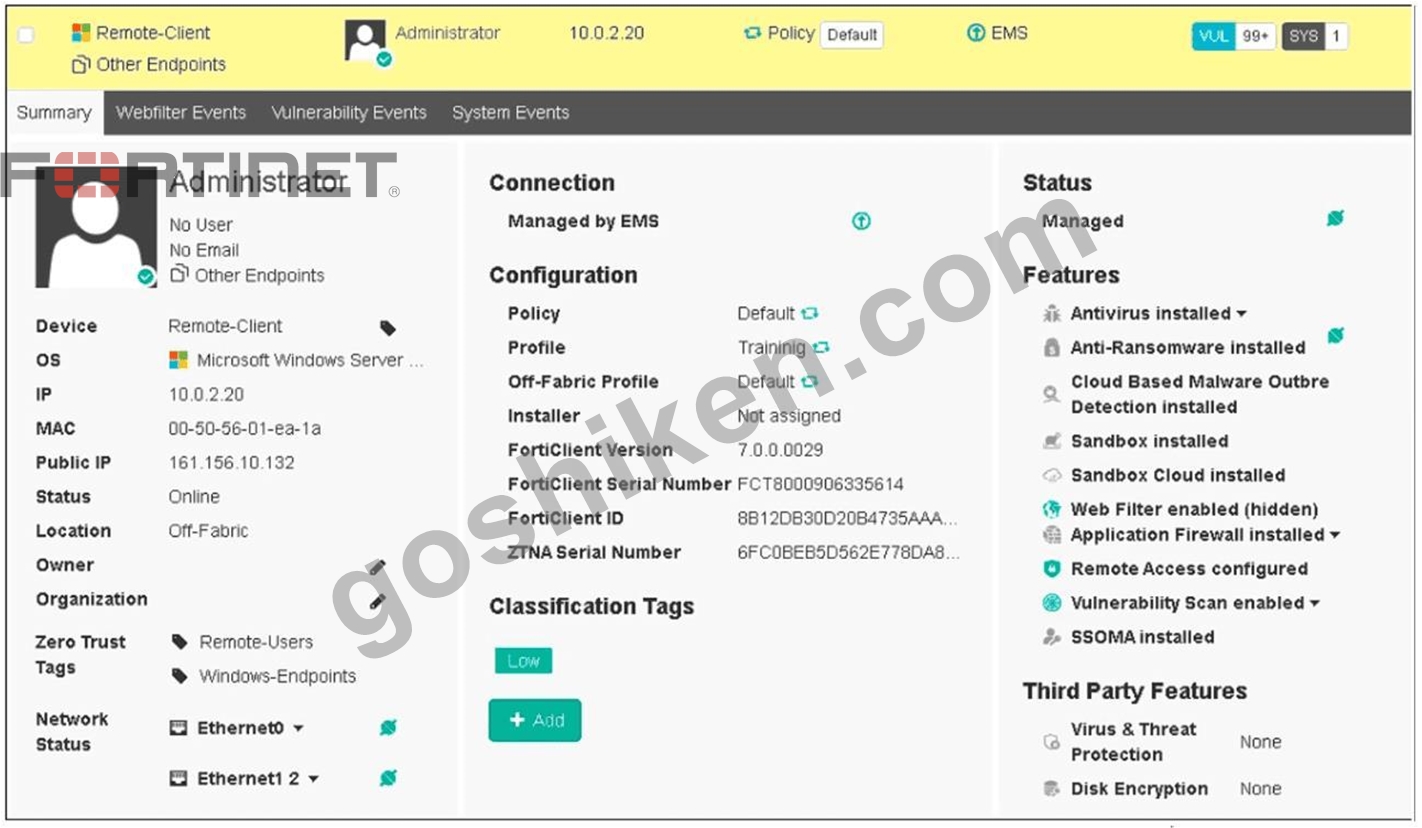
What two conclusions can you make based on the Remote-Client status shown above? (Choose two.)
- A. The endpoint is configured to support FortiSandbox.
- B. The endpoint is classified as at risk.
- C. The endpoint is currently off-net.
- D. The endpoint has been assigned the Default endpoint policy.
正解:C、D
解説:
Based on the Remote-Client status shown in the exhibit:
* Endpoint Policy:The "Policy" field shows "Default," indicating that the endpoint has been assigned the Default endpoint policy.
* Connection Status:The "Location" field shows "Off-Fabric," meaning that the endpoint is currently off the corporate network (off-net).
Therefore, the two conclusions that can be made are:
* The endpoint has been assigned the Default endpoint policy.
* The endpoint is currently off-net.
References
* FortiClient EMS 7.2 Study Guide, Endpoint Summary Information Section
* Fortinet Documentation on Endpoint Policies and Status Indicators
質問 # 53
Which statement about the FortiClient enterprise management server is true?
- A. It enforces compliance on the endpoints using tags
- B. It provides centralized management of multiple endpoints running FortiClient software.
- C. It receives the configuration information of endpoints from ForuGate.
- D. It receives the CA certificate from FortiGate to validate client certrficates.
正解:A
質問 # 54
An administrator has lost web access to the FortiClient EMS console, and the web page to access to the console is timing out.
How can the administrator gather information to investigate the issue? (Choose one answer)
- A. Use the diagnostic logs option from the FortiClient EMS GUI.
- B. Use the CLI diagnostic tool on the EMS server.
- C. Download the webserver logs from the PostgreSQL server.
- D. Download the log generator from the support site and run it on the EMS server.
正解:B
解説:
According to theFortiClient EMS Administrator Study Guideand officialTechnical Tipsfrom Fortinet, when the web console is inaccessible (e.g., timing out), the administrator must use tools available directly on the server's operating system (CLI) to gather diagnostic information.
1. Why the CLI Diagnostic Tool (Answer A) is the Correct Choice:
* Availability during Outage:When the GUI is unreachable, the standard "Generate Diagnostic Logs" option within the EMS interface is also unavailable.
* Windows-based EMS:The administrator can manually run the EMSDiagnosticTool.exe located at C:
\Program Files (x86)\Fortinet\FortiClientEMS\. This tool collects server information, Windows events, and EMS-specific logs into a compressed file for investigation.
* Linux-based EMS (v7.4+):For newer versions running on Linux, the administrator can use the CLI command: sudo /opt/forticlientems/bin/diagnostic_tool -o /tmp/diag to generate a diagnostic package.
* Service Verification:The CLI also allows administrators to verify if critical services (like fcems, apache2, or postgres) are running or if remote access has been disabled using the emscli utility.
2. Why Other Options are Incorrect:
* B. Download webserver logs from PostgreSQL:PostgreSQL is the database engine for EMS, not the web server. While database logs are useful, they are not the primary method for gathering general
"diagnostic information" and would typically be collected as part of the CLI diagnostic tool output rather than downloaded directly from the DB.
* C. Diagnostic logs option from the GUI:This option is impossible to use if the administrator has lost web access and the page is timing out.
* D. Download log generator from support site:While Fortinet provides various tools on their support site, theEMS Diagnostic Toolis natively installed with the FortiClient EMS software and is the primary, documented method for troubleshooting the EMS server itself.
質問 # 55
Refer to the exhibit, which shows FortiClient EMS deployment, profiles.
When an administrator creates a deployment profile on FortiClient EMS. which statement about the deployment profile is true?
- A. Deployment-2 will install FortiClient on both the AD group and workgroup.
- B. Deployment-1 will install FortiClient on new AO group endpoints.
- C. Deployment-2 will upgrade FortiClient on both the AD group and workgroup.
- D. Deployment-1 will upgrade FortiClient only on the workgroup.
正解:C
解説:
* Deployment Profiles Analysis:
* Deployment-1 has the "First-Time-Installation" package and is assigned to "All Groups" with a priority of 1 but is not enabled.
* Deployment-2 has the "To-Upgrade" package, is assigned to both "All Groups" and "trainingAD.
training.lab," with a priority of 2 and is enabled.
* Evaluating Deployment-2:
* Deployment-2 will upgrade FortiClient on both "All Groups" and "trainingAD.training.lab" since it is enabled and assigned to these groups. This includes both AD (Active Directory) groups and workgroups.
* Conclusion:
* Since Deployment-2 is set to upgrade FortiClient on all the assigned groups and workgroups, the correct answer is A.
References:
FortiClient EMS deployment and profile documentation from the study guides.
質問 # 56
Which component or device shares ZTNA tag information through Security Fabric integration?
- A. FortiClient
- B. FortiGate
- C. FortiGate Access Proxy
正解:B
解説:
FortiClient EMS is the component that shares ZTNA tag information through Security Fabric integration.
ZTNA tags are synchronized from FortiClient EMS as inputs for the FortiGate application gateway. They can be used in ZTNA policies as security posture checks to ensure certain security criteria are met. FortiClient EMS can share ZTNA tags across multiple devices in the Fabric, such as FortiGate, FortiManager, and FortiAnalyzer. FortiClient EMS can also share ZTNA tags across multiple VDOMs on the same FortiGate device. FortiClient EMS can be configured to control the ZTNA tag sharing behavior in the Fabric Devices settings1.
FortiGate is the device that enforces ZTNA policies using ZTNA tags. FortiGate can receive ZTNA tags from FortiClient EMS via Fabric Connector. FortiGate can also publish ZTNA services through the ZTNA portal, which allows users to access applications without installing FortiClient. FortiGate can also provide ZTNA inline CASB for SaaS application access control2.
FortiGate Access Proxy is a feature that enables FortiGate to act as a proxy for ZTNA traffic. FortiGate Access Proxy can be deployed in front of the application servers to provide ZTNA protection. FortiGate Access Proxy can also be deployed behind the application servers to provide ZTNA visibility. FortiGate Access Proxy can use ZTNA tags to identify and authenticate users and devices2.
FortiClient is the endpoint software that connects to ZTNA services. FortiClient can register ZTNA tags with FortiClient EMS based on the endpoint security posture. FortiClient can also use ZTNA tags to access ZTNA services published by FortiGate. FortiClient can also use ZTNA tags to access SaaS applications with ZTNA inline CASB2.
References :=
* Technical Tip: Behavior of ZTNA Tags shared across multiple vdoms or multiple FortiGate firewalls in the Security Fabric connected to the same FortiClient EMS Server
* Synchronizing FortiClient ZTNA tags
* Zero Trust Network Access (ZTNA) to Control Application Access
質問 # 57
......
FCP_FCT_AD-7.4問題集PDFとテストエンジン試験問題:https://www.goshiken.com/Fortinet/FCP_FCT_AD-7.4-mondaishu.html
無料提供中で最新のFCP_FCT_AD-7.4認定有効な試験問題集はこれ:https://drive.google.com/open?id=1sl2Zp5dReq_D1ciKFXBtaECBlDrvaUYC