

[2026年更新]合格できるOmniStudio-Developer日本語試験にはリアルな問題解答
OmniStudio-Developer日本語試験問題ゲット最新[2026]と正解回答
質問 # 13
展示品を参照してください。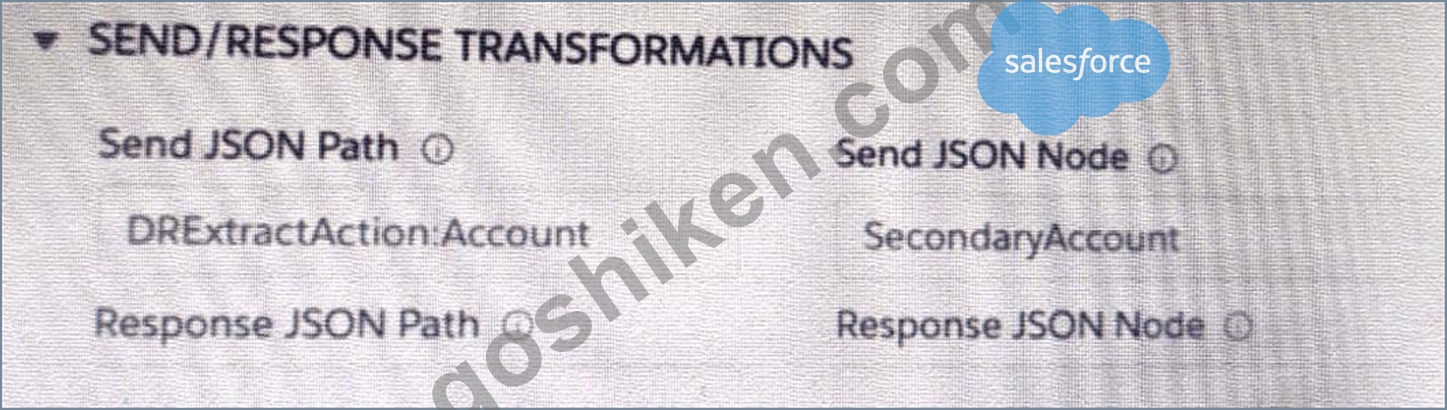
開発者は、図に示すように、SEND/RESPONSETRANFORMATIONS を使用して統合手順要素を構成しました。
あるいは、開発者はまったく同じデータを送信するために追加入力をどのように構成できるでしょうか? 開発者が [追加入力のみ送信] をオンにしたと仮定します。
- A.

- B.

- C.

正解:B
解説:
Option C is the correct way to configure Additional input to send exactly the same data as Input Data. The Additional input should have a key/value pair for each field in Input Data, and the value should be set to
{{InputData.field}} for each field. This will pass the value of Input Data for each field to Additional input.
質問 # 14
以下の図を参照してください。この統合手順構造で、DRReadCase DataRaptor抽出アクションからCaseNumberノードをHTTPアクションのHTTP URLに渡すために必要なマージコードは何ですか?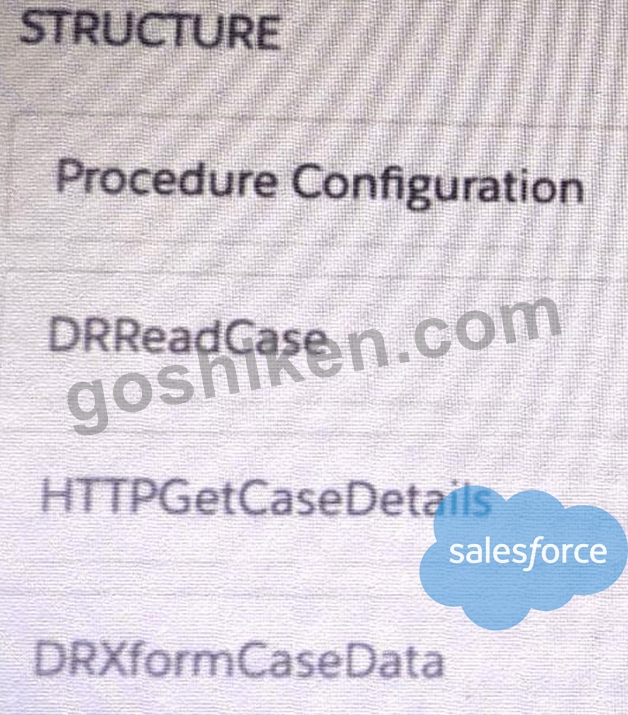
- A. ((CaseNumber))
- B. %DRReadCase: CaseNumber%
- C. ((DRRCase, CaseNumber))
- D. MTTOPDetCaseDetail: CaseNumber%
正解:B
解説:
The merge code syntax for passing data from a DataRaptor Extract Action to an HTTP Action is % DataRaptorName: NodeName%. In this case, it is %DRReadCase: CaseNumber%.
質問 # 15
展示品を参照してください。
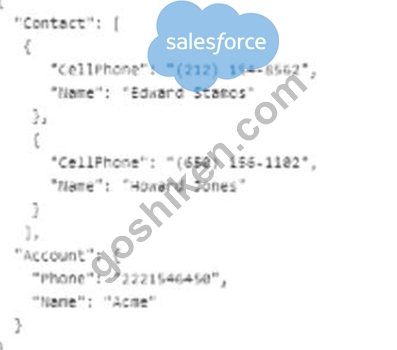
カードレイアウトは、統合プロシージャをデータソースとして使用します。カードはレイアウトデータソースを使用します。
どの JSON データ構造がこのカード レイアウトをサポートし、ベスト プラクティスに従っていますか?
- A.
- B.
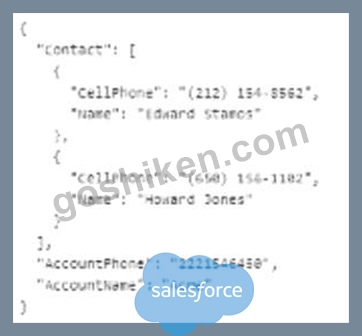
- C.
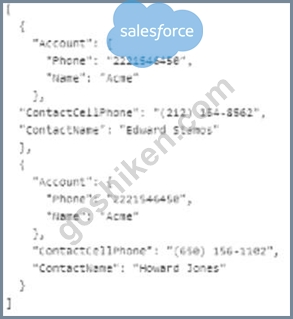
正解:C
解説:
The JSON data structure in option C supports the card layout and follows best practices. It has a list of objects, each representing a product, with the properties "ProductCode", "ProductName",
"ProductDescription", and "ProductPrice". These properties match the fields in the card layout. The JSON data structure also follows the naming convention of using camel case for property names. The JSON data structures in options A and B do not match the fields in the card layout and do not follow the naming convention.
質問 # 16
統合プロシージャは、HTTPアクションを使用してREST API呼び出しを行います。REST APIからのレスポンスは、別の外部Webサービスへの入力として送信する前に、特定のXML構造に変換する必要があります。
この要件を満たすために、開発者は統合手順をどのように構成する必要がありますか?
- A. XMLStreamReaderクラスを呼び出すリモートアクションを使用する
- B. DataRaptor Transform を使用して JSON を XML に変換する
- C. XMLStreamWriterクラスを呼び出すリモートアクションを使用する
- D. DataRaptor Extract を使用し、出力 JSON パスの XML チェックボックスをオンにします。
正解:B
解説:
According to the OmniStudio Developer Guide, "DataRaptor Transform actions can convert JSON to XML and vice versa." Therefore, the correct answer is C.
質問 # 17
開発者は、FlexCard内の単一のDatatableに、アカウントのケースリストを作成する必要があります。例えば、以下のようになります。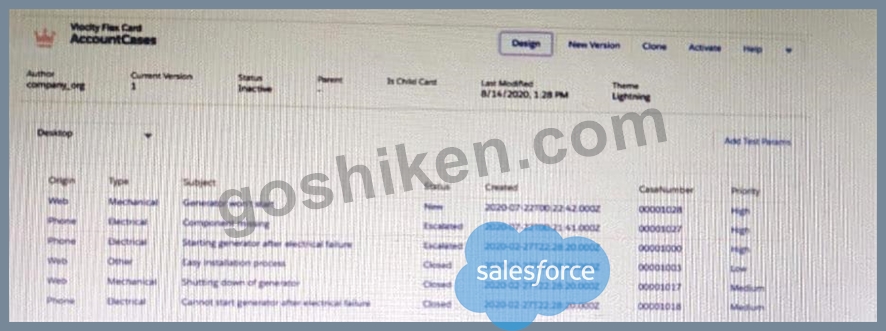
開発者は、このようにケースレコードを表示するように FlexCard をどのように構成できますか?
- A. FlexCard設定タブで繰り返し記録機能を無効にします
- B. データテーブル要素のレコードループ機能を有効にする
- C. FlexCard設定タブで繰り返しレコード機能を有効にする
- D. データテーブル要素の繰り返しモードプロパティを選択します。
正解:D
解説:
The Repeatable Mode property on the data table elements allows the developer to display multiple records in a single data table. The Repeat Records feature on the FlexCard Setup tab is used to display multiple FlexCards for each record in a data source. The Record Looping feature on the data table elements is used to iterate over a list of records and perform actions on each record. The Overwrite Target for all Null input checkbox on the Account id field is used to overwrite the existing value in the target object with null if the input value is null.
質問 # 18
下記の展示物を参照してください。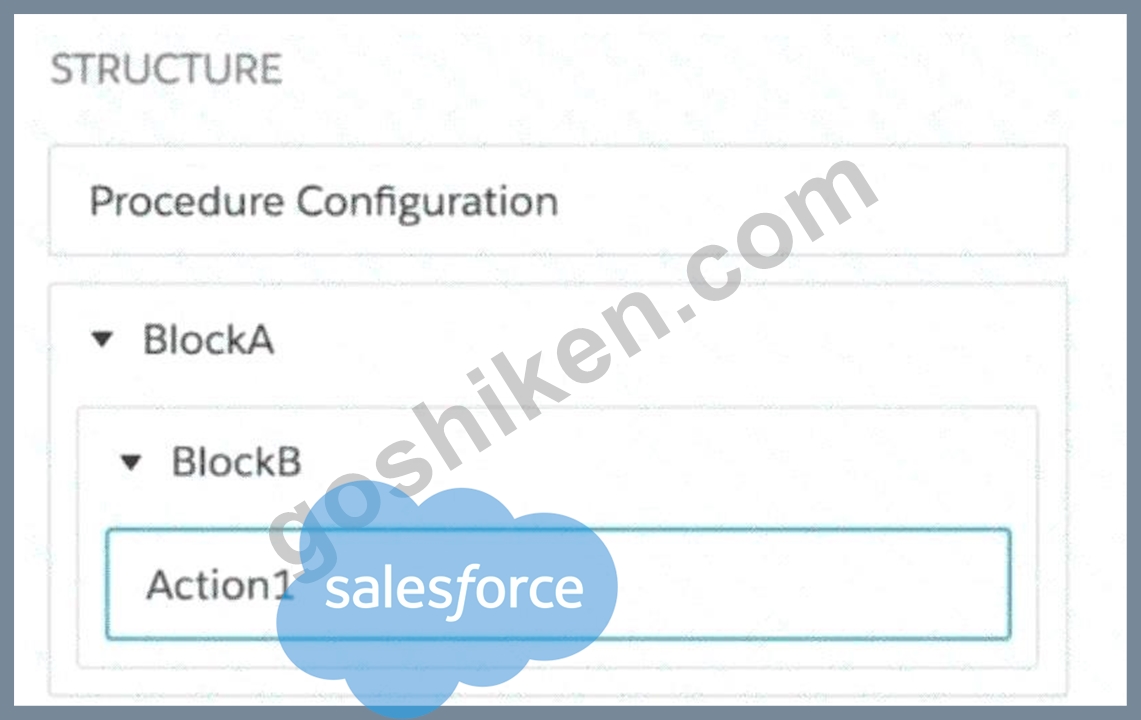
この統合手順構造では、Action1 要素の出力をリモート アクションに送信するためにどの送信 JSON パスを使用する必要がありますか?
- A. ブロックA.ブロックB.アクション1
- B. アクション1:ブロックB:ブロックA
- C. アクション1.ブロックB.ブロックA
- D. ブロックA:ブロックB:アクション1
正解:A
解説:
In OmniStudio Integration Procedures, when you want to reference the output of an element in a nested block (e.g., for use in a Remote Action or another step), you must use dot notation that mirrors the block structure hierarchy.
In the exhibit:
* Action1 is nested inside:
* BlockB, which is nested inside:
* BlockA
Therefore, the correct Send JSON Path to access the result of Action1 is:
CopyEdit
BlockA.BlockB.Action1
This format complies with the standard output reference syntax in Integration Procedures, which follows the pattern:
php-template
CopyEdit
<ParentBlock>.<ChildBlock>.<ActionElement>
Incorrect Options:
* B. BlockA:BlockB:Action1 - Uses colons instead of dots. This is invalid syntax in JSON path resolution within Integration Procedures.
* C. Action1:BlockB:BlockA - Incorrect order and invalid separators.
* D. Action1.BlockB.BlockA - Incorrect order (reversed path).
Reference:
Salesforce OmniStudio Developer Guide # Integration Procedure Element JSON Pathing Best Practices for Send JSON Path # Nested Blocks and Element Referencing
質問 # 19
OmniStudio開発者が、Set Values要素と、キーとしてAccountIdを必要とするData Mapper Extractアクションを含む統合手順を作成します。開発者が統合手順をプレビューする際に、AccountIdを正しく入力してプレビューを実行します。開発者は、デバッグログにData Mapperによって抽出されたデータを確認しますが、レスポンスは空です。この問題の考えられる原因は何ですか?
- A. データマッパーアクションの「レスポンスをレスポンスJSONに追加」プロパティがtrueに設定されていませんでした。
- B. 統合手順にレスポンスアクションが追加されませんでした。
- C. プレビューに使用されたアカウントIDが無効です。
- D. レスポンスアクションが追加されず、データマッパーの出力が送信JSONパスにマッピングされませんでした。
正解:B
解説:
The AccountId is not the issue because the Debug Log already shows that the Data Mapper Extract retrieved data successfully. The failure is at the response-return stage of the Integration Procedure. In OmniStudio, a Response Action is used to end the Integration Procedure and return data to the caller. If the Data Mapper action runs but no Response Action is configured, the internal debug data can exist while the external response remains empty. Option A is weaker because the core requirement is not only adding data to an internal response JSON property; the Integration Procedure needs a Response Action to send the final output.
Option C adds unnecessary and inaccurate wording about Send JSON Path. The clean verified cause is that no Response Action was added.
質問 # 20
下記の展示物を参照してください。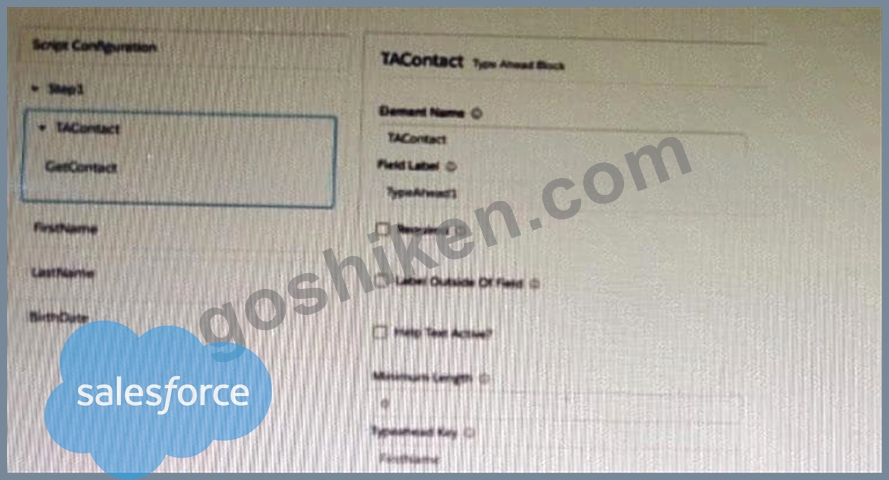
取得したデータがフィールドに表示されない理由は何ですか?
- A. Type Ahead ブロックのプロパティで「データ JSON の使用」が選択されていません。
- B. typeHead キーの形式が正しくありません。
- C. Type Ahead ブロックのプロパティでルックアップ モードが選択されています。
- D. FirstName、LastName、および BirthDate は、先行入力ブロック内に配置されません。
正解:A
解説:
The Use Data JSON property must be selected in the properties of the Type Ahead Block in order to display the fetched data in the fields. The Lookup Mode property is used to specify the type of lookup to perform. The FirstName, LastName, and BirthDate fields can be placed inside or outside the Type Ahead Block. The typeHead key is in the correct format.
質問 # 21
OmniStudio開発者はOmniScriptを作成します。開発者は、スクリプト構成のシードデータJSONに以下のキー/値ペアを追加します。
シードデータJSON
顧客タイプ = 住宅
顧客価値=高い
実行時、このシードデータはデータJSON内でどのように構造化されますか?
- A. { "スクリプト設定" : { "顧客タイプ" : "住宅" , "顧客価値" : "高" }}
- B. { "シード " : { "顧客価値 " : "高 " , "顧客タイプ " : "住宅" }}
正解:B
解説:
Seed Data JSON inserts static launch-time values into the OmniScript data JSON. These values are not stored under a node named "Script Configuration"; that is only where the developer configures the seed data in the designer. At runtime, the seeded key/value pairs are placed into the OmniScript's data JSON under the seed structure, so the correct representation is option B. This is useful when an OmniScript must start with hidden or prefilled values before any user interaction occurs. Salesforce documentation explains that the Seed Data JSON property is used to prefill OmniScript fields or add hidden nodes to the OmniScript Data JSON during initial load.
質問 # 22
開発者は、params.id を として使用する DataRaptor データソースを使用して FlexCard を設定しました。開発者が FlexCard の「データを表示」をクリックすると、有効なデータが表示されます。しかし、レイアウトをプレビューすると、FlexCard が表示されません。このエラーの原因は何でしょうか?
2つの回答を選択してください
- A. テスト データ ソース設定のレコード ID が間違ったレコード タイプに入力されています。
- B. レイアウトのテスト データ ソース設定のレコード ID に基づくと、FlexCard の Salesforce レコードが存在しません。
- C. FlexCard のデータ ノード フィールドが空です。
- D. 属性はデータをフィールドに渡すように構成されていません。
正解:B、C
解説:
The Data Node field for the FlexCard is required to specify which data source will be used to populate the FlexCard. If it is empty, the FlexCard will not display any data. The Record Id in the Test Data Source settings is used to preview the layout with a specific record. If there is no Salesforce record for that Record Id, the FlexCard will not display any data either.
質問 # 23
開発者は、値の設定と、Accountld をキーとして必要とする DataRaptor 抽出アクションを含む統合プロシージャを作成しました。開発者は統合プロシージャをプレビューする際に、Accountld を正しく入力し、プレビューを実行しました。開発者はデバッグログで DataRaptor によって抽出されたデータを確認しましたが、レスポンスは空でした。
この問題の原因は何でしょうか?
- A. 統合手順に応答アクションが追加されませんでした。
- B. DataRaptor アクションで、レスポンス JSON へのレスポンスの追加プロパティが true に設定されていませんでした。
- C. レスポンスを直接プレビューすることはできません。
- D. プレビューに使用された Accountld が無効です。
正解:B
解説:
The Add Response To Response JSON property on the DataRaptor Action indicates that the output of the DataRaptor should be added to the response JSON of the Integration Procedure. If this property is not set to true, the response will be empty even if the DataRaptor extracts data successfully.
質問 # 24
OmniStudioの開発者は、FlexCardが小型のモバイル画面でも正しく表示されるように、カード内の水平方向の余白を減らす必要があります。
コンテンツと要素の境界線の間のスペースを制御する標準要素スタイルプロパティはどれですか?
- A. 間隔
- B. ボーダー
- C. マージン
- D. パディング
正解:D
解説:
Padding is the correct property because padding controls the internal space between an element's content and its border. In this scenario, the developer wants to reduce horizontal space inside the FlexCard on small mobile screens, so the relevant adjustment is left and right padding. Margin would control space outside the element, between the element and surrounding elements, not inside the element. Border controls the line or visual boundary around the element. "Spacing" is too generic and is not the precise CSS box-model property being tested. Salesforce FlexCard styling documentation explains that FlexCard elements can be styled through the Style panel and CSS-related properties, and the CSS box model distinction makes padding the correct answer for internal spacing.
質問 # 25
以下の図を参照してください。この統合手順構造で、HTTPアクションの出力からCaseDataノードをDataRaptor変換アクションに渡すために必要なマージコードは何ですか?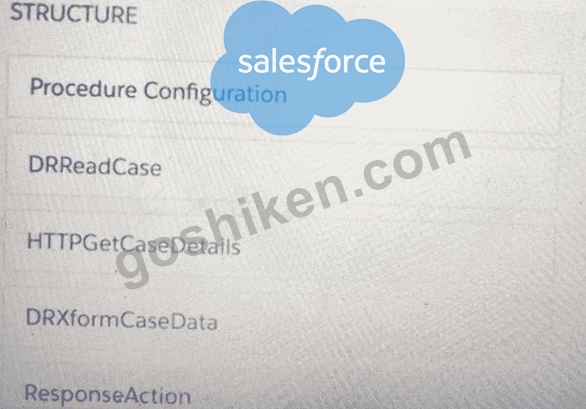
- A. %HTTPGetDetails:CaseData%
- B. {{CaseData}}
- C. %DRXformCaseData: CaseData%
- D. {{ HTTPGetCaseDetails:CaseData}}
正解:D
解説:
The merge code syntax for accessing a node from an Integration Procedure output is {{ProcedureName:
NodeName}}. In this case, the ProcedureName is HTTPGetCaseDetails and the NodeName is CaseData. The
% sign is used for single-value merge codes, not node merge codes. The $ sign is used for variables, not merge codes.
質問 # 26
Universal Containers社は、OmniScriptの下部にあるナビゲーションボタンのラベルを変更する必要があります。
具体的には、Universal Containers社は「次へ」ボタンの表示を「続行」に変更したいと考えています。
OmniStudioの開発者は、この変更をどこで行うべきでしょうか?
- A. 各ステップ要素の特性において
- B. ナビゲートアクション要素のプロパティで
- C. OmniScript設定タブの要素名とラベルのマッピングで
- D. OmniScript 設定タブの LWC コンポーネントオーバーライドプロパティで
正解:C
解説:
Navigation button labels such as Next are controlled through OmniScript setup-level label mapping/custom label configuration, not by editing each Step element or creating Navigate Actions. The Next button is part of the OmniScript framework navigation, so changing it globally for the script belongs in the setup configuration where element names and labels can be mapped. A Navigate Action is used to navigate to another page or component; it is not the framework Next button. LWC Component Override is for replacing component rendering behavior with a custom LWC, which is excessive and incorrect for a simple label change.
Salesforce documentation describes OmniScript setup configuration and custom label references for OmniScript properties, supporting the setup-label approach.
質問 # 27
開発者が顧客にトライアル組織をプロビジョニングするOmniScriptを作成しています。OmniScript内の次のテキストブロックでは、マージコードを使用して新しいトライアル組織のIDを表示しています。
Salesforceへようこそ
あなたのIDは%Details: Customer10:ID%です
テスト中に、開発者はIDが表示されないことに気付きました。JSONデータは以下のように構造化されています。
ID が表示されるようにするには、開発者はマージ コードをどのように修正する必要がありますか?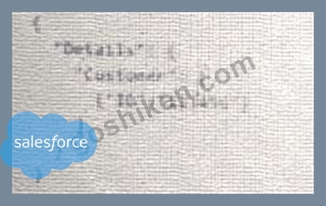
- A. To$Details:Customer|0:ID$
- B. To %%Details:Customer|0:ID%%
- C. To %%Details:Customer|1:ID%
- D. To %%Details:Customer|n:ID%
正解:C
解説:
The merge code syntax for accessing an array element is %%Details:Customer|1:ID%%, where 1 is the index of the element. The index starts from 1, not 0, so the first element is Customer|1. The % sign is used for single- value merge codes, not array merge codes. The $ sign is used for variables, not merge codes.
質問 # 28
......
練習できるOmniStudio-Developer日本語問題で認証試験問題集ガイド解答は練習専門GoShiken:https://www.goshiken.com/Salesforce/OmniStudio-Developer-JPN-mondaishu.html