

[2026年08月06日] 無料Microsoft Azure DP-300日本語試験問題を使おう
DP-300日本語問題集でMicrosoft Azure必ず合格できる練習問題集
質問 # 61
ADF1という名前のAzureData Factoryインスタンスと、WS1およびWS2という名前の2つのAzure SynapseAnalyticsワークスペースがあります。
ADF1には、次のパイプラインが含まれています。
P1:コピーアクティビティを使用して、WS1の専用SQLプール内のパーティション化されていないテーブルからAzure Data Lake Storage Gen2アカウントにデータをコピーします。P2:コピーアクティビティを使用して、Azure Data Lake StorageGen2アカウント内のテキスト区切りファイルからデータをコピーします。 WS2の専用SQLプール内のパーティション化されていないテーブルへ並列処理とパフォーマンスを最大化するには、P1とP2を構成する必要があります。
各パイプラインのコピーアクティビティに対してどのデータセット設定を構成する必要がありますか?回答するには、回答領域で適切なオプションを選択します。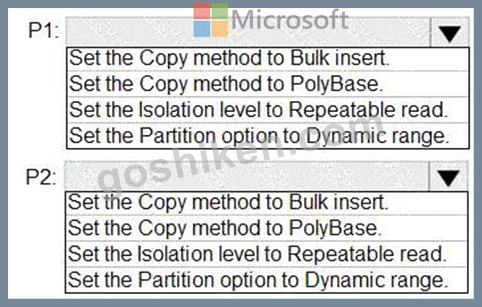
正解:
解説: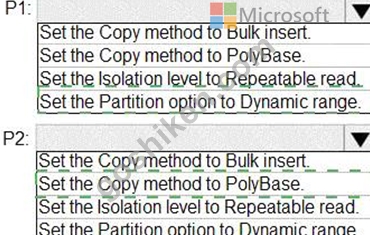
Explanation
Graphical user interface, text, chat or text message Description automatically generated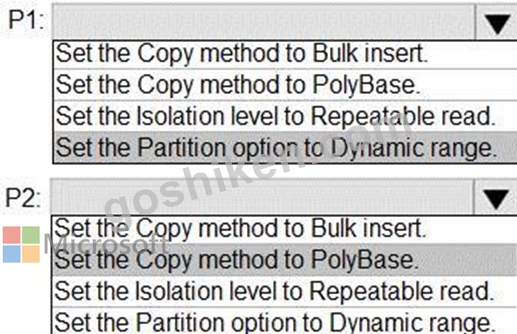
P1: Set the Partition option to Dynamic Range.
The SQL Server connector in copy activity provides built-in data partitioning to copy data in parallel.
P2: Set the Copy method to PolyBase
Polybase is the most efficient way to move data into Azure Synapse Analytics. Use the staging blob feature to achieve high load speeds from all types of data stores, including Azure Blob storage and Data Lake Store.
(Polybase supports Azure Blob storage and Azure Data Lake Store by default.) Reference:
https://docs.microsoft.com/en-us/azure/data-factory/connector-azure-sql-data-warehouse
https://docs.microsoft.com/en-us/azure/data-factory/load-azure-sql-data-warehouse
質問 # 62
タスク10
sql60152867 上のすべてのデータベースに対してインデックスが自動的に作成されるようにする必要があります。SQL Server Management Studio と Azure ポータルを使用する必要があるかもしれません。
正解:
解説:
See the explanation part for the complete Solution.
Explanation:
Enable Automatic tuning at the server level and turn Create Index to On.
Microsoft states that Azure SQL Database automatic tuning can create indexes automatically, verify performance improvement, and roll back changes if performance regresses. Server-level automatic tuning settings are applied to all databases on the server by default, unless a database has its own override.
Azure Portal Method - Recommended for Simulation
Step 1: Open the SQL logical server
Sign in to the Azure portal.
Search for SQL servers.
Open:
sql60152867
Do not open only db1. The task says all databases on sql60152867, so configure this at the server level.
Step 2: Open Automatic tuning
In the SQL server left menu:
Go to Intelligent Performance.
Select Automatic tuning.
Microsoft's documented path is to open the Azure SQL server in the portal and select Automatic tuning from the menu.
Step 3: Enable automatic index creation
On the Automatic tuning page, configure:
Setting
Value
Create index
On
Drop index
Leave unchanged unless required
Force last good plan
Leave unchanged unless required
The only required setting is:
Create index = On
Do not confuse this with Drop index. The task only asks to ensure indexes are created automatically.
Step 4: Apply the setting
Select Apply or Save.
Wait for the portal confirmation.
The setting is now configured at the SQL logical server level.
Important Database Inheritance Check
This is the part people miss.
Server-level automatic tuning applies to databases that inherit from the server. Microsoft states that individual databases can override server-level automatic tuning settings. Therefore, if the simulation shows any database with custom automatic tuning settings, set that database to Inherit from server or manually set Create index = On for that database.
For each database, the correct inherited state should be:
Automatic tuning = Inherit from server
Create index = Inherited / On
If a database is set to:
Custom
Create index = Off
then the server-level setting might not affect that database. Fix it.
Database-Level T-SQL Method
Use this only if the portal is unavailable or you need to correct a specific database override.
Connect to each database and run:
ALTER DATABASE CURRENT
SET AUTOMATIC_TUNING (
CREATE_INDEX = ON
);
Microsoft documents this exact syntax for enabling the CREATE_INDEX automatic tuning option by T-SQL on an individual Azure SQL Database.
To make an individual database inherit server settings, run:
ALTER DATABASE CURRENT
SET AUTOMATIC_TUNING = INHERIT;
But this must be executed inside each database, not from master as a single server-wide T-SQL command.
Verification with T-SQL
Connect to a database and run:
SELECT
name,
desired_state_desc,
actual_state_desc
FROM sys.database_automatic_tuning_options
WHERE name = ' CREATE_INDEX ' ;
Expected result:
name CREATE_INDEX
desired_state_desc ON or DEFAULT
actual_state_desc ON
If desired_state_desc is DEFAULT, that usually means the database is inheriting the server-level setting. The key result is:
actual_state_desc = ON
SSMS Clarification
SSMS can be used to verify or configure the setting per database using T-SQL, but it is not the best tool for the requirement as written.
Because the task says:
all the databases on sql60152867
the correct primary method is:
Azure portal > SQL server > Automatic tuning > Create index = On
Final Exam-Lab Action
Configure this:
SQL server: sql60152867
Automatic tuning
Create index: On
Apply
Then verify databases are inheriting the server setting or have CREATE_INDEX = ON.
That completes the task.
質問 # 63
df1という名前のAzureData Factoryバージョン2(V2)データファクトリを含むAzureサブスクリプションがあります。
DF1にはリンクされたサービスが含まれています。
key1という名前の暗号化kayを含むvault1という名前のAzureKeyボールトがあります。
key1を使用してdf1を暗号化する必要があります。
あなたは最初に何をすべきですか?
- A. リンクされたサービスをdf1から削除します。
- B. 自己ホスト型統合ランタイムを作成します。
- C. vault1のソフト削除を無効にします。
- D. vault1のパージ保護を無効にします。
正解:A
解説:
Explanation
A customer-managed key can only be configured on an empty data Factory. The data factory can't contain any resources such as linked services, pipelines and data flows. It is recommended to enable customer-managed key right after factory creation.
Note: Azure Data Factory encrypts data at rest, including entity definitions and any data cached while runs are in progress. By default, data is encrypted with a randomly generated Microsoft-managed key that is uniquely assigned to your data factory.
Reference:
https://docs.microsoft.com/en-us/azure/data-factory/enable-customer-managed-key
質問 # 64
Windows Server 2022 を実行し、SQL1 という名前の Microsoft SQL Server 2019 インスタンスをホストする VM1 という名前の Azure 仮想マシンがあります。
混合モード認証を使用するように SQL1 を構成する必要があります。
どの手順を実行する必要がありますか?
- A. xp_grant_login
- B. sp_change_users_login
- C. xp_instance_regwrite
- D. sp_eddremotelogin
正解:C
質問 # 65
シミュレーション
sql12345678 という名前のサーバーの Microsoft Entra 管理者としてユーザー アカウントを構成する必要があります。
このタスクを完了するには、仮想マシンにサインインしてください。SQL Server Management Studio と Azure ポータルの使用が必要になる場合があります。
正解:
解説:
Manage administrator accounts in Azure Active Directory B2C
You can assign a role when you create a user or invite a guest user. You can add a role, change the role, or remove a role for a user:
Solution 1:
Provision Microsoft Entra admin (SQL Managed Instance)
Your SQL Managed Instance needs permission to read Microsoft Entra ID to accomplish tasks such as authentication of users through security group membership or creation of new users. For this to work, you must grant the SQL Managed Instance permission to read Microsoft Entra ID.
You can do this using the Azure portal or PowerShell.
To grant your SQL Managed Instance read permissions to Microsoft Entra ID using the Azure portal, sign in as a Global Administrator and follow these steps:
Step 1: In the Azure portal, in the upper-right corner select your account, and then choose Switch directories to confirm which directory is your Current directory. Switch directories, if necessary.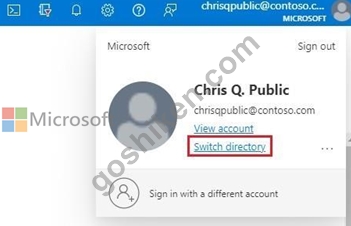
Step 2: Choose the correct Microsoft Entra directory as the Current directory.
This step links the subscription associated with Microsoft Entra ID to the SQL Managed Instance, ensuring the Microsoft Entra tenant and SQL Managed Instance use the same subscription.
Step 3: Now, you can choose your Microsoft Entra admin for your SQL Managed Instance. For that, go to your managed instance resource in the Azure portal and select Microsoft Entra admin under Settings.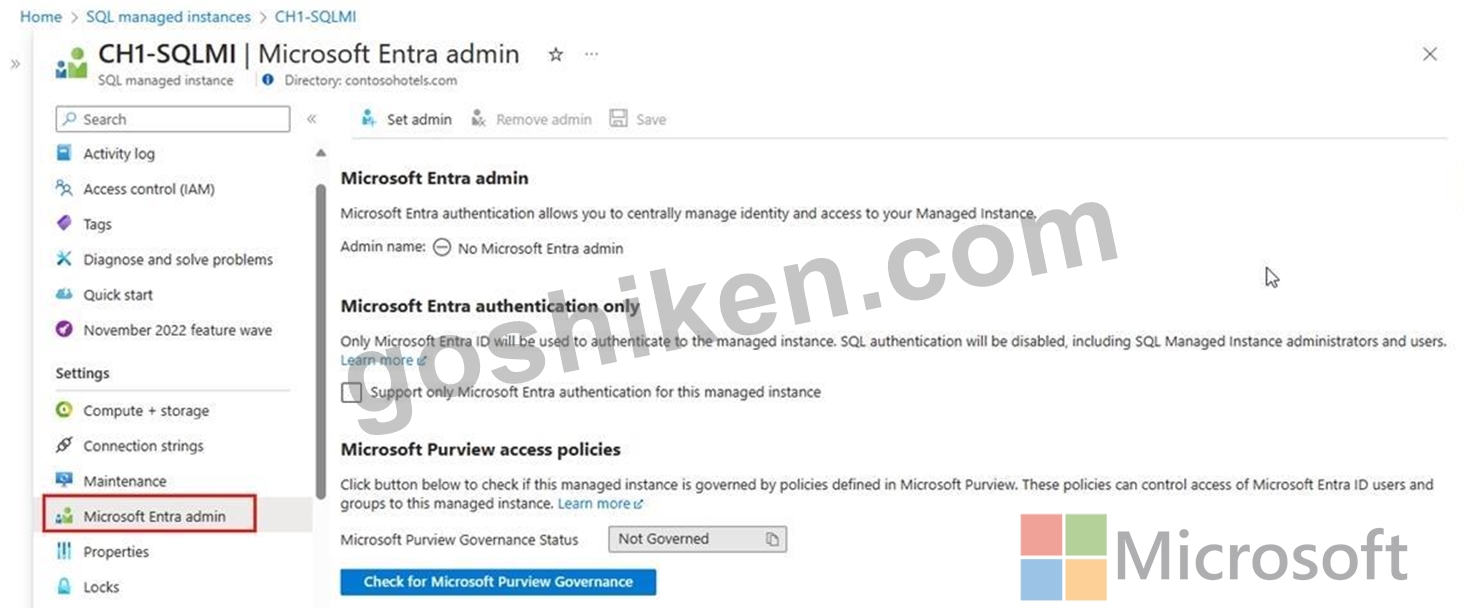
Step 4: Select the banner on top of the Microsoft Entra admin page and grant permission to the current user.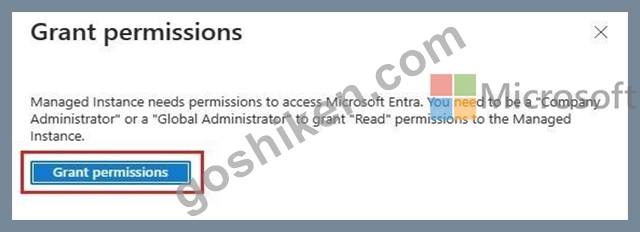
Step 5: After the operation succeeds, the following notification will show up in the top-right corner: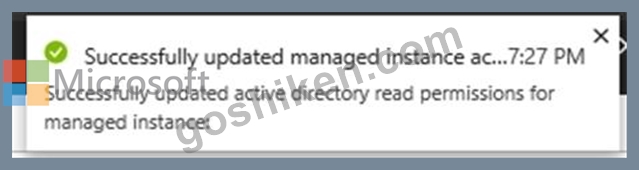
Step 6: On the Microsoft Entra admin page, select Set admin from the navigation bar to open the Microsoft Entra ID pane.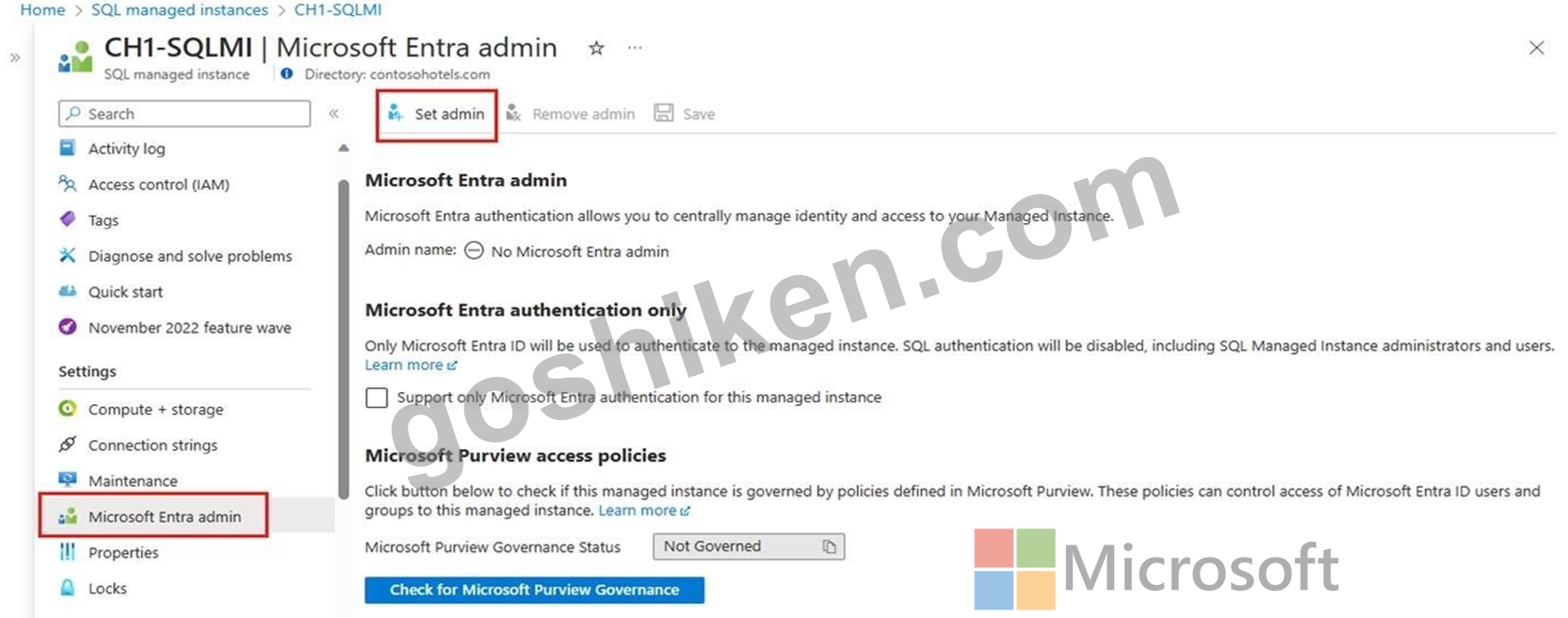
Step 7: On the Microsoft Entra ID pane, search for a user, check the box next to the user or group to be an administrator, and then press Select to close the pane and go back to the Microsoft Entra admin page for your managed instance. [Select yourself] Step 8: From the navigation bar of the Microsoft Entra admin page for your managed instance, select Save to confirm your Microsoft Entra administrator.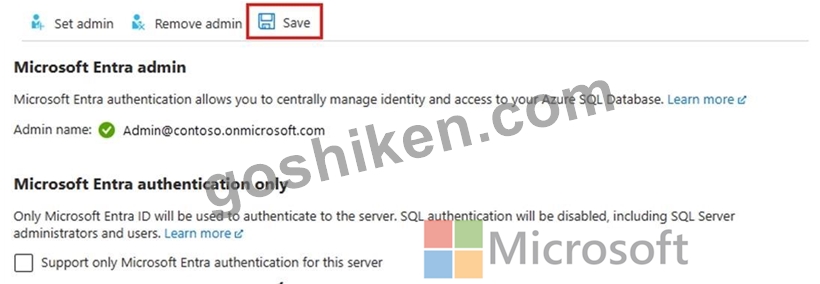
The process of changing the administrator might take several minutes. Then the new administrator appears in the Microsoft Entra admin box.
Solution 2:
Step 1: Sign in to the Azure portal with Global Administrator or Privileged Role Administrator permissions.
Step 2: (If you have access to multiple tenants, select the Settings icon in the top menu to switch to your Azure AD B2C tenant from the Directories + subscriptions menu.) Step 3: Under Azure services, select Azure AD B2C. Or use the search box to find and select Azure AD B2C.
Step 4: Under Manage, select Users.
Step 5: Select the user you want to change the roles for. [Select your user account]. Then select Assigned roles.
Step 6: Add a role assignment
Step 7: Select Add assignments, select the role to assign (for example, Application administrator),
[Select Microsoft Entra administrator] and then choose Add.
Reference:
https://learn.microsoft.com/en-us/azure/azure-sql/database/authentication-aad-configure
https://learn.microsoft.com/en-us/azure/active-directory-b2c/tenant-management-manage- administrator
質問 # 66
AzureSQLデータベースがあります。
次の展示に示すように、クエリと関連する実行プランがあります。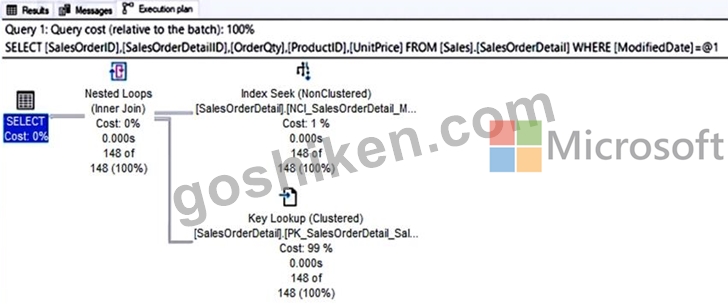
ドロップダウンメニューを使用して、図に示されている情報に基づいて各ステートメントを完了する回答の選択肢を選択します。
注:正しい選択はそれぞれ1ポイントの価値があります。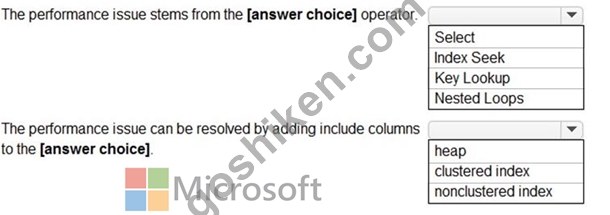
正解:
解説: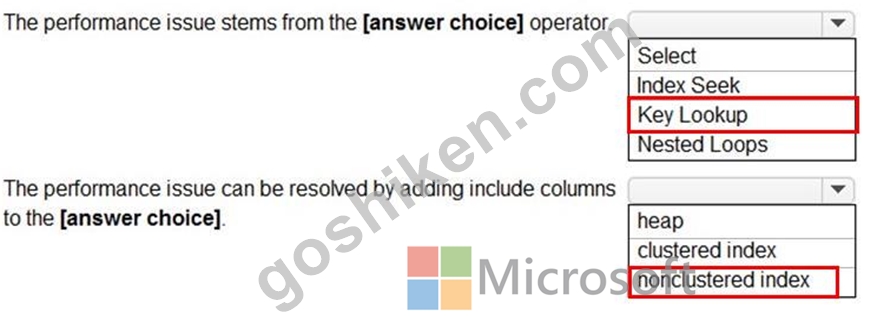
質問 # 67
Azureに移行した後、ManufacturingSQLDb1の構成を推奨する必要があります。ソリューションはビジネス要件を満たす必要があります。
推奨事項には何を含める必要がありますか?回答するには、回答領域で適切なオプションを選択します。
注:正しい選択はそれぞれ1ポイントの価値があります。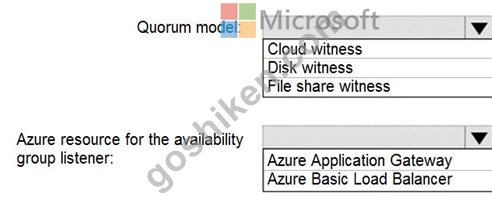
正解:
解説: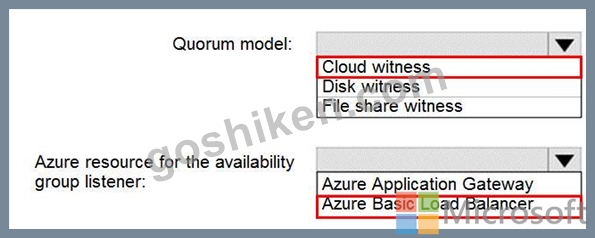
Explanation:
Scenario: Business Requirements
Litware identifies business requirements include: meet an SLA of 99.99% availability for all Azure deployments.
Box 1: Cloud witness
If you have a Failover Cluster deployment, where all nodes can reach the internet (by extension of Azure), it is recommended that you configure a Cloud Witness as your quorum witness resource.
Box 2: Azure Basic Load Balancer
Microsoft guarantees that a Load Balanced Endpoint using Azure Standard Load Balancer, serving two or more Healthy Virtual Machine Instances, will be available 99.99% of the time.
Note: There are two main options for setting up your listener: external (public) or internal. The external (public) listener uses an internet facing load balancer and is associated with a public Virtual IP (VIP) that is accessible over the internet. An internal listener uses an internal load balancer and only supports clients within the same Virtual Network.
Reference:
https://technet.microsoft.com/windows-server-docs/failover-clustering/deploy-cloud-witness
https://azure.microsoft.com/en-us/support/legal/sla/load-balancer/v1_0/
質問 # 68
Azure サブスクリプションに、Server という名前の Azure SQL マネージド インスタンスが含まれています。Azure リージョンに障害が発生した場合に Server1 が確実に利用できるようにする必要があります。どうすればよいですか?
- A. 別の Azure リージョンに読み取り専用のレプリカを作成し、Server1 がそのレプリカを使用するように構成します。
- B. フェールオーバー グループを作成し、新しい SQL マネージド インスタンスを別の Azure リージョンにデプロイします。
- C. フェールオーバー グループを作成し、Azure SQL Database の論理サーバーを別の Azure リージョンにデプロイします。
- D. Server1 でホストされているデータベースをハイパースケールサービス層に移行し、ローカル冗長ストレージ (LRS) を有効にします。
正解:C
解説:
Basic Concept: This question tests choosing the correct Azure migration approach by matching the source platform, target service, downtime tolerance, and administrative effort.
Why C is Correct: Create a failover group and deploy a logical server for Azure SQL Database to a different Azure region. matches the expected DP-300 administration action. Auto-failover groups provide managed geo-replication and listener-based failover for Azure SQL Database or Managed Instance, including automatic failover policies for regional outages. The question is not asking for a general Azure capability; it is asking for the feature that produces this result: You have an Azure subscription that contains an Azure SQL managed instance named Server! You need to ensure the availability of Server1 if an Azure region fails.
Why A is Wrong: Create a read only replica in a different Azure region and configure Server1 to use the replica. is an Azure data-platform feature, but it must match the workload model, service tier, migration path, or deployment constraint described in the scenario. It applies to a different Azure data-platform design than the one the question is testing.
Why B is Wrong: Hyperscale is designed for very large databases and fast scale-out storage architecture, not merely for intermittent CPU bursts. It would solve a neighboring problem, but not the deployment, sizing, or migration requirement in this item.
Why D is Wrong: Auto-failover groups provide managed geo-replication and listener-based failover for Azure SQL Database or Managed Instance, including automatic failover policies for regional outages. It applies to a different Azure data-platform design than the one the question is testing.
質問 # 69
Azure Data Lake Storage Gen2 コンテナーがあります。
データはコンテナに取り込まれ、データ統合アプリケーションによって変換されます。その後、データは変更されません。ユーザーはコンテナ内のファイルを読み取ることはできますが、変更することはできません。
次の要件を満たすデータ アーカイブ ソリューションを設計する必要があります。
* 新しいデータは頻繁にアクセスされるため、できるだけ早く利用できる必要があります。
* 5 年以上前のデータはアクセス頻度は低いですが、要求された場合は 1 秒以内に利用可能である必要があります。
* 7年以上経過したデータにはアクセスしません。7年経過後は、可能な限り低コストでデータを永続化する必要があります。
* 必要な可用性を維持しながらコストを最小限に抑える必要があります。
データをどのように管理すればよいですか? 回答するには、回答エリアで適切なオプションを選択してください。
注意: 正しい選択ごとに 1 ポイントが加算されます。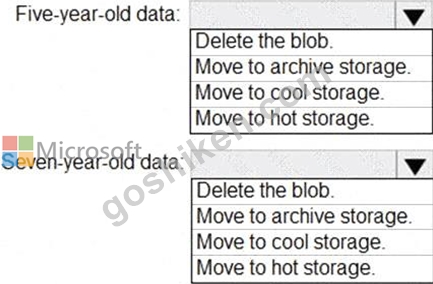
正解:
解説: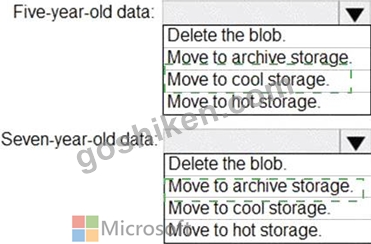
Explanation: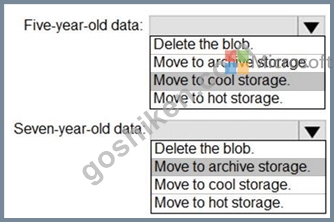
Box 1: Move to cool storage
The cool access tier has lower storage costs and higher access costs compared to hot storage. This tier is intended for data that will remain in the cool tier for at least 30 days. Example usage scenarios for the cool access tier include:
Short-term backup and disaster recovery
Older data not used frequently but expected to be available immediately when accessed Large data sets that need to be stored cost effectively, while more data is being gathered for future processing Note: Hot - Optimized for storing data that is accessed frequently.
Cool - Optimized for storing data that is infrequently accessed and stored for at least 30 days.
Archive - Optimized for storing data that is rarely accessed and stored for at least 180 days with flexible latency requirements, on the order of hours.
Box 2: Move to archive storage
Example usage scenarios for the archive access tier include:
Long-term backup, secondary backup, and archival datasets
Original (raw) data that must be preserved, even after it has been processed into final usable form Compliance and archival data that needs to be stored for a long time and is hardly ever accessed Reference:
https://docs.microsoft.com/en-us/azure/storage/blobs/storage-blob-storage-tiers
質問 # 70
Azure SQL データベースを含む Azure サブスクリプションを持っています。データベースには、tablet という名前のテーブルが含まれています。
次の Transact-SQL ステートメントを実行します。
データベースに対する分析クエリの実行にかかる時間を短縮する必要があります。
どの構成を有効にする必要がありますか?
- A. BATC H_MODE_ON_ROWSTOR E
- B. ROW_ MODE_MEMORY GRANT_FEEDBACK
- C. BATCH_MODE_ADAPTIVE_TOIMS
- D. BATCH MODE_MEMORY GRAIJT_FEEDBACK
正解:A
質問 # 71
ホットスポットに関する質問
Azure Virtual Machines インスタンス上の SQL Server にデータベースがあります。データベースのクエリストアの現在の状態は、次の図に示されています。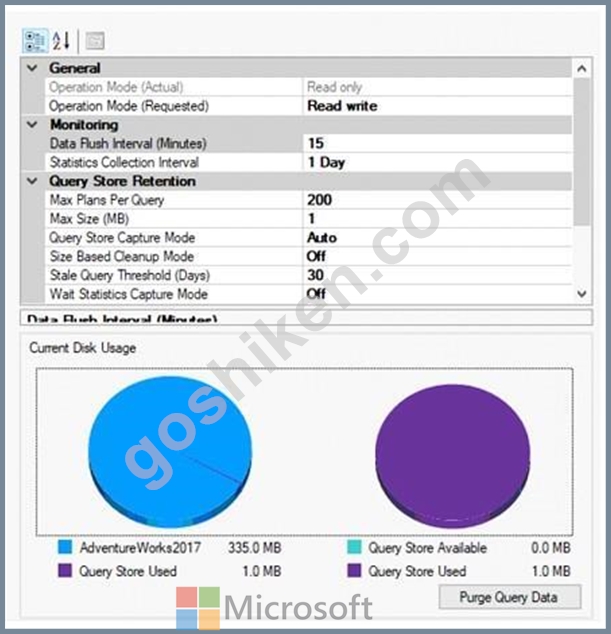
ドロップダウン メニューを使用して、グラフィックに表示された情報に基づいて各ステートメントを完成させる回答の選択肢を選択します。
注意: 正しい選択ごとに 1 ポイントが付与されます。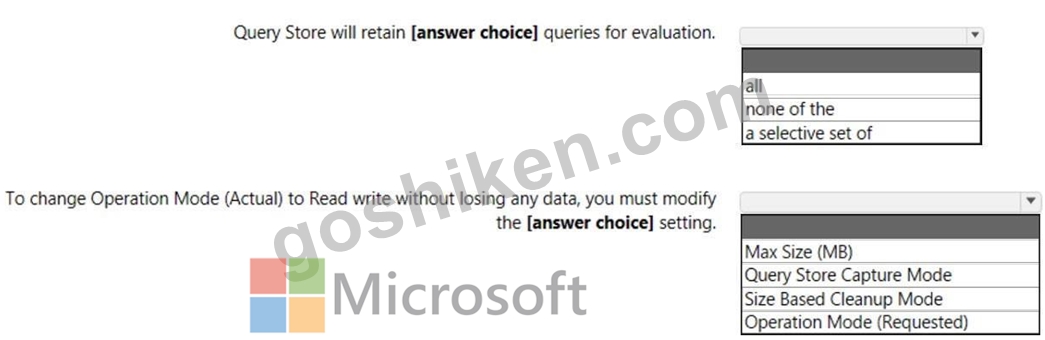
正解:
解説: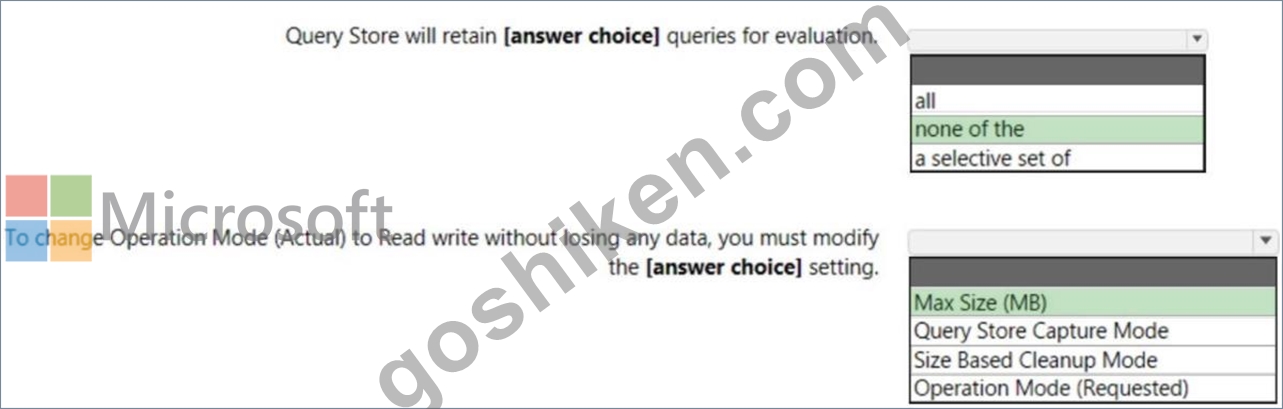
Explanation:
The first answer is "none of the" because the Operation Mode (actual) is "Read only" so it is not retaining any query for evaluation due to the Query Store Available is 0.0 MB.
When the actual state is read-only, use the readonly_reason column to determine the root cause.
Typically, you find that Query Store transitioned to read-only mode because the size quota was exceeded. In that case, the readonly_reason is set to 65536 Consider the following steps to switch Query Store to read-write mode and activate data collection:
* Increase the maximum storage size by using the MAX_STORAGE_SIZE_MB option of ALTER DATABASE or
* Clean up Query Store data
https://learn.microsoft.com/en-us/sql/relational-databases/performance/best-practice-with-the- query-store?view=sql-server-ver16#Verify
質問 # 72
注: この問題は、同じシナリオを提示する一連の問題の一部です。一連の問題にはそれぞれ、定められた目標を満たす可能性のある独自の解答が含まれています。問題セットによっては、複数の正解が存在する場合もあれば、正解がない場合もあります。
このセクションの質問に回答した後は、その質問に戻ることはできません。そのため、これらの質問はレビュー画面に表示されません。
次の表に示すオンプレミス ネットワークがあります。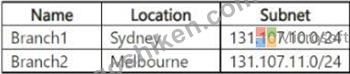
SQL1 という名前の Azure SQL データベース サーバーが含まれる Azure サブスクリプションがあります。
SQL1 には、DB1 と DB2 という 2 つのデータベースが含まれています。
DB1とDB2へのアクセスを構成する必要があります。ソリューションは以下の要件を満たす必要があります。
- DB1 にアクセスできるのは Branch1 のユーザーのみであることを確認します。
- DB2 にアクセスできるのは Branch2 のユーザーのみであることを確認します。
解決策: SQL1 のマスターに接続し、次のコマンドを実行します。
EXECUTE sp_set_firewall_rule 'db1およびdb2ユーザーを許可する', '131.107.10.0',
'131.107.10.255'
これは目標を満たしていますか?
- A. いいえ
- B. はい
正解:A
質問 # 73
ホットスポットに関する質問
次の Azure Resource Manager テンプレートがあります。
以下の各文について、正しい場合は「はい」を選択してください。そうでない場合は「いいえ」を選択してください。
注意: 正しい選択ごとに 1 ポイントが付与されます。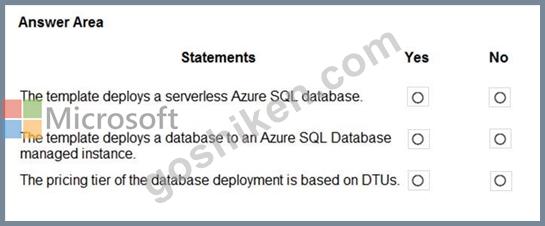
正解:
解説: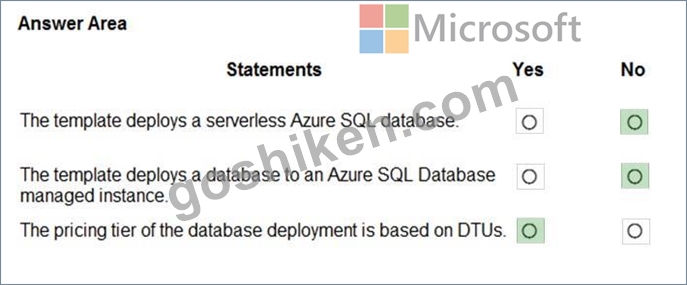
Explanation:
https://docs.microsoft.com/en-us/azure/azure-sql/database/purchasing-models
https://docs.microsoft.com/en-us/azure/azure-sql/database/single-database-create-arm-template- quickstart
質問 # 74
AzureSQLデータベースを含むAzureサブスクリプションがあります。
データベースは、クエリにタイムリーに応答できません。
問題がresource_semaphore待機に関連しているかどうかを識別する必要があります。
Transact-SQLクエリをどのように完了する必要がありますか?回答するには、回答エリアで適切なオプションを選択してください。
注:正しい選択はそれぞれ1ポイントの価値があります。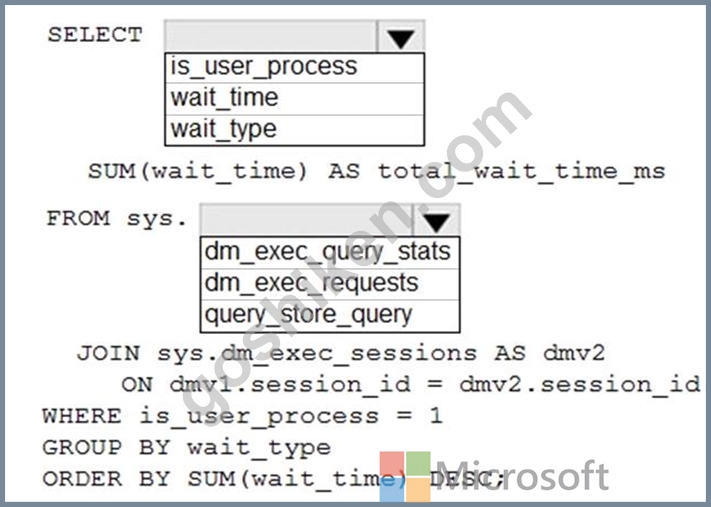
正解:
解説: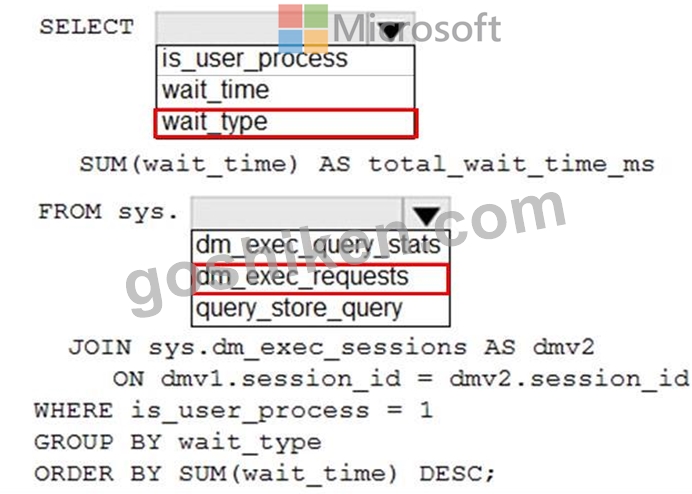
Reference:
https://docs.microsoft.com/en-us/azure/azure-sql/database/monitoring-with-dmvs
質問 # 75
Azure サブスクリプションをお持ちです。
Azure Marketplace イメージを使用して、Azure Virtual Machines に SQL Server のインスタンスをデプロイすることを計画しています。
SQL Server IaaS エージェント拡張機能 (SqlIaasExtension) を登録する必要があります。ソリューションは次の要件を満たす必要があります。
- SQL Server の重要な更新を自動的にインストールします。
- 仮想マシンへのパフォーマンスへの影響を最小限に抑えます。
どの管理モードを選択する必要がありますか?
- A. エージェントなし
- B. フル
- C. 軽量
正解:B
解説:
Full mode installs the SQL IaaS Agent to the VM to deliver full functionality. Use it for managing a SQL Server VM with a single instance. Full mode installs two Windows services that have a minimal impact to memory and CPU.
https://learn.microsoft.com/en-us/azure/azure-sql/virtual-machines/windows/sql-server-iaas-agent-extension-automate-management?view=azuresql&tabs=azure-powershell#management-modes
質問 # 76
......
Microsoft DP-300日本語実際の問題とブレーン問題集:https://www.goshiken.com/Microsoft/DP-300J-mondaishu.html