

[2026年09月27日] 無料Certified System Administrator CSA公式認定ガイドPDFダウンロード
ServiceNow CSA公式認定ガイドPDF
質問 # 217
A knowledge article must be which of the following states to display to a user?
- A. Reviewed
- B. Drafted
- C. Retired
- D. Published
正解:D
解説:
InServiceNow Knowledge Management, knowledge articles must be in a specificstatebefore they can be visible to end users. The correct state that allows users to view the article isPublished.
Understanding Knowledge Article StatesKnowledge articles in ServiceNow go through alifecyclethat includes the following states:
Draft- The article is being created or edited and isnot visibleto end users.
Review- The article is under internal review by approvers before publication. It remainshiddenfrom users.
Published- The article isapproved and publicly availableto users who have access to the Knowledge Base.
Retired- The article is no longer relevant or has been replaced. It isnot visibleto end users.
OnlyPublishedarticles appear in the Knowledge Base and can be accessed by users.
Articles inDraft, Review, or Retiredstates arenot visibleto the general audience.
B: Drafted- Articles inDraftare still being written or edited andcannot be accessed by users.
C: Retired- Retired articles are considered obsolete and areno longer displayedin the Knowledge Base.
D: Reviewed- Articles inRevieware under approval butare not yet visibleto users.
ServiceNow Docs: Knowledge Article Stateshttps://docs.servicenow.com/en-US/bundle/utah-servicenow- platform/page/product/knowledge-management/concept/knowledge-article-states.html ServiceNow CSA Official Training Guide (Knowledge Management Lifecycle & Publishing Workflow) Why is "Published" the Correct Answer?Why the Other Options Are Incorrect?References from Certified System Administrator (CSA) Documentation:This confirms that aknowledge article must be in the
"Published" stateto be visible to users in the Knowledge Base.
質問 # 218
A Role is defined as what?
- A. A Persona in a workflow
- B. A set of user access policies
- C. A collection of permissions
- D. A set of access control rules
正解:C
解説:
Reference: https://docs.servicenow.com/bundle/rome-platform-administration/page/administer/roles/concept
/c_Roles.html
質問 # 219
Which feature can be used to categorize a set of records from a list and make them visible to other users?
- A. History
- B. Favorites
- C. Tags
- D. Activity Formatter
正解:C
解説:
In ServiceNow,Tagsallow users tocategorize and grouprecords in a list. Tagged records arevisible to othersif set to public or shared with specific users or groups.
A: Tags
Tags help usersorganize and quickly locaterecords.
Tags can beprivate (Me)orshared (Everyone, Groups, or Specific Users).
Example:
A support team might tagcritical incidentswith "Urgent" for easy tracking.
B: History
TheHistorymodule showsrecently accessed recordsbut does not categorize or share records.
C: Favorites
Favoritesallow users tobookmark specific records or listsfor quick access, but they areprivateand not shared with others.
D: Activity Formatter
TheActivity Formattertrackschanges and updatesin a record (e.g., who modified the record, comments added), but it does notcategorize or sharerecords.
References:ServiceNow Documentation:Using Tags in Lists
ServiceNow User Guide:Managing and Sharing Tags
質問 # 220
When searching using the App Navigator search field, what can be returned? (Choose four.)
- A. Names of Applications
- B. Favorites
- C. Titles of Dashboard Gauges
- D. History Records
- E. Names of Modules
- F. Names of Applications and Modules
正解:A、B、E、F
質問 # 221
What capability allows users to create dashboards with widgets to visualize data over time in order to identify areas of improvement?
- A. Reporting
- B. Analytics Reports
- C. Performance Analytics
- D. Scheduled Reports
正解:C
質問 # 222
Access Control rules are applied to a specific table, like the Incident table. What is the object name for a rule that applies to the entire Incident table (all rows and fields)?
- A. incident .!
- B. incident.None
- C. incident .*
- D. incident.all
正解:C
解説:
Explanation
The object name for a rule that applies to the entire Incident table is incident .* , which means any field on the incident table. The other options are not valid object names for access control rules.
ReferencesAccess control list rulesAccess Control List in ServiceNowAccess Controls
質問 # 223
What is the difference between a Ul Policy and Data Policy?
- A. Data Policies can be converted into Ul Policies, but Ul Policies can not be converted into Data Policies
- B. Data Policies run only after Ul Policies run successfully
- C. Data Policies run when data is entered through the form, by an Import Set or by web services, while Ul Policies are set only by web services
- D. Data Policies run regardless of how data is entered Into ServiceNow, while Ul Policies are used for form interactions
正解:C
質問 # 224
What is a schema map?
- A. A schema map enables administrators to define records from specific tables as trouble sources for Configuration Items
- B. A schema map displays the details of tables and their relationships in a visual manner, allowing administrators to view and easily access different parts of the database schema
- C. A schema map graphically displays the Configuration Items that support a business service
- D. A schema map graphically organizes the visual task boards for the CMDB
正解:B
質問 # 225
Which application is used primarily to load data into ServiceNow?
- A. Data Import Configuration
- B. Import Hub
- C. Import Management
- D. System Import Sets
正解:D
質問 # 226
What is NOT an example of a UI Action?
- A. Search
- B. Related Links
- C. Form buttons
- D. list Buttons
正解:A
解説:
In ServiceNow, UI Actions are used to add interactive elements like buttons, links, and context menu items to forms and lists. They can trigger scripts, workflows, or other actions when clicked.
Common Types of UI Actions:
Form Buttons - Buttons that appear on a form (e.g., Save, Update, Resolve Incident).
List Buttons - Buttons that appear in a list view and perform actions on multiple records.
Related Links - Links that appear in the Related Links section of a form and provide quick navigation or actions.
Since Form Buttons, List Buttons, and Related Links are all types of UI Actions, they are valid UI Actions.
Why "Search" is NOT a UI Action?
Search is a built-in system functionality that allows users to find records but does not involve UI Actions.
UI Actions execute predefined actions, whereas Search simply retrieves and filters data.
ServiceNow search functions (Global Search, List Search, and Quick Search) are not part of UI Actions.
Why the Other Options Are UI Actions?
B . Form Buttons → ✅ Valid UI Action
Appears on forms (e.g., Submit, Save, Update).
C . List Buttons → ✅ Valid UI Action
Used in list views for bulk actions (e.g., Close All, Approve Selected).
D . Related Links → ✅ Valid UI Action
Provides quick links in forms (e.g., View CI Details, Reopen Ticket).
Reference from Certified System Administrator (CSA) Documentation:
ServiceNow Docs: UI Actions Overview
https://docs.servicenow.com/en-US/bundle/utah-platform-administration/page/administer/form-administration/concept/c_UIActions.html ServiceNow CSA Official Training Guide (UI Actions & User Interface Customization)
質問 # 227
What is specified in an Access Control rule?
- A. Groups, Conditional Expressions and Workflows
- B. security_admin
- C. Object and Operation being secured; Permissions required to access the object
- D. Table Schema, CRUD, and User Authentication
正解:C
解説:
An Access Control rule (ACL) in ServiceNow defines who can access data and what actions they can perform on that data. Each ACL consists of three primary components:
Object being secured - The specific table, field, or record that the rule applies to.
Operation - The type of action that is being secured (e.g., Read, Write, Create, Delete).
Permissions required - The conditions, roles, or scripts that determine whether access is granted.
How ACLs Work in ServiceNow:
ACLs evaluate whether a user has permission to access a specific table, field, or action.
The security rules are processed from most specific to least specific (e.g., field-level > table-level).
Permissions can be granted based on roles, conditions, or custom scripts using GlideSystem (gs).
Explanation of Incorrect Options:
A . Groups, Conditional Expressions, and Workflows ❌ (Incorrect)
ACLs do not manage workflows or directly control group assignments.
B . Table Schema, CRUD, and User Authentication ❌ (Incorrect)
CRUD (Create, Read, Update, Delete) permissions are controlled by ACLs, but User Authentication is managed separately through login policies (LDAP, SSO, etc.).
D . security_admin ❌ (Incorrect)
security_admin is a special elevated role required to modify security settings, but it is not what an ACL specifies.
Official Reference from Certified System Administrator (CSA) Documentation:
Access Control Rules Overview:
https://docs.servicenow.com/en-US/bundle/utah-platform-security/page/administer/security/concept/access-control-rules.html Configuring ACLs in ServiceNow:
https://docs.servicenow.com/en-US/bundle/utah-platform-security/page/administer/security/task/t_CreateOrModifyAnAccessControl.html
質問 # 228
Which SericeNow utility gives a Service Desk agent the ability to trace from a Service having an issue, to see which Cis supporing that service have active issues?
- A. Event Management Homepage
- B. AL Service Dashboard
- C. Cl Health Dashboard
- D. Dependency View
正解:C
質問 # 229
Refer to the exhibit.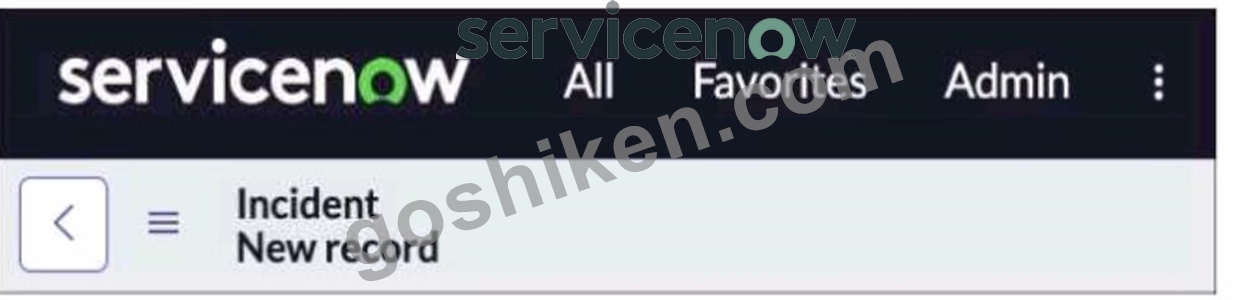
You are editing a new incident record and would like the Save" Dutton to be located on the Form header. Which action would need to be taken for that button to appear?
- A. All > System Properties > Ul Properties > Turn on the Save" button
- B. Context Menu > Form Layout > add the Save* button.
- C. All > System Properties > Ul Properties > Turn on the glide.ui.advanced* property
- D. Context Menu > Form Design > add the Save'' button
正解:C
解説:
In ServiceNow, by default, the "Save" button is not displayed on the form header. Instead, users typically use the "Submit" or "Update" buttons.
To enable the "Save" button on the form header, you must enable the glide.ui.advanced system property.
Why is "Turning on glide.ui.advanced" the Correct Answer?
Enables the "Save" Button in the Form Header
The glide.ui.advanced property activates additional UI options, including the Save button on forms.
Once enabled, users will see the "Save" button alongside "Submit" and "Update" in the form header.
Allows Partial Record Saves Without Submitting
Unlike "Submit" (which creates a new record) or "Update" (which modifies an existing record), "Save" allows users to retain changes without submitting the form.
Useful for drafts or in-progress edits.
Controlled via System Properties
The "Save" button is not a field or UI action that can be manually added through Form Design or Layout.
It is enabled at the system level via System Properties > UI Properties.
How to Enable the Save Button in ServiceNow?
Navigate to All > System Properties > UI Properties
Find the glide.ui.advanced property
Set it to "true"
Save the changes
Refresh the Incident form → The "Save" button will now appear
Incorrect Answer Choices Analysis:
B). Context Menu > Form Design > Add the "Save" button
❌ Incorrect - The "Save" button is not a UI action that can be added via Form Design. It must be enabled through system properties.
C). All > System Properties > UI Properties > Turn on the "Save" button
❌ Incorrect - No such specific "Save" button setting exists in UI Properties. The correct setting is glide.ui.advanced.
D). Context Menu > Form Layout > Add the "Save" button
❌ Incorrect - Form Layout only controls fields, not form buttons. The "Save" button is controlled via UI Properties.
Official ServiceNow Documentation Reference:
ServiceNow Docs - Enabling the Save Button
📖 Configuring UI Properties
ServiceNow Docs - Using the glide.ui.advanced Property
📖 Understanding glide.ui.advanced
Conclusion:
The correct answer is:
✅ A. All > System Properties > UI Properties > Turn on the glide.ui.advanced property This enables advanced UI options, including the "Save" button, allowing users to save records without submitting them.
質問 # 230
What is the Import Set Table?
- A. A table where data will be placed, post-transformation
- B. A staging area for imported records
- C. A table that determines relationships
- D. A repository for Update Set information
正解:B
解説:
InServiceNow, anImport Set Tableis atemporary staging areawhere raw data is storedbefore it is transformed and moved into a target table. It is primarily used indata import processesto ensure data integrity and allow transformation before committing data to production tables.
Stores incoming data from external sources(e.g., CSV files, Excel files, APIs, LDAP, etc.).
Acts as a temporary staging areabefore records are mapped and transformed into atarget table(e.g.,incident, cmdb_ci,problem).
Allows validation and error handlingbefore final data migration.
Uses Transform Mapsto determine how fields in the import set relate to fields in the target table.
Key Functions of an Import Set Table:
Data is importedinto anImport Set Tablefrom an external source.
TheImport Set Table temporarily stores the datawithout affecting existing records.
ATransform Mapis applied to move and modify the data before inserting it into the correct table.
Once transformation is complete, the data is transferred to thetarget table, and the Import Set Table can be cleared.
Example Workflow of an Import Set:
(A) A table where data will be placed, post-transformation - Incorrect
Thetarget table(e.g.,incident,cmdb_ci,problem) holds the dataaftertransformation.
TheImport Set Table is only a temporary staging areabefore transformation occurs.
(B) A table that determines relationships - Incorrect
Relationship tables(e.g.,cmdb_rel_ci) definedependencies between recordsbut are not used for data import.
Import Set Tables do not determine relationships between records.
(C) A staging area for imported records - Correct
Import Set Tables temporarily store incoming recordsbefore processing.
The data is transformed and mappedbefore being inserted into the final target table.
This ensuresdata integrity and consistency.
(D) A repository for Update Set information - Incorrect
Update Sets (sys_update_set) store changes to configurations, such as scripts, workflows, and UI policies.
Import Set Tables are used for data imports, not Update Sets.
Explanation of Each Option:
Always review data in the Import Set Table before applying transformationsto avoid incorrect data entry.
Use Transform Mapsto define field mappings between Import Set Tables and target tables.
Monitor Import Logs(sys_import_set_run) for errors or incomplete data.
Delete old Import Set dataperiodically to improve performance and avoid unnecessary storage usage.
Additional Notes & Best Practices:
ServiceNow Docs: Import Set Overview
https://docs.servicenow.com
ServiceNow Community: Best Practices for Import Set Management
https://community.servicenow.com
References from Certified System Administrator (CSA) Documentation:
質問 # 231
Which one of the following statements applies to a set of fields when they are coalesced during an import?
- A. If a match is not found using the coalesce fields, the system does not create a Transform Map
- B. If a match is found using the coalesce fields, the system creates a new record
- C. If a match is not found using the coalesce fields, the existing record is updated with the information being imported
- D. If a match is found using the coalesce fields, the existing record is updated with the information being imported
正解:D
質問 # 232
The wait time for end users is based on the round-trip between the client and the server. What activities are included in the round-trips?
- A. Insert + Verify
- B. Request + Response
- C. Write + Read
- D. Submit + Query
- E. Save + Update
正解:B
解説:
In ServiceNow, thewait timefor end users is influenced by theround-trip timebetween the client (browser) and the server. The round-trip consists of two key activities:
Request- The client sends a request to the server (e.g., when a user opens a record, submits a form, or performs an action).
Response- The server processes the request and sends back the required data to the client.
This cycle directly affects the perceived performance of the ServiceNow instance, as delays in request processing or data retrieval can lead to a slower user experience.
Minimizing client-server interactionsis a best practice for optimizing performance.
Using GlideAjax or Asynchronous Callscan help reduce unnecessary round-trips.
Client-side scripting best practices(e.g., reducing the number of server lookups) improve response times.
Performance Considerations:Incorrect Answers Explanation:B.Save + Update- Saving and updating are database operations, but they do not define the full round-trip.
C:Write + Read- Writing and reading refer to database interactions, not the client-server exchange process.
D:Submit + Query- Submission and querying are user actions, but they do not encompass the entire round- trip process.
E:Insert + Verify- Inserting a record and verifying it are database actions, not the round-trip process.
ServiceNow Documentation#"Client-Side Scripting Best Practices"
ServiceNow Performance Best Practices# "Understanding Client-Server Round-Trips" References from Certified System Administrator (CSA) Documentation:
質問 # 233
Which modules can you use to create a new table?
Choose 2 answers
- A. Tables
- B. Tables & Columns
- C. Dictionary
- D. Schema Map
正解:A、B
質問 # 234
Which tab on the knowledge base record, would you use to identify the sets of users who are able to read articles in that knowledge base?
- A. Access List
- B. Accessible to
- C. Can Access
- D. Can Read
正解:D
解説:
Reference:
https://docs.servicenow.com/bundle/rome-servicenow-platform/page/product/knowledge-management/task/t_Sel
質問 # 235
......
無料CSA試験問題集試験点数を伸ばそう:https://www.goshiken.com/ServiceNow/CSA-mondaishu.html
試験CSA最新ブレーン専門問題集はここGoShiken:https://drive.google.com/open?id=1urTKMfedWSoDuGohZXgNORsPdIfsCL3r