

検証済みのCKAD問題集と解答で合格保証もしくは全額返金 [2024年02月]
CKADのPDF問題集で2024年02月18日最近更新された問題
認定試験はオンラインで管理されており、世界中のどこからでも取得できます。候補者は、Kubernetesクラスターにアプリケーションを展開および管理する方法など、Kubernetesの基礎を強く理解する必要があります。また、Linuxコマンドラインツールと基本的なネットワーキングの概念を確実に理解する必要があります。 CKAD認定試験が正常に完了すると、候補者はKubernetesアプリケーション開発の習熟度を示す認定を受け取ります。
Linux Foundation CKAD認定試験は、Kubernetesアプリケーション開発の習熟度を実証したい開発者にとって貴重な認定プログラムです。これは、Kubernetesアプリケーションを展開、構成、および管理する候補者の能力をテストする実用的でパフォーマンスベースの試験です。 CKAD認定は世界的に認められており、開発者がキャリアの見通しを強化し、雇用機会を増やすのに役立ちます。
Linux Foundation CKAD 認定試験の出題範囲:
| トピック | 出題範囲 |
|---|---|
| トピック 1 |
|
| トピック 2 |
|
| トピック 3 |
|
| トピック 4 |
|
| トピック 5 |
|
質問 # 11
Refer to Exhibit.
Set Configuration Context:
[student@node-1] $ | kubectl
Config use-context k8s
Context
You sometimes need to observe a pod's logs, and write those logs to a file for further analysis.
Task
Please complete the following;
* Deploy the counter pod to the cluster using the provided YAMLspec file at /opt/KDOB00201/counter.yaml
* Retrieve all currently available application logs from the running pod and store them in the file /opt/KDOB0020l/log_Output.txt, which has already been created
正解:
解説:
Solution:
To deploy the counter pod to the cluster using the provided YAML spec file, you can use the kubectl apply command. The apply command creates and updates resources in a cluster.
kubectl apply -f /opt/KDOB00201/counter.yaml
This command will create the pod in the cluster. You can use the kubectl get pods command to check the status of the pod and ensure that it is running.
kubectl get pods
To retrieve all currently available application logs from the running pod and store them in the file /opt/KDOB0020l/log_Output.txt, you can use the kubectl logs command. The logs command retrieves logs from a container in a pod.
kubectl logs -f <pod-name> > /opt/KDOB0020l/log_Output.txt
Replace <pod-name> with the name of the pod.
You can also use -f option to stream the logs.
kubectl logs -f <pod-name> > /opt/KDOB0020l/log_Output.txt &
This command will retrieve the logs from the pod and write them to the /opt/KDOB0020l/log_Output.txt file.
Please note that the above command will retrieve all logs from the pod, including previous logs. If you want to retrieve only the new logs that are generated after running the command, you can add the --since flag to the kubectl logs command and specify a duration, for example --since=24h for logs generated in the last 24 hours.
Also, please note that, if the pod has multiple containers, you need to specify the container name using -c option.
kubectl logs -f <pod-name> -c <container-name> > /opt/KDOB0020l/log_Output.txt The above command will redirect the logs of the specified container to the file.


質問 # 12
Refer to Exhibit.
Task:
1) Fix any API depreciation issues in the manifest file -/credible-mite/www.yaml so that this application can be deployed on cluster K8s.
2) Deploy the application specified in the updated manifest file -/credible-mite/www.yaml in namespace cobra
正解:
解説:
Solution:


質問 # 13
Exhibit:
Context
As a Kubernetes application developer you will often find yourself needing to update a running application.
Task
Please complete the following:
* Update the app deployment in the kdpd00202 namespace with a maxSurge of 5% and a maxUnavailable of 2%
* Perform a rolling update of the web1 deployment, changing the Ifccncf/ngmx image version to 1.13
* Roll back the app deployment to the previous version
- A. Solution:


- B. Solution:

正解:A
質問 # 14
Refer to Exhibit.
Task:
Update the Pod ckad00018-newpod in the ckad00018 namespace to use a NetworkPolicy allowing the Pod to send and receive traffic only to and from the pods web and db
正解:
解説:
Solution:

質問 # 15 
Context
You are asked to prepare a Canary deployment for testing a new application release.
Task:
A Service named krill-Service in the goshark namespace points to 5 pod created by the Deployment named current-krill-deployment
1) Create an identical Deployment named canary-kill-deployment, in the same namespace.
2) Modify the Deployment so that:
-A maximum number of 10 pods run in the goshawk namespace.
-40% of the krill-service 's traffic goes to the canary-krill-deployment pod(s)
正解:
解説:
See the solution below.
Explanation
Solution:
Text Description automatically generated

質問 # 16
Context
Context
A project that you are working on has a requirement for persistent data to be available.
Task
To facilitate this, perform the following tasks:
* Create a file on node sk8s-node-0 at /opt/KDSP00101/data/index.html with the content Acct=Finance
* Create a PersistentVolume named task-pv-volume using hostPath and allocate 1Gi to it, specifying that the volume is at /opt/KDSP00101/data on the cluster's node. The configuration should specify the access mode of ReadWriteOnce . It should define the StorageClass name exam for the PersistentVolume , which will be used to bind PersistentVolumeClaim requests to this PersistenetVolume.
* Create a PefsissentVolumeClaim named task-pv-claim that requests a volume of at least 100Mi and specifies an access mode of ReadWriteOnce
* Create a pod that uses the PersistentVolmeClaim as a volume with a label app: my-storage-app mounting the resulting volume to a mountPath /usr/share/nginx/html inside the pod

正解:
解説:
Solution:


質問 # 17
Context
Context
As a Kubernetes application developer you will often find yourself needing to update a running application.
Task
Please complete the following:
* Update the app deployment in the kdpd00202 namespace with a maxSurge of 5% and a maxUnavailable of 2%
* Perform a rolling update of the web1 deployment, changing the Ifccncf/ngmx image version to 1.13
* Roll back the app deployment to the previous version
正解:
解説:
Solution:
質問 # 18
Refer to Exhibit.
Task:
Create a Pod named nginx resources in the existing pod resources namespace.
Specify a single container using nginx:stable image.
Specify a resource request of 300m cpus and 1G1 of memory for the Pod's container.
正解:
解説:
Solution:


質問 # 19
Context
A web application requires a specific version of redis to be used as a cache.
Task
Create a pod with the following characteristics, and leave it running when complete:
* The pod must run in the web namespace.
The namespace has already been created
* The name of the pod should be cache
* Use the Ifccncf/redis image with the 3.2 tag
* Expose port 6379
正解:
解説:
Solution:
質問 # 20
Context
Context
Your application's namespace requires a specific service account to be used.
Task
Update the app-a deployment in the production namespace to run as the restrictedservice service account. The service account has already been created.
正解:
解説:
Solution:
質問 # 21 
Context
You are tasked to create a ConfigMap and consume the ConfigMap in a pod using a volume mount.
Task
Please complete the following:
* Create a ConfigMap named another-config containing the key/value pair: key4/value3
* start a pod named nginx-configmap containing a single container using the nginx image, and mount the key you just created into the pod under directory /also/a/path See the solution below.
正解:
解説:
Explanation
Solution:


質問 # 22
Context
Anytime a team needs to run a container on Kubernetes they will need to define a pod within which to run the container.
Task
Please complete the following:
* Create a YAML formatted pod manifest
/opt/KDPD00101/podl.yml to create a pod named app1 that runs a container named app1cont using image Ifccncf/arg-output with these command line arguments: -lines 56 -F
* Create the pod with the kubect1 command using the YAML file created in the previous step
* When the pod is running display summary data about the pod in JSON format using the kubect1 command and redirect the output to a file named /opt/KDPD00101/out1.json
* All of the files you need to work with have been created, empty, for your convenience
正解:
解説:
Solution:


質問 # 23
Task:
1) Create a secret named app-secret in the default namespace containing the following single key-value pair:
Key3: value1
2) Create a Pod named ngnix secret in the default namespace.Specify a single container using the nginx:stable image.
Add an environment variable named BEST_VARIABLE consuming the value of the secret key3.
正解:
解説:
See the solution below.
Explanation
Solution:
Text Description automatically generated
Text Description automatically generated
質問 # 24
Exhibit:
Given a container that writes a log file in format A and a container that converts log files from format A to format B, create a deployment that runs both containers such that the log files from the first container are converted by the second container, emitting logs in format B.
Task:
* Create a deployment named deployment-xyz in the default namespace, that:
* Includes a primary
lfccncf/busybox:1 container, named logger-dev
* includes a sidecar Ifccncf/fluentd:v0.12 container, named adapter-zen
* Mounts a shared volume /tmp/log on both containers, which does not persist when the pod is deleted
* Instructs the logger-dev
container to run the command
which should output logs to /tmp/log/input.log in plain text format, with example values:
* The adapter-zen sidecar container should read /tmp/log/input.log and output the data to /tmp/log/output.* in Fluentd JSON format. Note that no knowledge of Fluentd is required to complete this task: all you will need to achieve this is to create the ConfigMap from the spec file provided at /opt/KDMC00102/fluentd-configma p.yaml , and mount that ConfigMap to /fluentd/etc in the adapter-zen sidecar container
- A. Solution:


- B. Solution:

正解:B
質問 # 25
Exhibit:
Context
You have been tasked with scaling an existing deployment for availability, and creating a service to expose the deployment within your infrastructure.
Task
Start with the deployment named kdsn00101-deployment which has already been deployed to the namespace kdsn00101 . Edit it to:
* Add the func=webFrontEnd key/value label to the pod template metadata to identify the pod for the service definition
* Have 4 replicas
Next, create ana deploy in namespace kdsn00l01 a service that accomplishes the following:
* Exposes the service on TCP port 8080
* is mapped to me pods defined by the specification of kdsn00l01-deployment
* Is of type NodePort
* Has a name of cherry
- A. Solution:


- B. Solution:
正解:A
質問 # 26
Exhibit:
Task
You are required to create a pod that requests a certain amount of CPU and memory, so it gets scheduled to-a node that has those resources available.
* Create a pod named nginx-resources in the pod-resources namespace that requests a minimum of 200m CPU and 1Gi memory for its container
* The pod should use the nginx image
* The pod-resources namespace has already been created
- A. Solution:


- B. Solution:
正解:A
質問 # 27
Exhibit:
Task
A deployment is falling on the cluster due to an incorrect image being specified. Locate the deployment, and fix the problem.
- A. Pending
正解:A
質問 # 28 
Context
A project that you are working on has a requirement for persistent data to be available.
Task
To facilitate this, perform the following tasks:
* Create a file on node sk8s-node-0 at /opt/KDSP00101/data/index.html with the content Acct=Finance
* Create a PersistentVolume named task-pv-volume using hostPath and allocate 1Gi to it, specifying that the volume is at /opt/KDSP00101/data on the cluster's node. The configuration should specify the access mode of ReadWriteOnce . It should define the StorageClass name exam for the PersistentVolume , which will be used to bind PersistentVolumeClaim requests to this PersistenetVolume.
* Create a PefsissentVolumeClaim named task-pv-claim that requests a volume of at least 100Mi and specifies an access mode of ReadWriteOnce
* Create a pod that uses the PersistentVolmeClaim as a volume with a label app: my-storage-app mounting the resulting volume to a mountPath /usr/share/nginx/html inside the pod

正解:
解説:
See the solution below.
Explanation
Solution:


質問 # 29
Exhibit:
Context
You sometimes need to observe a pod's logs, and write those logs to a file for further analysis.
Task
Please complete the following;
* Deploy the counter pod to the cluster using the provided YAMLspec file at /opt/KDOB00201/counter.yaml
* Retrieve all currently available application logs from the running pod and store them in the file /opt/KDOB0020l/log_Output.txt, which has already been created
- A. Solution:


- B. Solution:
正解:A
質問 # 30 
Context
You are tasked to create a secret and consume the secret in a pod using environment variables as follow:
Task
* Create a secret named another-secret with a key/value pair; key1/value4
* Start an nginx pod named nginx-secret using container image nginx, and add an environment variable exposing the value of the secret key key 1, using COOL_VARIABLE as the name for the environment variable inside the pod See the solution below.
正解:
解説:
Explanation
Solution:


質問 # 31
Exhibit:
Task
You have rolled out a new pod to your infrastructure and now you need to allow it to communicate with the web and storage pods but nothing else. Given the running pod kdsn00201 -newpod edit it to use a network policy that will allow it to send and receive traffic only to and from the web and storage pods.

- A. Pending
正解:A
質問 # 32
Refer to Exhibit.
Context
A project that you are working on has a requirement for persistent data to be available.
Task
To facilitate this, perform the following tasks:
* Create a file on node sk8s-node-0 at /opt/KDSP00101/data/index.html with the content Acct=Finance
* Create a PersistentVolume named task-pv-volume using hostPath and allocate 1Gi to it, specifying that the volume is at /opt/KDSP00101/data on the cluster's node. The configuration should specify the access mode of ReadWriteOnce . It should define the StorageClass name exam for the PersistentVolume , which will be used to bind PersistentVolumeClaim requests to this PersistenetVolume.
* Create a PefsissentVolumeClaim named task-pv-claim that requests a volume of at least 100Mi and specifies an access mode of ReadWriteOnce
* Create a pod that uses the PersistentVolmeClaim as a volume with a label app: my-storage-app mounting the resulting volume to a mountPath /usr/share/nginx/html inside the pod

正解:
解説:
Solution:


質問 # 33
Exhibit:
Context
Your application's namespace requires a specific service account to be used.
Task
Update the app-a deployment in the production namespace to run as the restrictedservice service account. The service account has already been created.
- A. Solution:
- B. Solution:

正解:A
質問 # 34
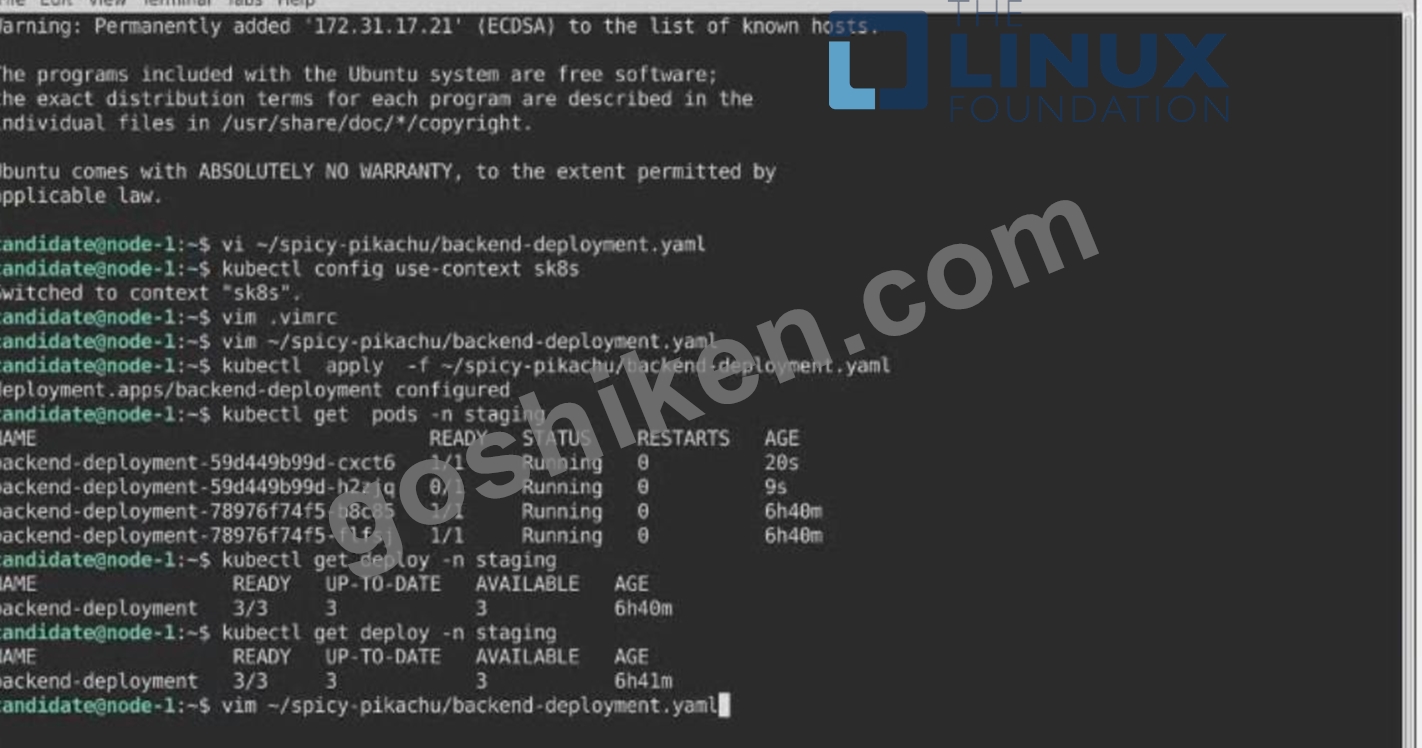
Task
A Deployment named backend-deployment in namespace staging runs a web application on port 8081.
正解:
解説:
See the solution below.
Explanation
Solution:
Text Description automatically generated
質問 # 35
......
CKAD試験問題有効なCKAD問題集PDF:https://www.goshiken.com/Linux-Foundation/CKAD-mondaishu.html
CKAD練習テスト問題解答には更新された33問があります:https://drive.google.com/open?id=1vA2bup6BvdGvWLAJvwOrI2oOYr6Cu0ze