

SPLK-1005合格させる問題集でSplunk24時間で試験合格できます
最新問題を使おうSPLK-1005試験問題と解答でPDFで一年間無料更新
質問 # 28
When should Splunk Cloud Support be contacted?
- A. For resizing, license changes, or any purchases.
- B. For all configuration changes.
- C. When unable to resolve issues or perform problem isolation.
- D. For scripted input troubleshooting.
正解:C
解説:
Splunk Cloud Support should be contacted when issues arise that cannot be resolved internally or when problem isolation has been unsuccessful.
* C. When unable to resolve issues or perform problem isolationis the correct answer. Splunk Cloud Support is typically involved when internal troubleshooting has been exhausted, and the issue requires expert assistance or deeper investigation. While scripted input troubleshooting might be handled by internal teams, contacting support for unresolved issues is the appropriate step.
Splunk Documentation References:
* When to Contact Splunk Support
質問 # 29
When adding a directory monitor and specifying a sourcetype explicitly, it applies to all files in the directory and subdirectories. If automatic sourcetyping is used, a user can selectively override it in which file on the forwarder?
- A. outputs.cont
- B. inputs.conf
- C. props.conf
- D. transforms.conf
正解:C
解説:
When a directory monitor is set up with automatic sourcetyping, a user can selectively override the sourcetype assignment by configuring the props.conf file on the forwarder. The props.conf file allows you to define how data should be parsed and processed, including assigning or overriding sourcetypes for specific data inputs.
Splunk Documentation Reference: props.conf configuration
質問 # 30
Which statement is true about monitor inputs?
- A. Monitor inputs can ignore a file's existing content, indexing new data as it arrives, by configuring the tailProcessor option.
- B. ThecrSaltsetting is required.
- C. Monitor inputs are configured in the monitor, conf file.
- D. The ignoreOlderThan option allows files to be ignored based on the file modification time.
正解:D
解説:
The statement about monitor inputs that is true is that the ignoreOlderThan option allows files to be ignored based on their file modification time. This setting helps prevent Splunk from indexing older data that is not relevant or needed.
Splunk Documentation Reference: Monitor files and directories
質問 # 31
When a forwarder phones home to a Deployment Server it compares the check-sum value of the forwarder's app to the Deployment Server's app. What happens to the app If the check-sum values do not match?
- A. A warning is generated on the Deployment Server stating the apps are out of sync. An Admin will need to confirm which version of the app should be used.
- B. The app on the forwarder is always deleted and re-downloaded from the Deployment Server.
- C. The app on the forwarder is only deleted and re-downloaded from the Deployment Server if the forwarder's app has a smaller check-sum value.
- D. The app is downloaded from the Deployment Server and the changes are merged.
正解:B
解説:
When a forwarder phones home to a Deployment Server, it compares the checksum of its apps with those on the Deployment Server. If the checksums do not match, the app on the forwarder is always deleted and re- downloaded from the Deployment Server. This ensures that the forwarder has the most current and correct version of the app as dictated by the Deployment Server.
Splunk Documentation Reference: Deployment Server Overview
質問 # 32
Which of the following statements regarding apps in Splunk Cloud is true?
- A. Self-service install of premium apps is possible.
- B. Self-service install is available for all apps on Splunkbase.
- C. Only Cloud certified and vetted apps are supported.
- D. Any app that can be deployed in an on-prem Splunk Enterprise environment is also supported on Splunk Cloud.
正解:C
解説:
In Splunk Cloud, only apps that have been certified and vetted by Splunk are supported. This is because Splunk Cloud is a managed service, and Splunk ensures that all apps meet specific security, performance,and compatibility requirements before they can be installed. This certification process guarantees that the apps won't negatively impact the overall environment, ensuring a stable and secure cloud service.
Self-service installation is available, but it is limited to apps that are certified for Splunk Cloud. Non-certified apps cannot be installed directly; they require a review and approval process by Splunk support.
Splunk Cloud Reference:Refer to Splunk's documentation on app installation and the list of Cloud-vetted apps available on Splunkbase to understand which apps can be installed in Splunk Cloud.
Source:
* Splunk Docs: About apps in Splunk Cloud
* Splunkbase: Splunk Cloud Apps
質問 # 33
Which type of forwarder can perform data parsing and enrichment before sending it to the indexer?
- A. Universal forwarder
- B. Search head
- C. Deployment server
- D. Heavy forwarder
正解:D
質問 # 34
Which setting in inputs.conf can be used to specify the SSL certificate for a TCP or UDP input?
- A. sslCertPath
- B. sslRootCAPath
- C. All of the above
- D. sslPassword
正解:C
質問 # 35
What syntax is required in inputs.conf to ingest data from files or directories?
- A. A monitor stanza, sourcetype, and Index is required to ingest data.
- B. A monitor stanza and sourcetype is required to ingest data.
- C. Only the monitor stanza is required to ingest data.
- D. A monitor stanza, sourcetype, index, and hostis required to ingest data.
正解:A
質問 # 36
A customer wants to mask unstructured data before sending it to Splunk Cloud. Where should SEBCMD be configured for this?
- A. props.conf on a Heavy Forwarder.
- B. props. conf- on a Universal Forwarder.
- C. transforms, cent on a Splunk Cloud indexer.
- D. props. conf on a Splunk Cloud search head,
正解:A
解説:
To mask unstructured data before sending it to Splunk Cloud, the SEDCMD should be configured in the props.
conf file on a Heavy Forwarder. The Heavy Forwarder is responsible for data parsing and transformation before forwarding the data to Splunk Cloud. This ensures that sensitive data is masked before it reaches the indexing stage.
Splunk Documentation Reference: Using SEDCMD to Mask Data
質問 # 37
How are HTTP Event Collector (HEC) tokens configured in a managed Splunk Cloud environment?
- A. Any token will be accepted by HEC, the data may just end up in the wrong index.
- B. Open a support case for each new data input and a token will be provided.
- C. Obtain a token from the organization's application developers and apply it in Settings > Data Inputs > HTTP Event Collector > New Token.
- D. A token is generated when configuring a HEC input, which should be provided to the application developers.
正解:D
解説:
In a managed Splunk Cloud environment, HTTP Event Collector (HEC) tokens are configured by an administrator through the Splunk Web interface. When setting up a new HEC input, a unique token is automatically generated. This token is then provided to application developers, who will use it to authenticate and send data to Splunk via the HEC endpoint.
This token ensures that the data is correctly ingested and associated with the appropriate inputs and indexes.
Unlike the other options, which either involve external tokens or support cases, option B reflects the standard procedure for configuring HEC tokens in Splunk Cloud, where control over tokens remains within the Splunk environment itself.
Splunk Cloud Reference:Splunk's documentation on HEC inputs provides detailed steps on creating and managing tokens within Splunk Cloud. This includes the process of generating tokens, configuring data inputs, and distributing these tokens to application developers.
Source:
* Splunk Docs: HTTP Event Collector in Splunk Cloud Platform
* Splunk Docs: Create and manage HEC tokens
質問 # 38
Which configuration file needs to be edited to configure the universal forwarder to act as a deployment client?
- A. outputs.conf
- B. deploymentclient.conf
- C. server.conf
- D. inputs.conf
正解:B
質問 # 39
Which option in Splunk web can be used to access the Guided Data On-boarding feature?
- A. Add data
- B. Data summary
- C. Data models
- D. Data inputs
正解:A
質問 # 40
Which setting in inputs.conf can be used to set the host field to a static value for a monitor input?
- A. host_override
- B. host
- C. host_regex
- D. host_segment
正解:B
質問 # 41
Which Windows-specific input type allows Splunk software to read special Windows log files such as the DNS debug server log?
- A. Windows Registry
- B. MonitorNoHandle
- C. Windows Management Instrumentation (WMI)
- D. Windows Event Log
正解:B
質問 # 42
Which feature of forwarders can protect the data from unauthorized access or tampering?
- A. Data masking
- B. SSL security
- C. Data encryption
- D. Data compression
正解:B
質問 # 43
What is the main advantage of self-service Splunk Cloud over managed Splunk Cloud in terms of cost and control?
- A. Self-service Splunk Cloud costs more to get started and maintain and requires your organization to rely on Splunk for setup and security configurations.
- B. Self-service Splunk Cloud costs less to get started and maintain and allows your organization total control in setup and security configurations.
- C. Self-service Splunk Cloud costs less to get started and maintain but requires your organization to rely on Splunk for setup and security configurations.
- D. Self-service Splunk Cloud costs more to get started and maintain but allows your organization total control in setup and security configurations.
正解:B
質問 # 44
What is the name of the default field that stores the timestamps in UNIX time when data is indexed?
- A. _time
- B. _timestamp
- C. _date
- D. _epoch
正解:A
質問 # 45
Which setting in inputs.conf can be used to specify the interval at which the script runs for a scripted input?
- A. interval
- B. cron
- C. schedule
- D. frequency
正解:A
質問 # 46
For the following data, what would be the correct attribute/value oair to use to successfully extract the correct timestamp from all the events?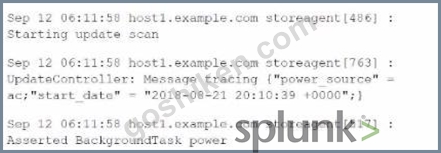
- A. TIMK_FORMAT = %b %d %H:%M:%S %z
- B. DATETIKE CONFIG = Sb %d %H:%M:%S
- C. DATETIME CONFIG= %Y-%m-%d %H:%M:%S %2
- D. TIME_FORMAT = %b %d %H:%M:%S
正解:D
解説:
The correct attribute/value pair to successfully extract the timestamp from the provided events is TIME_FORMAT = %b %d %H:%M:%S. This format corresponds to the structure of the timestamps in the provided data:
* %b represents the abbreviated month name (e.g., Sep).
* %d represents the day of the month.
* %H:%M:%S represents the time in hours, minutes, and seconds.
This format will correctly extract timestamps like "Sep 12 06:11:58".
Splunk Documentation Reference: Configure Timestamp Recognition
質問 # 47
What is the name of the Splunk Cloud feature that allows you to get data from APIs and other remote data interfaces through scripted inputs?
- A. Splunk Cloud Data Collectors
- B. Splunk Cloud Data Integrations
- C. Splunk Cloud Data Connectors
- D. Splunk Cloud Data Sources
正解:A
質問 # 48
What is the main difference between events indexes and metrics indexes in Splunk Cloud?
- A. Events indexes use a highly structured format to handle event-based log data, while metrics indexes impose minimal structure and can accommodate any kind of data.
- B. Events indexes store data in compressed form, while metrics indexes store data in uncompressed form.
- C. Events indexes store data in uncompressed form, while metrics indexes store data in compressed form.
- D. Events indexes impose minimal structure and can accommodate any kind of data, while metrics indexes use a highly structured format to handle metrics data.
正解:D
質問 # 49
Which of the following methods is valid for creating index-time field extractions?
- A. Use the rexcommand to extract the desired field, and then save as a calculated field.
- B. Use the UI to create a sourcetype, specify the field name and corresponding regular expression with capture statement.
- C. Use the CU app to define settings in fields.conf, and restart Splunk Cloud.
- D. Create a configuration app with the index-time props.conf and/or transfoms. conf, and upload the app via UI.
正解:D
解説:
The valid method for creating index-time field extractions is to create a configuration app that includes the necessary props.conf and/or transforms.conf configurations. This app can then be uploaded via the UI. Index- time field extractions must be defined in these configuration files to ensure that fields are extracted correctly during indexing.
Splunk Documentation Reference: Index-time field extractions
質問 # 50
Which of the following statements is true about data transformations using SEDCMD?
- A. Can only be used to mask or truncate raw data.
- B. Operates on a REGEX pattern match of the source, sourcetype, or host of an event.
- C. Configuredin props.conf and transform.conf.
- D. Can be used to manipulate the sourcetype per event.
正解:A
解説:
SEDCMD is a directive used within the props.conf file in Splunk to perform inline data transformations.
Specifically, it uses sed-like syntax to modify data as it is being processed.
* A. Can only be used to mask or truncate raw data:This is the correct answer because SEDCMD is typically used to mask sensitive data, such as obscuring personally identifiable information (PII) or truncating parts of data to ensure privacy and compliance with security policies. It is not used for more complex transformations such as changing the sourcetype per event.
* B. Configured in props.conf and transform.conf:Incorrect, SEDCMD is only configured in props.
conf.
* C. Can be used to manipulate the sourcetype per event:Incorrect, SEDCMD does not manipulate the sourcetype.
* D. Operates on a REGEX pattern match of the source, sourcetype, or host of an event:Incorrect, while SEDCMD uses regex for matching patterns in the data, it does not operate on the source, sourcetype, or host specifically.
Splunk Documentation References:
* SEDCMD Usage
* Mask Data with SEDCMD
質問 # 51
What does the followTail attribute do in inputs.conf?
- A. Pauses a file monitor if the queue is full.
- B. Prevents pre-existing content in a file from being ingested.
- C. Ingests a file starting with new content and then reading older events.
- D. Only creates a tail checkpoint of the monitored file.
正解:B
解説:
The followTail attribute in inputs.conf controls how Splunk processes existing content in a monitored file.
* D. Prevents pre-existing content in a file from being ingested:This is the correct answer. When followTail = true is set, Splunk will ignore any pre-existing content in a file and only start monitoring from the end of the file, capturing new data as it is added. This is useful when you want to start monitoring a log file but do not want to index the historical data that might be present in the file.
* A. Pauses a file monitor if the queue is full:Incorrect, this is not related to the followTail attribute.
* B. Only creates a tail checkpoint of the monitored file:Incorrect, while a tailing checkpoint is created for state tracking, followTail specifically refers to skipping the existing content.
* C. Ingests a file starting with new content and then reading older events:Incorrect, followTail does not read older events; it skips them.
Splunk Documentation References:
* followTail Attribute Documentation
* Monitoring Files
These answers align with Splunk's best practices and available documentation on managing and configuring Splunk environments.
質問 # 52
......
最新問題をダウンロードSPLK-1005問題集で2024年最新のSPLK-1005試験問題集:https://www.goshiken.com/Splunk/SPLK-1005-mondaishu.html
最新のSplunk SPLK-1005認定練習テスト問題:https://drive.google.com/open?id=1ynxhGvJkL7BLr1N0Upabu1sEnZIBkKNh