
GoShiken は C_S43 試験「SAP Certified Implementation Consultant - SAP S/4HANA Cloud Private Edition, Asset Management (C_S43_2601)」のサンプル問題を無料で提供しています。購入する前、弊社の模擬試験画面や問題のクオリティー、使いやすさを事前に体験できます。
SAP Certified Implementation Consultant - SAP S/4HANA Cloud Private Edition, Asset Management (C_S43_2601): C_S43 試験
「SAP Certified Implementation Consultant - SAP S/4HANA Cloud Private Edition, Asset Management (C_S43_2601)」、C_S43試験であります、SAP認定でございます。 最適な問題と解答をまとめられて、GoShiken はお客様のC_S43試験に計 12 問をまとめてご用意いたしました。C_S43試験の集結内容には、SAP Certified Application Associate認定にあるエリアとカテゴリの全てをカバーしており、お客様の SAP Certified Implementation Consultant - SAP S/4HANA Cloud Private Edition, Asset Management (C_S43_2601) 試験認定合格の準備を手助けをお届けします。
リアルなC_S43テストエンジン
弊社のSAP Certified Implementation Consultant - SAP S/4HANA Cloud Private Edition, Asset Management (C_S43_2601)受験資料はお客様がSAP C_S43試験を受けるために必要なすべてのものが含まれています。詳細はSAP Certified Implementation Consultant - SAP S/4HANA Cloud Private Edition, Asset Management (C_S43_2601)認証専門家側が研究して制作されて、彼らは業界の経験を利用して正確で論理的な制品を改良され続けています。
品質と価値のあるC_S43試験問題
GoShiken練習試験SAP C_S43は認定された対象分野の専門家と公開された作成者のみを招いて、最高水準の技術的精度で作成されています。
C_S43試験合格を100%返金保証
お客様がもしGoShikenのテストエンジンを使って C_S43 試験「SAP Certified Implementation Consultant - SAP S/4HANA Cloud Private Edition, Asset Management (C_S43_2601)」に不合格されました場合、弊社はお客様に購入金額を全額返金致します。
- C_S43 試験に関する広範囲的な問題と解答
- C_S43 試験問題集は事前使用できる
- 問題は業界の専門家によって調査されて、ほぼ100%正解率の検証済みの回答
- C_S43 試験問題集は定期的に更新されます
- 本番試験を基づいてまとめられた C_S43 問題集
- こちらの問題集は販売される前に複数回シミュレーション済み
- GoShiken で購入すると決める前に、無料で C_S43 試験問題集のサンプルを試せます
365日無料アップデート
購入日から365日無料アップデートをご利用いただけます。365日後、C_S43問題集更新版がほしく続けて50%の割引を与えれます。
インスタントダウンロード
お支払い後、弊社のシステムは、1分以内に購入したC_S43問題集をあなたのメールボックスにお送りします。 2時間以内に届かない場合に、お問い合わせください。
100%返金保証
購入後60日以内に、C_S43試験に合格しなかった場合は、全額返金します。 そして、無料で他の試験問題集を入手できます。
ハイパスレート
近年、C_S43テスト連続は好評を博しており、すべての献身的な努力で99%の合格率に達しています。 より多くの労働者がより高い自己啓発を進めるための強力なツールとして、C_S43認定トレーニングは高度なパフォーマンスと人間中心の技術への情熱を追求し続けています。 さまざまな種類の受験者がSAP Certified Implementation Consultant - SAP S/4HANA Cloud Private Edition, Asset Management (C_S43_2601)認定を受けるのをどのように手助けするかを理解するために多くの研究が行われてきました。 シラバスの変更および理論と実践における最新の動向に従って、SAP Certified Implementation Consultant - SAP S/4HANA Cloud Private Edition, Asset Management (C_S43_2601)ガイドの連続を修正して更新します。 私たちは、厳密な分析を通じて、近年のテストと業界の動向に基づいてC_S43認定トレーニングを行います。
信頼できる売り上げ後のサービス
最高のC_S43テスト連続を提供することにおける世界的なリーダーとして、我々は大多数の消費者に包括的なサービスを提供することに専念して、そして統合されたサービスを構築するよう努めます。 さらに、C_S43認定トレーニングアプリケーション、インタラクティブ共有、アフターサービスでも画期的な成果を上げました。 実際のところ、私たちの会社はすべてのクライアントのフィッティングソリューションに対する困難を考慮に入れています。 あなたが助けを必要とする限り、SAP Certified Implementation Consultant - SAP S/4HANA Cloud Private Edition, Asset Management (C_S43_2601)ガイドの連続に関する問題のいずれかに対処するための即時サポートを提供します。 いつでも利用可能です。 私たちの責任あるスタッフが質問に答えてくれます。
SAP C_S43 試験シラバストピック:
| セクション | 比重 | 目標 |
|---|---|---|
| トピック 1: 保全業務の実行 | 35% | - 保全通知の管理
|
| トピック 2: 予防保全 | 25% | - 作業手順書の管理
|
| トピック 3: 点検および保全業務の実行 | 10% | - 点検ロットと結果記録の管理
|
| トピック 4: 他領域との統合およびレポート機能 | 10% | - 財務、ロジスティクス、購買管理との連携 - 標準レポートと分析機能の活用 |
| トピック 5: 組織構造とマスタデータ | 20% | - 組織単位の定義と設定
|
SAP Certified Implementation Consultant - SAP S/4HANA Cloud Private Edition, Asset Management (C_S43_2601) 認定 C_S43 試験問題:
Task 6: Configure Maintenance Order Types and work with Maintenance Orders The project team evaluates during the implementation project Maintenance Orders in SAP S/4HANA Asset Management. The following features need to be checked:
* Configure a Maintenance Order Type and create a Maintenance Order
* Create a Time Confirmation a Maintenance Order
* Prepare a Maintenance Order for Completion
* Create a Maintenance Order and save it.
Note:
Make sure that you have maintained all required customizing settings for the Maintenance Order Type.
Use the following information at header level:
Plan a Maintenance Order Operation and use the following information:

* Create a Time Confirmation for the just created Maintenance Order. Use the following information:
* Display the Actual Costs assigned to the just created Maintenance Order and set it to Technically Completed. Display the Settlement Rule.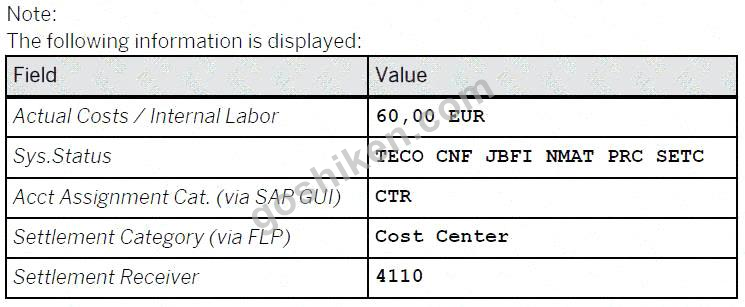
正解:
See the Explanation for complete Solution of this Task.
Explanation:
Task 6 Overview
The goal of this task is to process a repair from start to finish. You will convert the "leaking pump" notification into a work order, plan the labor, record the work performed, and technically close the file.
Step 1: Create the Maintenance Order from Notification
Instead of starting from scratch, we link the order to the notification you created in Task 5.
* Access the Transaction : Use transaction code IW31 .
* Initial Screen :
* Order Type : PM01.
* Notification : Enter your notification number (e.g., 10000147).
* Press Enter .
* Header Data :
* The description "Pump is leaking" should pull in automatically.
* Main Work Center : Ensure it is T-ME48.
Explanation : By entering the notification number, SAP automatically pulls in the equipment, functional location, and problem description, ensuring "data integrity" across the maintenance process.
Step 2: Plan the Operations (Labor)
You must tell the system how much effort the repair requires.
* Go to the Operations Tab .
* Enter Planning Data :
* Work : 2.
* Unit (Un) : H (Hours).
* Number : 1 (One person).
* Duration (Dur.) : 2 / Unit : H.
* Add Enhancement Data :
* Click the Additional Data tab - > Enhancement sub-tab.
* In the Field Key box, use the search (F4) to select 0000001 (User-defined fields).
* In the first text box ( Text 1 ), type: Industrial Z48.
Explanation : Planning the work allows the system to calculate the estimated cost of the repair. The
"Enhancement" data is used to store specific technical details (like the motor type) that aren't in the standard SAP fields.
Step 3: Release the Order
An order in "Created" (CRTD) status is just a plan. To start work, it must be "Released" (REL).
* Release : Look at the top toolbar and click the Green Flag icon .
* Verify Status : The "Sys.Status" field should now include REL.
* Save : Click the Save (floppy disk) icon.
Explanation : Releasing the order is the "Green Light" for the shop floor. It allows technicians to charge time to the job and warehouse staff to issue parts.
Step 4: Time Confirmation (Recording the Work)
Now we record that the repair is physically finished.
* Access the Transaction : Use transaction code IW41 .
* Enter Data :
* Order : Enter your order number (e.g., 4000395).
* Actual Work : 2 H.
* Check the boxes for Final Confirmation and No Remaining Work .
* Confirmation Text : Pump repaired and tested.
* Save : Click the Save icon.
Explanation : This step captures the "Actual Cost." SAP multiplies the 2 hours of labor by the hourly rate of work center T-ME48 to calculate exactly how much this repair cost the company.
Step 5: Technical Completion (TECO)
The final administrative step to close the repair file.
* Access the Transaction : Use transaction code IW32 .
* Complete Technically :
* Go to menu: Order > Functions > Complete > Complete (technically) .
* Click the Green Checkmark on the popup window.
* Save : Click the Save icon.
Explanation : TECO (Technical Completion) locks the order. It tells the system the asset is back in service and prevents any further labor or parts from being charged to this specific job.
Check Inspection Lot and record Inspection Results
The project team evaluates during the implementation project the checking of Inspection Lots Checklist processing including result recording. The following features need to be checked:
* Display the automatically created Inspection Lot
* Record Inspection Results
* Display the automatically created Inspection Lot for the previously created Maintenance Order including Checklist. The Inspection Lot comprises the following data: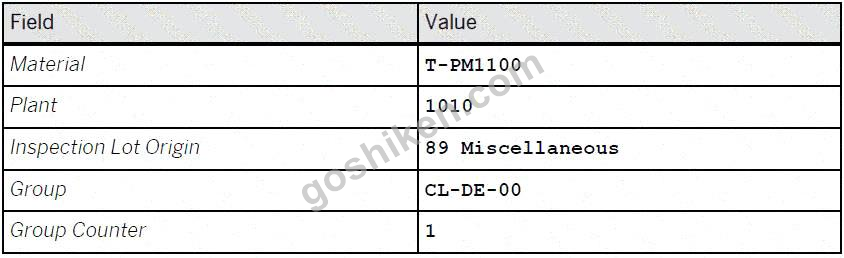
* Record Inspection Results for the previously created Inspection Lot so that the Usage Decision is automatically set to Can be used .
正解:
See the Explanation for complete Solution of this Task.
Explanation:
Task 13 Overview
This task focuses on the quality management (QM) integration with maintenance. You will verify the inspection lot that was automatically triggered by your maintenance order and then record the results to confirm the technical object is fit for use.
Step 1: Display the Automatically Created Inspection Lot
Before recording results, you must verify that the system generated the correct inspection lot for your maintenance order.
* Access the Transaction : Enter QA03 (Display Inspection Lot) in the command field and press Enter .
* Locate the Lot : Search for the inspection lot associated with the maintenance order you created in Task 12.
* Verify the Following Data :
* Material : T-PM1100
* Plant : 1010
* Inspection Lot Origin : 89 (Miscellaneous)
* Group : CL-DE-00
* Group Counter : 1
Explanation : The inspection lot is the central record for quality testing. Seeing these specific values (Group CL-DE-00) confirms that the classification you set up in Task 11 correctly triggered the intended inspection plan.
Step 2: Record Inspection Results
This is the process of entering the actual findings from the checklist inspection.
* Access the Transaction : You can navigate directly from the Inspection Lot in QA03 or use transaction QE51N (Results Recording Selection).
* Select the Lot : Enter your inspection lot number and click Execute .
* Record Results :
* Enter the inspection values for each characteristic listed in the checklist.
* Ensure the values you enter are within the "Acceptable" range or marked as "Pass".
* Automatic Usage Decision : Record the results such that the Usage Decision (UD) is automatically set to "Can be used" .
* Save : Click the Save (floppy disk) icon.
Explanation : By recording positive results, you satisfy the quality requirements for the maintenance task.
The automatic transition to "Can be used" status tells the system the pump has passed inspection and the maintenance order can proceed toward completion.
全 6 ページ中 1 ページ目を表示しています。
全 12 問中 1-2 問目を表示しています。
 477 お客様のコメント最新のコメント 「一部の類似なコメント・古いコメントは隠されています」
間違いの選択肢についてもキチンと解説されているので、深く理解&幅広く習得できるC_S43がいいだと思う。
たな**

C_S43の問題集だけで勉強して、先日試験に合格しました。
模擬用のソフトも、実際の試験の形式とほぼ同じで非常に有用だと思います。
ありがとうございました。
Iizuka

今時のアプリを利用した過去問演習にも対応
至れり尽くせりのC_S43一冊だなって思いました。
Takase
お陰さまでC_S43試験に合格しました!C_S43試験参考書が本当に助かりました!誠にありがとうございました。
国実**
網羅性もかなり高いですね。GoShikenさんの問題集を購入するのはこれで四回目になりました。今回も無事合格です。
Kurahashi
GoShikenから提供されたこのC_S43問題集一つで習得できました。今回は試験に受かりそうです。
杏野**
分かりやすく解説が載っており良かったですおかげで合格できました。このC_S43一冊だけで合格することが可能です。
杏さ**
GoShikenに助けて、C_S43試験に合格した後、私はいい仕事を見つけました。C_S43試験に初めて参加して、絶対合格したい人にこの問題集を進めます。
长谷**
私は1週間前にC_S43問題集のみを準備しましたが、高得点で試験に合格しました。出題分野を幅広く網羅し、側注付きで理解しやすい参考書だなっていう印象です。
大山**
易しすぎず難しすぎず、絶妙なバランスの解説が分かりやすいC_S43試験対策書で本当にGoShikenに助かられました。
田中**
C_S43試験のために、ずっと勉強しています。C_S43問題集を利用したら、短い時間でC_S43試験をパスしました。
増田**
とても読みやすくて5日で読み終わることができました。そして早速試験に受けで、ほんとに合格できましたよ!嬉しいすぎます。
内野**
C_S43試験めっちゃ余裕でね!!すべてはGoShikenさんから提供された素晴らしい問題集のおかげです!しかも高得点。次はC-TS452-2022に挑戦したいと思います!
Takahashi
御社の問題集C_S43の解説が充実していて分かりやすく、試験への取り組み方が身についた気がします。自信を持って試験に臨めます。御社の問題集C_S43の解説が充実していて分かりやすく、試験への取り組み方が身についた気がします。自信を持って試験に臨めます
松た**
初学で一発合格できたのはGoShikenさんのおかげです。C_S43学習教材は有効です。そして、合格率は高いです。
Itou
無事にC_S43試験に合格しました。C_S43試験問題集は本当にわかりやすいです!
Aihara
