

ベストLpi 305-300学習ガイドと問題集は2024年更新
トップクラスLpi 305-300試験最先端学習ガイド!練習問題バージョン
LPIC-3試験305は、仮想化とコンテナ化技術を深く理解する必要がある挑戦的な試験です。この試験に合格したIT専門家は、安全で効率的な方法で仮想化およびコンテナ化された環境を設計、展開、および管理する能力を示しています。 LPIC-3認定は、IT業界で非常に尊敬されており、世界中の多くの組織によって認められています。 LPIC-3認定を取得することにより、ITの専門家はキャリアの見通しを強化し、組織でより挑戦的な役割を引き受けることができます。
質問 # 36
Which of the following statements in aDockerfileleads to a container which outputs hello world? (Choose two.)
- A. ENTRYPOINT "echo", "Hello", "World*
- B. ENTRYPOINT [ "echo hello world" ]
- C. ENTRYPOINT [ "echo", "hello", "world" ]
- D. ENTRYPOINT echo Hello World
- E. ENTRYPOINT "echo Hello World"
正解:B、C
質問 # 37
What is the purpose ofcloud-init?
- A. Replace common Linux inic systems, such as systemd or SysV init.
- B. Standardize the configuration of infrastructure services, such as load balancers or virtual firewalls in a cloud.
- C. Assign an laaS instance to a specific computing node within a cloud.
- D. Orchestrate the creation and start of multiple related laaS instances.
- E. Prepare the generic image of an laaS instance to fit a specific instance's configuration.
正解:E
解説:
Explanation
Cloud-init is a tool that processes configurations and runs through five stages during the initial boot of Linux VMs in a cloud. It allows users to customize a Linux VM as it boots for the first time, by applying user data to the instance. User data can include scripts, commands, packages, files, users, groups, SSH keys, and more.
Cloud-init can also interact with various cloud platforms and services, such as Azure, AWS, OpenStack, and others. The purpose of cloud-init is to prepare the generic image of an laaS instance to fit a specific instance's configuration, such as hostname, network, security, and application settings. References:
* Cloud-init - The standard for customising cloud instances
* Understanding cloud-init - Azure Virtual Machines
* Tutorial - Customize a Linux VM with cloud-init in Azure - Azure Virtual Machines
質問 # 38
Which statement is true regarding the Linux kernel module that must be loaded in order to use QEMU with hardware virtualization extensions?
- A. It must be loaded into the kernel of the first virtual machine as it interacts with the QEMU bare metal hypervisor and is required to trigger the start of additional virtual machines
- B. It must be loaded into the Kernel of the host system in order to use the visualization extensions of the host system's CPU
- C. It must be loaded into the kernel of each virtual machine that will access files and directories from the host system's file system.
- D. It must be loaded into the kernel of the host system only if the console of a virtual machine will be connected to a physical console of the host system
- E. It must be loaded into the kernel of each virtual machine to provide Para virtualization which is required by QEMU.
正解:B
質問 # 39
What does IaaS stand for?
- A. Intelligence as a Service
- B. Infrastructure as a Service
- C. Information as a Service
- D. Integration as a Service
- E. Instances as a Service
正解:B
解説:
Explanation
IaaS is a type of cloud computing service that offers essential compute, storage, and networking resources on demand, on a pay-as-you-go basis. IaaS is one of the four types of cloud services, along with software as a service (SaaS), platform as a service (PaaS), and serverless12. IaaS eliminates the need for enterprises to procure, configure, or manage infrastructure themselves, and they only pay for what they use23. Some examples of IaaS providers are Microsoft Azure, Google Cloud, and Amazon Web Services.
質問 # 40
Which of the following commands lists all differences between the disk images vm1-snap.img and vm1.img?
- A. virt-diff -a vm1-snap.img -A vm1.img
- B. virt-history -a vm1-snap.img -A vm1.img
- C. virt-cp-in -a vm1-snap.img -A vm1.img
- D. virt-delta -a vm1-snap.img -A vm1.img
- E. virt-cmp -a vm1-snap.img -A vm1.img
正解:A
解説:
Explanation
The virt-diff command-line tool can be used to list the differences between files in two virtual machines or disk images. The output shows the changes to a virtual machine's disk images after it has been running. The command can also be used to show the difference between overlays1. To specify two guests, you have to use the -a or -d option for the first guest, and the -A or -D option for the second guest. For example: virt-diff -a old.img -A new.img1. Therefore, the correct command to list all differences between the disk images vm1-snap.img and vm1.img is: virt-diff -a vm1-snap.img -A vm1.img. The other commands are not related to finding differences between disk images. virt-delta is a tool to create delta disks from two disk images2. virt-cp-in is a tool to copy files and directories into a virtual machine disk image3. virt-cmp is a tool to compare two files or directories in a virtual machine disk image4. virt-history is a tool to show the history of a virtual machine disk image5. References:
* 21.13. virt-diff: Listing the Differences between Virtual Machine Files ...
* 21.14. virt-delta: Creating Delta Disks from Two Disk Images ...
* 21.6. virt-cp-in: Copying Files and Directories into a Virtual Machine Disk Image ...
* 21.7. virt-cmp: Comparing Two Files or Directories in a Virtual Machine Disk Image ...
* 21.8. virt-history: Showing the History of a Virtual Machine Disk Image ...
質問 # 41
Which of the following commands boots a QEMU virtual machine using hardware virtualization extensions?
- A. vm -kvm -drive file=debian.img -cdrom debian.iso -m 1024 -boot d
- B. qemu -accel kvm -drive file-debian.img -cdrom debian.iso -m 1024 -boot d
- C. qemu-hw -create -drive file=debian.img -cdrom debian.iso -m 1024 -boot d
- D. qvm start -vmx -drive file=debian.img -cdrom debian.iso -m 1024 -boot d
- E. qvirt -create -drive file=debian.img -cdrom debian.iso -m 1024 -boot d -driver hvm
正解:B
解説:
Explanation
The correct command to boot a QEMU virtual machine using hardware virtualization extensions is qemu
-accel kvm -drive file-debian.img -cdrom debian.iso -m 1024 -boot d. This command uses the -accel option to specify the hardware accelerator to use, which in this case is kvm. KVM is a full virtualization solution for Linux on x86 hardware containing virtualization extensions (Intel VT or AMD-V)1. The -drive option specifies the disk image file to use, which in this case is debian.img. The -cdrom option specifies the ISO image file to use as a CD-ROM, which in this case is debian.iso. The -m option specifies the amount of memory to allocate to the virtualmachine, which in this case is 1024 MB. The -boot option specifies the boot order, which in this case is d, meaning to boot from the CD-ROM first. References:
https://access.redhat.com/documentation/en-us/red_hat_enterprise_linux/7/html/virtualization_deployment_and_
https://fedoraproject.org/wiki/Virtualization
質問 # 42
FILL BLANK
What LXC command lists containers sorted by their CPU, block I/O or memory consumption? (Specify ONLY the command without any path or parameters.)
正解:
解説:
lxc-top
Explanation
LXD supports the following network interface types for containers: macvlan, bridged, physical, sriov, and ovn1. Macvlan creates a virtual interface on the host that is connected to the same network as the parent interface2. Bridged connects the container to a network bridge that acts as a virtual switch3. Physical attaches the container to a physical network interface on the host2. Ipsec and wifi are not valid network interface types for LXD containers. References:
* 1: Bridge network - Canonical LXD documentation
* 2: How to create a network - Canonical LXD documentation
* 4: LXD containers and networking with static IP - Super User
質問 # 43
Which of the following mechanisms are used by LXC and Docker to create containers? (Choose three.)
- A. POSIXACLs
- B. Linux Capabilities
- C. File System Permissions
- D. Control Groups
- E. Kernel Namespaces
正解:B、D、E
質問 # 44
A clone of a previously used virtual machine should be created. All VM specific information, such as user accounts, shell histories and SSH host keys should be removed from the cloned disk image. Which of the following tools can perform these tasks?
- A. sysprep
- B. virt-sparsi
- C. virt-svspre
- D. virt-rescue
- E. virc-reset
- F. vire-wipe
正解:C
質問 # 45
Which of the following values are valid in the type attribute of a<domain>element in a libvirt domain definition? (Choose two.)
- A. Ixc
- B. proc
- C. kvm
- D. namespace
- E. cgroup
正解:A、C
質問 # 46
What is the purpose of thekubeletservice in Kubernetes?
- A. Build a container image as specified in a Dockerfile.
- B. Run containers on the worker nodes according to the Kubernetes configuration.
- C. Store and replicate Kubernetes configuration data.
- D. Manage permissions of users when interacting with the Kubernetes API.
- E. Provide a command line interface to manage Kubernetes.
正解:B
解説:
Explanation
The purpose of the kubelet service in Kubernetes is to run containers on the worker nodes according to the Kubernetes configuration. The kubelet is an agent or program that runs on each node and communicates with the Kubernetes control plane. It receives a set of PodSpecs that describe the desired state of the pods that should be running on the node, and ensures that the containers described in those PodSpecs are running and healthy. The kubelet also reports the status of the node and the pods back to the control plane. The kubelet does not manage containers that were not created by Kubernetes. References:
* Kubernetes Docs - kubelet
* Learn Steps - What is kubelet and what it does: Basics on Kubernetes
質問 # 47
Which of the following statements is true regarding the following output ofxl list: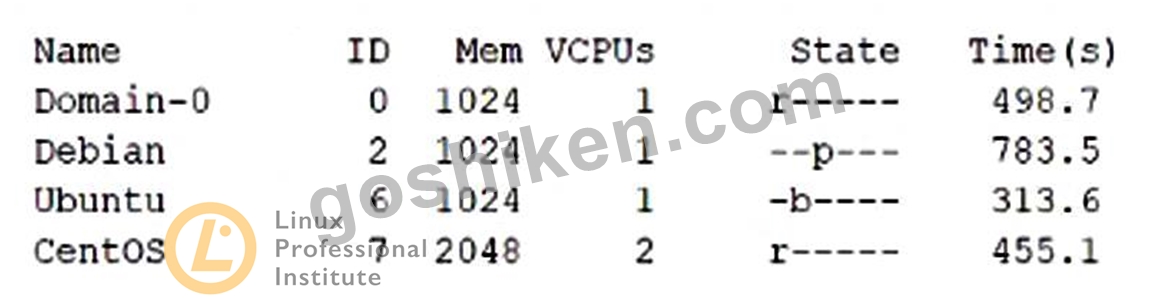
- A. The domain with ID 2 uses Para virtualization.
- B. Both Debian and Ubuntu require xl commands to start running.
- C. CentOS is the domain which has consumed the most CPU time.
- D. It is necessary to use the xl command to change Ubuntu's state to running.
- E. Ubuntu is idle or waiting for I/O.
正解:E
解説:
Explanation
The output of xl list shows the state of the domains. The domain with ID 6, Ubuntu, has a state of "b-". This means that the domain is blocked, which means it is idle or waiting for I/O.
https://xenbits.xen.org/docs/unstable/man/xl.1.html
質問 # 48
Which of the following statements are true regarding a Pod in Kubernetes? (Choose two.)
- A. All containers of a Pod run on the same node.
- B. Pods are always created automatically and cannot be explicitly configured.
- C. A Pod is the smallest unit of workload Kubernetes can run.
- D. When a Pod fails, Kubernetes restarts the Pod on another node by default.
- E. systemd is used to manage individual Pods on the Kubernetes nodes.
正解:A、C
質問 # 49
After setting up a data container using the following command:
docker create -v /data --name datastore debian /bin/true
how is an additional new container started which shares the/datavolume with the datastore container?
- A. docker run -v /data --name service debian bash
- B. docker run --share-with datastore --name service debian bash
- C. docker run --volumes-from datastore --name service debian bash
- D. docker run -v datastore:/data --name service debian bash
- E. docker run --volume-backend datastore -v /data --name service debian bash
正解:C
解説:
Explanation
The correct way to start a new container that shares the /data volume with the datastore container is to use the
--volumes-from flag. This flag mounts all the defined volumes from the referenced containers. In this case, the datastore container has a volume named /data, which is mounted in the service container at the same path. The other options are incorrect because they either use invalid flags, such as --share-with or --volume-backend, or they create new volumes instead of sharing the existing one, such as -v datastore:/data or -v /data. References:
* Docker Docs - Volumes
* Stack Overflow - How to map volume paths using Docker's --volumes-from?
* Docker Docs - docker run
質問 # 50
Which of the following statements in aDockerfileleads to a container which outputs hello world? (Choose two.)
- A. ENTRYPOINT "echo", "Hello", "World*
- B. ENTRYPOINT [ "echo hello world" ]
- C. ENTRYPOINT [ "echo", "hello", "world" ]
- D. ENTRYPOINT echo Hello World
- E. ENTRYPOINT "echo Hello World"
正解:B、C
解説:
Explanation
The ENTRYPOINT instruction in a Dockerfile specifies the default command to run when a container is started from the image. The ENTRYPOINT instruction can be written in two forms: exec form and shell form.
The exec form uses a JSON array to specify the command and its arguments, such as [ "executable",
"param1", "param2" ]. The shell form uses a single string to specify the command and its arguments, such as
"executable param1 param2". The shell form is converted to the exec form by adding /bin/sh -c to the beginning of the command. Therefore, the following statements in a Dockerfile are equivalent and will lead to a container that outputs hello world:
ENTRYPOINT [ "echo hello world" ] ENTRYPOINT [ "/bin/sh", "-c", "echo hello world" ] ENTRYPOINT
"echo hello world" ENTRYPOINT [ "echo", "hello", "world" ] ENTRYPOINT [ "/bin/sh", "-c", "echo",
"hello", "world" ] ENTRYPOINT "echo hello world"
The other statements in the question are invalid or incorrect. The statement A. ENTRYPOINT "echo Hello World" is invalid because it uses double quotes to enclose the entire command, which is not allowed in the shell form. The statement D. ENTRYPOINT echo Hello World is incorrect because it does not use quotes to enclose the command, which is required in the shell form. The statement E. ENTRYPOINT "echo", "Hello",
"World" is invalid because it uses double quotes to separate the command and its arguments, which is not allowed in the exec form. References:
* Dockerfile reference | Docker Docs
* Using the Dockerfile ENTRYPOINT and CMD Instructions - ATA Learning
* Difference Between run, cmd and entrypoint in a Dockerfile
質問 # 51
Which of the following commands lists all differences between the disk images vm1-snap.img and vm1.img?
- A. virt-diff -a vm1-snap.img -A vm1.img
- B. virt-history -a vm1-snap.img -A vm1.img
- C. virt-cp-in -a vm1-snap.img -A vm1.img
- D. virt-delta -a vm1-snap.img -A vm1.img
- E. virt-cmp -a vm1-snap.img -A vm1.img
正解:A
質問 # 52
How can data be shared between several virtual machines running on the same Linux-based host system?
- A. By writing data to the file system since all virtual machines on the same host system use the same file system.
- B. By setting up a ramdisk in one virtual machine and mounting it using its UUID in the other VMs.
- C. By attaching the same virtual hard disk to all virtual machines and activating EXT4 sharing extensions on it.
- D. By mounting other virtual machines' file systems from /dev/virt-disks/remote/.
- E. By using a network file system or file transfer protocol.
正解:E
質問 # 53
Which of the following types of guest systems does Xen support? (Choose two.)
- A. Paravirtualized quests (PVI
- B. Emulated guests
- C. Fully virtualized guests
- D. Container virtualized guests
- E. Foreign architecture guests (FA)
正解:A、C
解説:
Explanation
Xen supports two types of guest systems: paravirtualized guests (PV) and fully virtualized guests (HVM).
* Paravirtualized guests (PV) are guests that have been modified to run on the Xen hypervisor. They use a special kernel that communicates with the hypervisor through hypercalls, and use paravirtualized drivers
* for I/O devices. PV guests can run faster and more efficiently than HVM guests, but they require the guest operating system to be ported to Xen and to support the Xen ABI12.
* Fully virtualized guests (HVM) are guests that run unmodified operating systems on the Xen hypervisor.
They use hardware virtualization extensions, such as Intel VT-x or AMD-V, to create a virtual platform for the guest. HVM guests can run any operating system that supports the hardware architecture, but they incur more overhead and performance penalties than PV guests. HVM guests can also use paravirtualized drivers for I/O devices to improve their performance12.
The other options are not correct. Xen does not support foreign architecture guests (FA), emulated guests, or container virtualized guests.
* Foreign architecture guests (FA) are guests that run on a different hardware architecture than the host.
For example, running an ARM guest on an x86 host. Xen does not support this type of virtualization, as it would require emulation or binary translation, which are very complex and slow techniques3.
* Emulated guests are guests that run on a software emulator that mimics the hardware of the host or another platform. For example, running a Windows guest on a QEMU emulator. Xen does not support this type of virtualization, as it relies on the emulator to provide the virtual platform, not the hypervisor. Xen can use QEMU to emulate some devices for HVM guests, but not the entire platform14.
* Container virtualized guests are guests that run on a shared kernel with the host and other guests, using namespaces and cgroups to isolate them. For example, running a Linux guest on a Docker container. Xen does not support this type of virtualization, as it requires the guest operating system to be compatible with the host kernel, and does not provide the same level of isolation and security as hypervisor-based virtualization56.
References:
* Xen Project Software Overview - Xen
* Xen ARM with Virtualization Extensions - Xen
* Xen Project Beginners Guide - Xen
* QEMU - Xen
* Docker overview | Docker Documentation
* What is a Container? | App Containerization | VMware
質問 # 54
Which of the following are true regarding the CPU of a QEMU virtual machine? (Choose two.)
- A. The CPU architecture of a QEMU virtual machine is independent of the host system's architecture.
- B. For each QEMU virtual machine, one dedicated physical CPU core must be reserved.
- C. QEMU virtual machines support multiple virtual CPUs in order to run SMP systems.
- D. QEMU uses the concept of virtual CPUs to map the virtual machines to physical CPUs.
- E. Each QEMU virtual machine can only have one CPU with one core.
正解:A、C
解説:
Explanation
The CPU architecture of a QEMU virtual machine is independent of the host system's architecture. QEMU can emulate many CPU architectures, including x86, ARM, Alpha, and SPARC, regardless of the host system's architecture1. This allows QEMU to run guest operating systems that are not compatible with the host system's hardware. Therefore, option A is correct. QEMU virtual machines support multiple virtual CPUs in order to run SMP systems. QEMU uses the concept of virtual CPUs (vCPUs) to map the virtual machines to physical CPUs. Each vCPU is a thread that runs on a physical CPU core. QEMU allows the user to specify the number of vCPUs and the CPU model for each virtual machine. QEMU can run SMP systems with multiple vCPUs, as well as single-processor systems with one vCPU2. Therefore, option E is also correct. The other options are incorrect because they do not describe the CPU of a QEMU virtual machine. Option B is wrong because QEMU virtual machines can have more than one CPU with more than one core. Option C is wrong because QEMU does not require a dedicated physical CPU core for each virtual machine. QEMU can share the physical CPU cores among multiple virtual machines, depending on the load and the scheduling policy.
Option D is wrong because QEMU does not use the term CPU, but vCPU, to refer to the virtual machines' processors. References:
* QEMU vs VirtualBox: What's the difference? - LinuxConfig.org
* QEMU / KVM CPU model configuration - QEMU documentation
* Introduction - QEMU documentation
* Qemu/KVM Virtual Machines - Proxmox Virtual Environment
質問 # 55
Which of the following kinds of data cancloud-initprocess directly from user-data? (Choose three.)
- A. ISO images to boot from
- B. Base64-encoded binary files to execute
- C. Shell scripts to execute
- D. cloud-config declarations in YAML
- E. Lists of URLs to import
正解:C、D、E
解説:
Explanation
Cloud-init is a tool that allows users to customize the configuration and behavior of cloud instances during the boot process. Cloud-init can process different kinds of data that are passed to the instance via user-data, which is a mechanism provided by various cloud providers to inject data into the instance. Among the kinds of data that cloud-init can process directly from user-data are:
* Shell scripts to execute: Cloud-init can execute user-data that is formatted as a shell script, starting with the #!/bin/sh or #!/bin/bash shebang. The script can contain any commands that are valid in the shell environment of the instance. The script is executed as the root user during the boot process12.
* Lists of URLs to import: Cloud-init can import user-data that is formatted as a list of URLs, separated by newlines. The URLs can point to any valid data source that cloud-init supports, such as shell scripts, cloud-config files, or include files. The URLs are fetched and processed by cloud-init in the order they appear in the list13.
* cloud-config declarations in YAML: Cloud-init can process user-data that is formatted as a cloud-config file, which is a YAML document that contains declarations for various cloud-init modules. The cloud-config file can specify various aspects of the instance configuration, such as hostname, users, packages, commands, services, and more. The cloud-config file must start with the #cloud-config header14.
The other kinds of data listed in the question are not directly processed by cloud-init from user-data. They are either not supported, not recommended, or require additional steps to be processed. These kinds of data are:
* ISO images to boot from: Cloud-init does not support booting from ISO images that are passed as user-data. ISO images are typically used to install an operating system on a physical or virtual machine, not to customize an existing cloud instance. To boot from an ISO image, the user would need to attach it as a secondary disk to the instance and configure the boot order accordingly5.
* Base64-encoded binary files to execute: Cloud-init does not recommend passing binary files as user-data, as they may not be compatible with the instance's architecture or operating system.
Base64-encoding does not change this fact, as it only converts the binary data into ASCII characters. To execute a binary file, the user would need to decode it and make it executable on the instance6.
References:
* User-Data Formats - cloud-init 22.1 documentation
* User-Data Scripts
* Include File
* Cloud Config
* How to Boot From ISO Image File Directly in Windows
* How to run a binary file as a command in the terminal?.
質問 # 56
In order to use the optiondom0_memto limit the amount of memory assigned to the Xen Domain-0, where must this option be specified?
- A. In any of Xen's global configuration files.
- B. In the configuration file /etc/xen/Domain-0.cfg, when Xen starts.
- C. In the bootloader configuration, when Xen is booted.
- D. In its .config file, when the Domain-0 kernel is built.
- E. In its Makefile, when Xen is built.
正解:C
質問 # 57
Which of the following statements are true about sparse images in the context of virtual machine storage?
(Choose two.)
- A. Sparse images can only be used in conjunction with paravirtualization.
- B. Sparse images may consume an amount of space different from their nominal size.
- C. Sparse images are automatically resized when their maximum capacity is about to be exceeded.
- D. Sparse images are automatically shrunk when files within the image are deleted.
- E. Sparse images allocate backend storage at the first usage of a block.
正解:B、E
質問 # 58
What is the purpose of the commandvagrantinit?
- A. It starts a Vagrant box.
- B. It installs Vagrant on a Linux host.
- C. It creates a Vagrant configuration file.
- D. It executes a provisioning tool in a running box.
- E. It downloads a Vagrant box.
正解:C
質問 # 59
Which of the following statements about the commandlxc-checkpointis correct?
- A. It creates a container image based on an existing container.
- B. It doubles the memory consumption of the container.
- C. It only works on stopped containers.
- D. It creates a clone of a container.
- E. It writes the status of the container to a file.
正解:E
解説:
Explanation
The command lxc-checkpoint is used to checkpoint and restore containers. Checkpointing a container means saving the state of the container, including its memory, processes, file descriptors, and network connections, to a file or a directory. Restoring a container means resuming the container from the saved state, as if it was never stopped. Checkpointing and restoring containers can be useful for various purposes, such as live migration, backup, debugging, or snapshotting. The command lxc-checkpoint has the following syntax:
lxc-checkpoint {-n name} {-D path} [-r] [-s] [-v] [-d] [-F]
The options are:
* -n name: Specify the name of the container to checkpoint or restore.
* -D path: Specify the path to the file or directory where the checkpoint data is dumped or restored.
* -r, --restore: Restore the checkpoint for the container, instead of dumping it. This option is incompatible with -s.
* -s, --stop: Optionally stop the container after dumping. This option is incompatible with -r.
* -v, --verbose: Enable verbose criu logging. Only available when providing -r.
* -d, --daemon: Restore the container in the background (this is the default). Only available when providing -r.
* -F, --foreground: Restore the container in the foreground. Only available when providing -r.
The command lxc-checkpoint uses the CRIU (Checkpoint/Restore In Userspace) tool to perform the checkpoint and restore operations. CRIU is a software that can freeze a running application (or part of it) and checkpoint it to a hard drive as a collection of files. It can then use the files to restore and run the application from the point it was frozen at1.
The other statements about the command lxc-checkpoint are not correct. It does not create a clone or an image of a container, nor does it double the memory consumptionof the container. It can work on both running and stopped containers, depending on the options provided. References:
* Linux Containers - LXC - Manpages - lxc-checkpoint.12
* lxc-checkpoint(1) - Linux manual page - man7.org3
* CRIU4
質問 # 60
What is the purpose of the packer inspect subcommand?
- A. List the artifacts created during the build process of a Packer image.
- B. Show usage statistics of a Packer image.
- C. Execute commands within a running instance of a Packer image.
- D. Retrieve files from an existing Packer image.
- E. Display an overview of the configuration contained in a Packer template.
正解:E
質問 # 61
......
LPI 305-300(LPIC-3試験305:仮想化とコンテナ化)認定試験は、仮想化とコンテナ化の分野でIT専門家の知識とスキルをテストするために設計されています。この認定試験は、LPIC-2認定をすでに達成しており、その分野でのキャリアを前進させようとしている人を対象としています。この認定を取得することにより、候補者はKVM、Xen、VirtualBox、Dockerなどの仮想化技術の専門知識を実証します。
有効な305-300試験最新問題で2024年最新の学習ガイド:https://www.goshiken.com/Lpi/305-300-mondaishu.html
305-300認定で究極のガイド:https://drive.google.com/open?id=1HA7Ab9KWSGAhQX_3BgAyxaGfqobNl6UD