

UiPath-ADAv1試験問題集を使って一日でUiPath Certified Professional - Developer Track試験合格目指す(最新の256解答)
UiPath-ADAv1試験正確な問題集、学習ノートと理論
質問 # 65
A developer created a process that performs the following tasks
1 Prompts the user for an input company name
2. Opens a browser and searches for the company name
3. Scrapes the search results
4. Writes the results to a Microsoft Excel file
What is the total number of steps that require human interaction?
- A. Two
- B. Four
- C. Three
- D. One
正解:D
解説:
Explanation
The only step that requires human interaction is the first one, where the user is prompted for an input company name. The rest of the steps are performed by the automation process without any human intervention.
質問 # 66
A developer creates a process that uses data from multiple sources and uploads it to an Orchestrator queue.
The data originates from emails in different email inboxes and needs to be processed in the same order in which the email was received. To ensure the Queue Items are processed in the correct order, which property of the Add Queue Item activity should be used?
- A. Reference
- B. ItemInformation
- C. Deadline
- D. Postpone
正解:D
解説:
The Postpone property of the Add Queue Item activity allows you to specify a date and time when the queue item becomes available for processing. This can be used to ensure that the queue items are processed in the same order as the emails were received, by setting the Postpone value to the email received date and time.
(UiPath Studio - Add Queue Item - UiPath Academy)
References:
Studio - Add Queue Item - UiPath Documentation Portal
UiPath Studio - Add Queue Item - UiPath Academy
How to use Postpone property in Add Queue Item activity? - Studio - UiPath Community Forum
質問 # 67
What distinguishes the Settings sheet from the Assets sheet in the "Config.xlsx" file?
Settings sheet contains Credential Assets stored in Orchestrator. Assets sheet contains hard-coded values.
- A. Settings sheet contains hard-coded values. Assets sheet contains all names of Orchestrator Assets except those of type Credential.
- B. Settings sheet contains only values used for the initialization of applications. Assets sheet contains only Credential Assets stored in Orchestrator.
- C. Settings sheet contains hard-coded values. Assets sheet contains all names of Orchestrator Assets including those of type Credential.
正解:A
解説:
The Config.xlsx file is a configuration file that stores the values of various parameters used in the automation process1. It has three sheets: Settings, Constants, and Assets2. The Settings sheet contains hard-coded values that may need to be changed occasionally, such as file paths, file names, timeout values, etc23. The Constants sheet contains values that are universal variables for the process, such as selectors, URLs, etc23. The Assets sheet contains the names of Orchestrator Assets that are used to store dynamic values that can be accessed across different processes, such as credentials, text, boolean, integer, etc24. However, the Assets sheet does not contain the names of Credential Assets stored in Orchestrator, because they are retrieved using a different activity (Get Credentials) than other assets (Get Asset). Therefore, the Credential Assets are stored in the Settings sheet instead of the Assets sheet.
References: Config.xlsx documentation, Settings, Constants and Assets sheet in config file, Config Dictionary in ReFramework without Excel, Custom Configuration File Reader, [UiPath Framework - Assets VS Settings Sheet of Config.xlsx].
質問 # 68
A developer is using a Type into activity to enter details into a web form The developer notices that the selector for the text field is unreliable. The selector that is shown in the exhibit currently targets both a text label and a text field at runtime Only one additional Property needs to be clicked to ensure the selector targets only the First Name text field at runtime.
Instructions: Click the additional Property checkbox in the following Ul Explorer "Unselected Items" column that should be used for the First Name text field.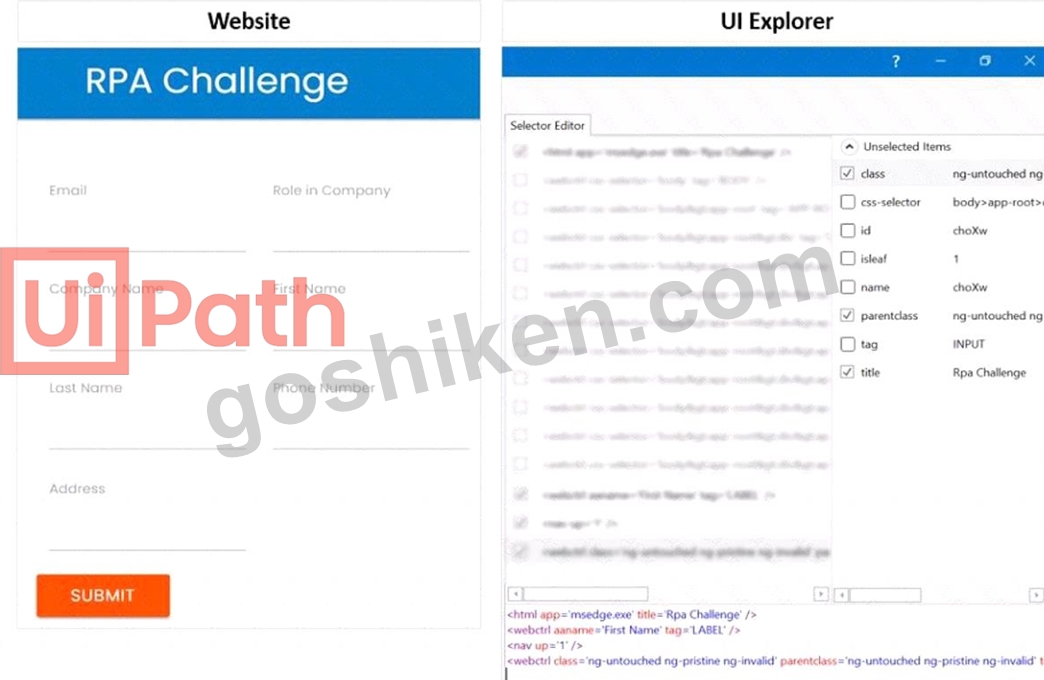
正解:
解説: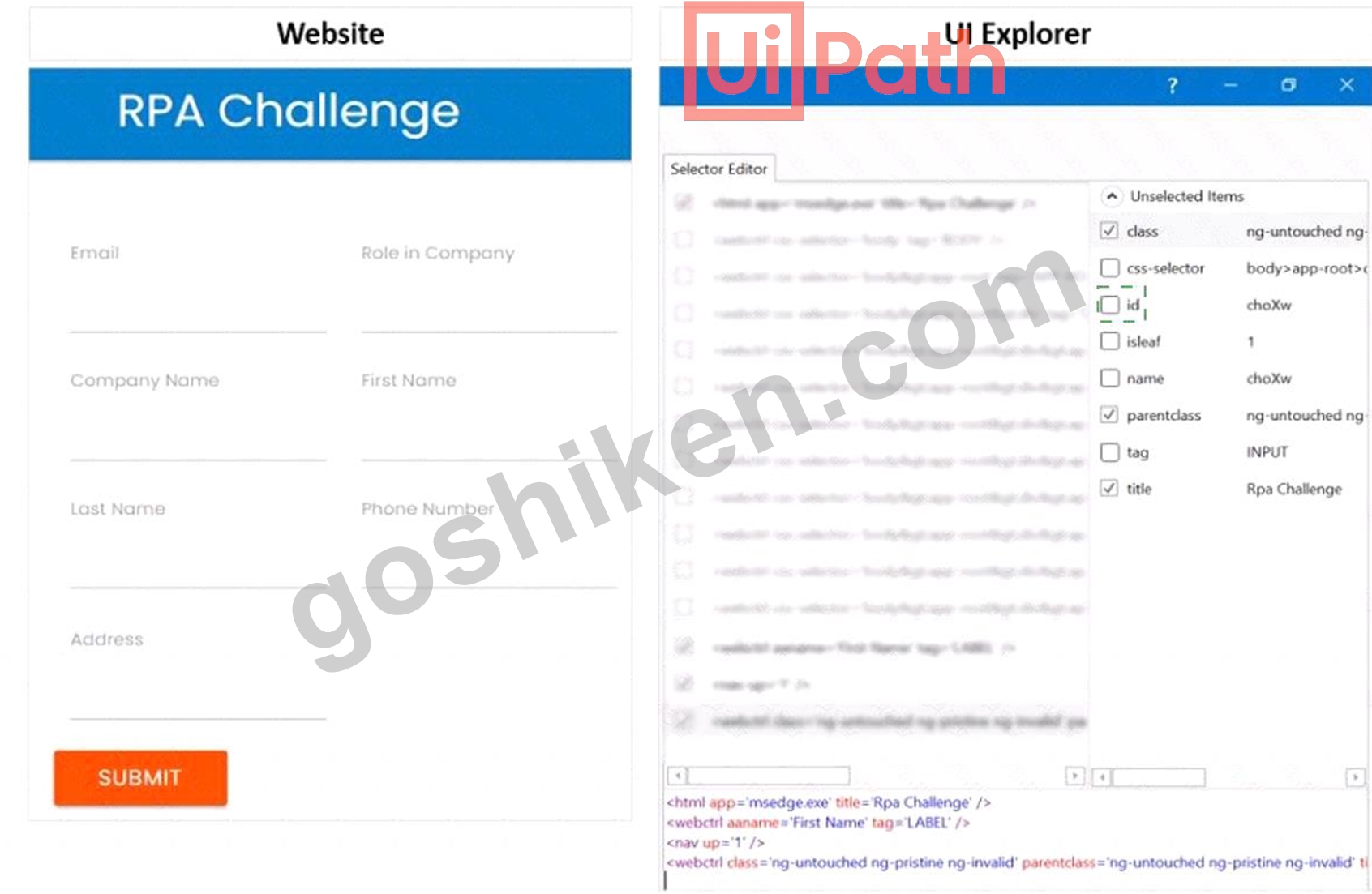
Explanation
To ensure the selector targets only the First Name text field at runtime, you need to click the additional Property checkbox for ID in the UI Explorer Unselected Items column. This will add the ID attribute to the selector, which is a unique identifier for the text field element. The ID attribute has the value "firstname" for the First Name text field, as shown in the image. This will make the selector more reliable and specific, and avoid targeting the text label or other elements with the same class or tag.
https://docs.uipath.com/de/studio/standalone/2021.10/user-guide/uipath-explorer
質問 # 69
A developer is using a Type into activity to enter details into a web form The developer notices that the selector for the text field is unreliable. The selector that is shown in the exhibit currently targets both a text label and a text field at runtime Only one additional Property needs to be clicked to ensure the selector targets only the First Name text field at runtime.
Instructions: Click the additional Property checkbox in the following Ul Explorer "Unselected Items" column that should be used for the First Name text field.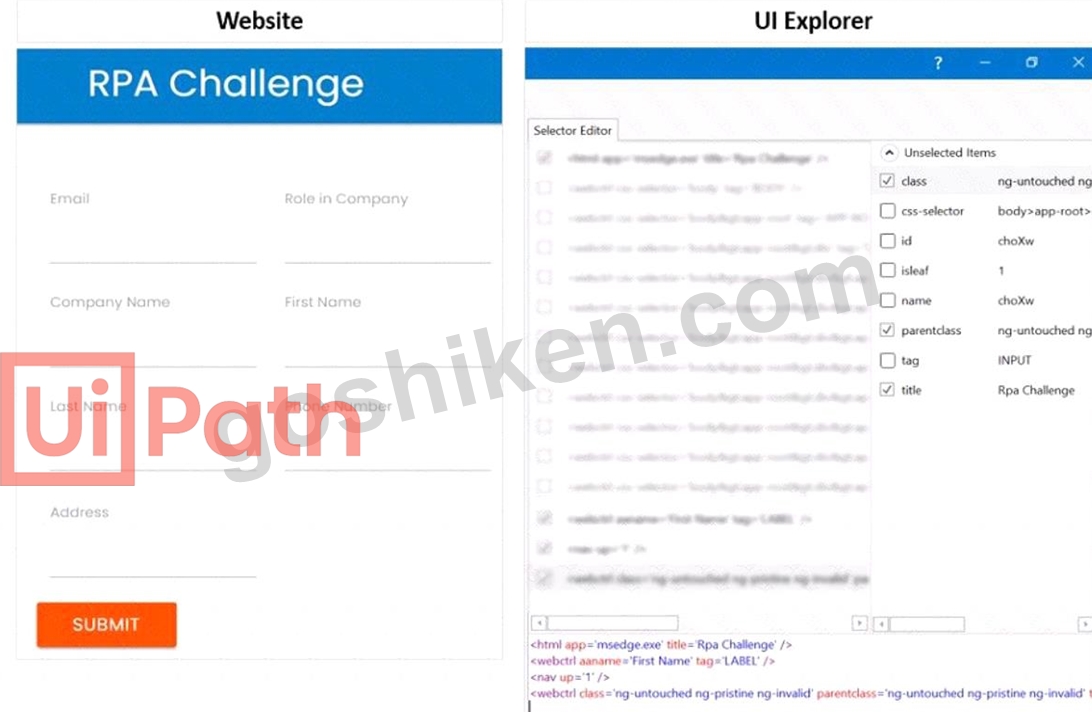
正解:
解説: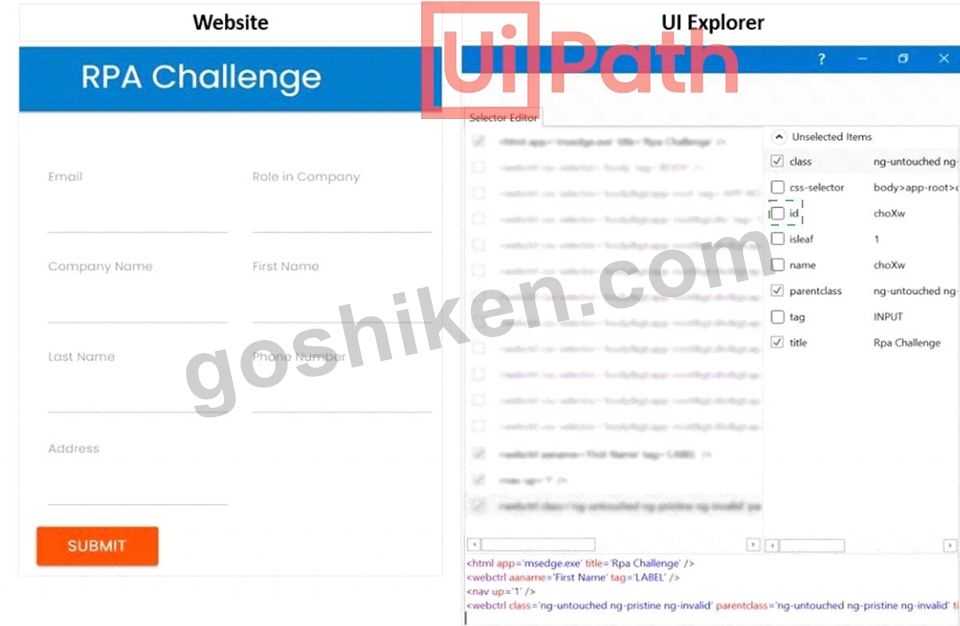
Explanation:
To ensure the selector targets only the First Name text field at runtime, you need to click the additional Property checkbox for ID in the UI Explorer Unselected Items column. This will add the ID attribute to the selector, which is a unique identifier for the text field element. The ID attribute has the value "firstname" for the First Name text field, as shown in the image. This will make the selector more reliable and specific, and avoid targeting the text label or other elements with the same class or tag.
https://docs.uipath.com/de/studio/standalone/2021.10/user-guide/uipath-explorer
質問 # 70
A developer is using a Global Exception Handler as an error handling mechanism for a project. By default, how many times does a Global Exception Handler retry an activity that continually throws an error?
- A. 0
- B. 1
- C. 2
- D. 3
正解:A
解説:
Explanation
The Global Exception Handler is an error handling mechanism for a project. By default, it retries an activity that continually throws an error 3 times. The Global Exception Handler is a workflow that is executed when an exception occurs in the project. It allows the developer to define custom actions for handling different types of exceptions, such as logging, retrying, aborting, or continuing the execution1. When the Global Exception Handler encounters an exception, it logs the name of the activity which faulted and starts retrying the activity three times. If it encounters the same exception each time and the number of retries reaches 3, the execution is aborted at the level of the activity which threw the exception2. The number of retries can be modified by changing the value of the RetryCount variable in the Global Exception Handler workflow3. References: Global Exception Handler and Global Handler for Exceptions from UiPath documentation and Marketplace.
質問 # 71
What functionality can the developer use to improve the reliability of the Type Into activity for text input fields that are impacted by changing orientations?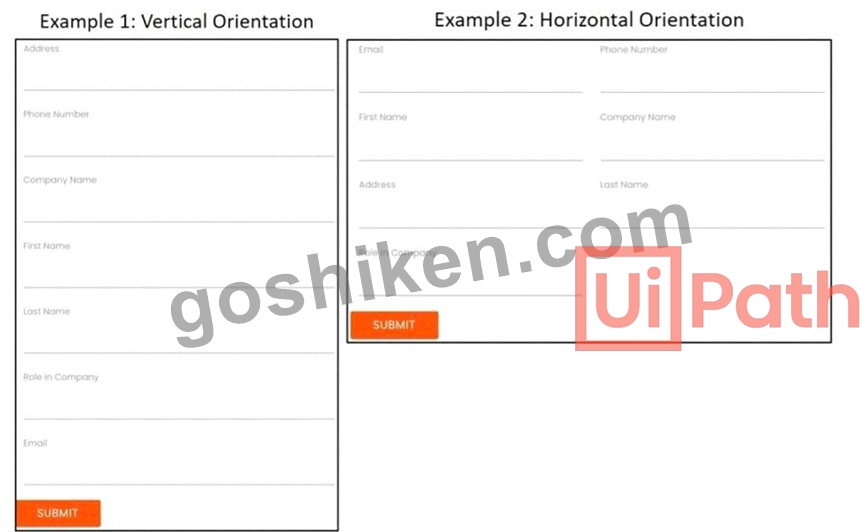
- A. Delay Before
- B. Anchor
- C. Highlight Elements
- D. Find Element
正解:B
解説:
The developer can use the Anchor functionality to improve the reliability of the Type Into activity for text input fields that are impacted by changing orientations. This is because the Anchor functionality allows the developer to specify a particular element as a reference point for the Type Into activity. This ensures that the activity will always be performed in the correct location, even if the orientation of the text input fields changes.
References:
Type Into - UiPath Activities
Anchor Base - UiPath Activities
UiPath Anchor Base Tutorial & AnchorPosition Example
質問 # 72
Which of the following best describes the Alerts panel?
- A. A panel that displays alerts as they occur.
- B. A panel that displays summaries of the alerts you subscribed to, received as error reports every ten minutes, or as daily reports.
- C. A panel that displays the most severe five alerts, accessible from the Alerts bell.
- D. A panel that displays a more comprehensive list of all alerts.
正解:C
解説:
The Alerts panel is a feature of the UiPath Orchestrator that shows the most critical alerts related to robots, queue items, triggers, and more1. The alerts are displayed in descending order of severity and time2. The Alerts panel can be accessed by clicking the Alerts bell icon on the top-right corner of the Orchestrator dashboard3. Clicking an alert in the panel redirects the user to the custom filtered page of the associated component4.
質問 # 73
A developer wants to invoke a workflow in Main xaml called ProcessPurchaseOrders.xamI. Data needs to be passed to and from the invoked workflow What is the correct sequence of steps the developer needs to perform?
Instructions: Drag the Description found on the left and drop on the correct Step found on the right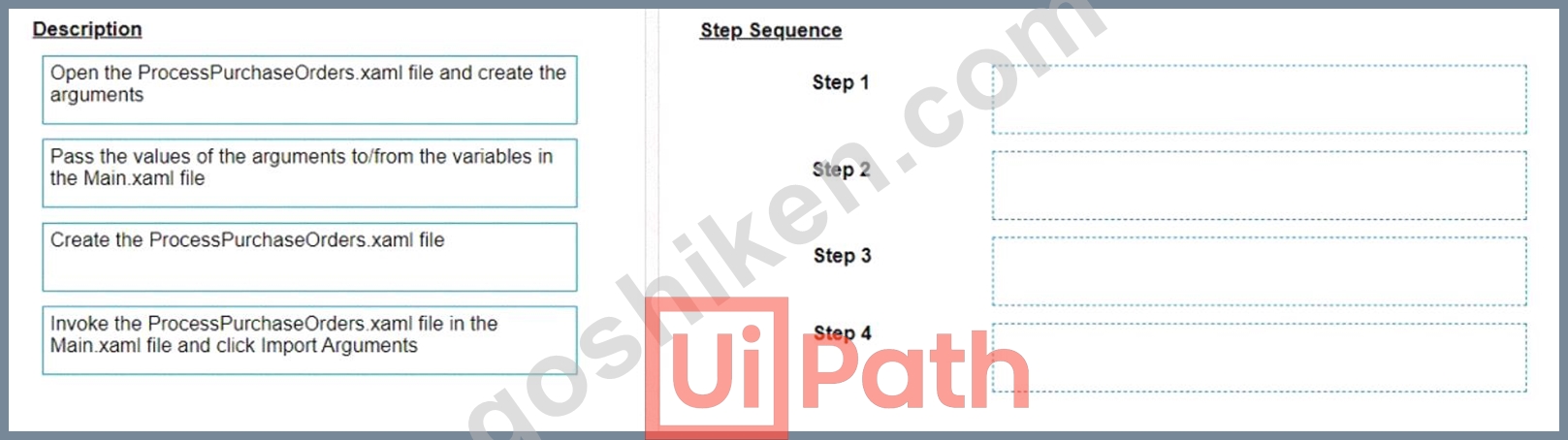
正解:
解説: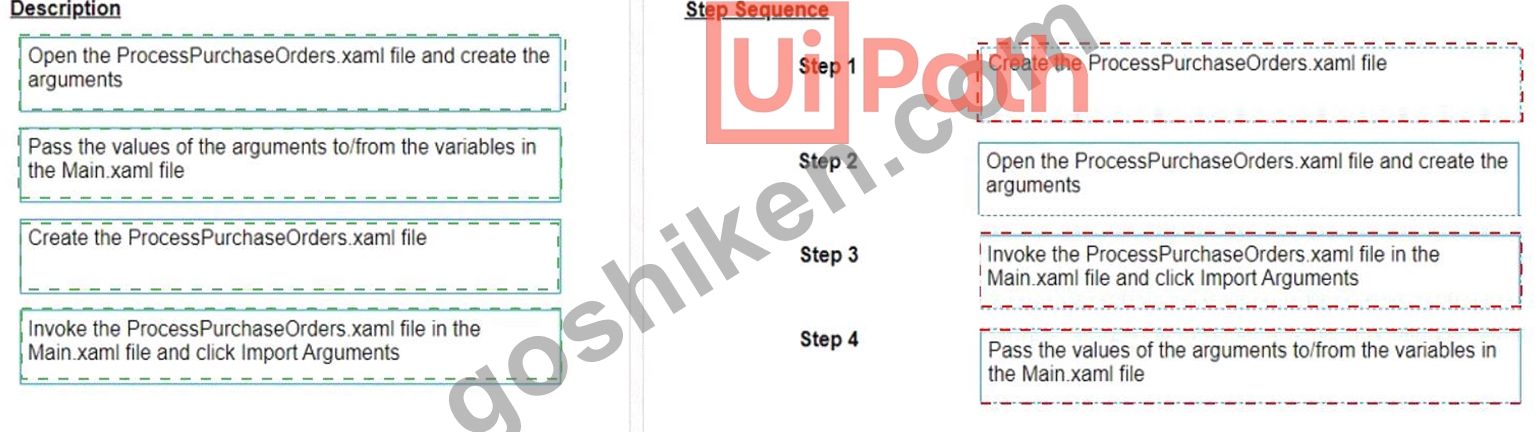
Explanation
The correct sequence of steps the developer needs to perform is:
Step 1 = Create the ProcessPurchaseOrders.xaml file
Step 2 = Open the ProcessPurchaseOrders.xaml file and create the arguments Step 3 = Invoke the ProcessPurchaseOrders.xaml file in the Main.xaml file and click Import Arguments Step 4 = Pass the values of the arguments to/from the variables in the Main.xaml file This sequence will ensure that the developer can create a reusable workflow, invoke it from the main workflow, and pass data between them using arguments.
https://forum.uipath.com/t/import-arguments-in-invoke-workflow-file/1923
https://forum.uipath.com/t/pass-arguments-invoke/132595
質問 # 74
A variable should be created and used for storing one or multiple IDs. The collection of IDs can be updated during the execution of the robot by adding elements. Which should be the data type of this variable, taking into account that each of the IDs has the following format: XX-XX-XX (where X is a digit)?
- A. List<String>
- B. String[]
- C. List<lnt32>
- D. String
正解:A
解説:
For storing one or multiple IDs with the format XX-XX-XX (where X is a digit) and allowing for updates during execution, the appropriate data type is List<String>. This is because you need a collection that can dynamically expand as more IDs are added, and the IDs are in a string format due to the inclusion of the hyphen characters.References:
UiPath Studio Guide: The Main Data Types in Studio
質問 # 75
Upon extracting data from a website, a developer saves it in three variables: "FirstName", "LastName", and
"City". The developer intends to store these three String variables in a fixed-size data structure called
"UserData", to be utilized later within another workflow in the process.
Considering best practices, which data structure and assignment should be used?
- A. UserData is of type List<Object>
UserData = New List(Of Object) ({ FirstName, LastName, City }) - B. UserData is of type String[]
UserData = {FirstName, LastName, City} - C. UserData is of type Object[]
UserData = {FirstName, LastName, City} - D. UserData is of type List<String>
UserData = New List(Of String) ({ FirstName, LastName, City })
正解:B
解説:
Explanation
This is the best option because it meets the requirements of storing three String variables in a fixed-size data structure. A String[] is an array of String values, which can be initialized with a fixed size and assigned with a set of values using curly braces. An array is a simple and efficient data structure that can store multiple values of the same type and access them by index. A List is another data structure that can store multiple values, but it is not fixed-size and it requires creating a new instance using the New keyword. An Object is a generic type that can store any kind of value, but it is not recommended to use it for specific types like String, as it may cause type conversion errors or performance issues. Therefore, option D is the best choice for storing the three String variables in a fixed-size data structure called UserData. References: Variables, Arguments, and Control Flow in Studio, Data Types in UiPath, Arrays in UiPath
質問 # 76
Which activity should the developer utilize in order to retrieve all UI elements from a form based on a filter criterion?
- A. Get Ancestor
- B. Export UI Tree
- C. Find Children
- D. Find Element
正解:C
解説:
The "Find Children" activity should be used to retrieve all UI elements from a form based on a filter criterion.
This activity can be used to find all UI elements that are children of a specified UI element, and it allows for filtering these children according to specified criteria. Therefore, the correct answer is D.
References:
UiPath Activities Guide: Find Children
質問 # 77
The provided exhibit displays the representation of the "Deadline" field using the yyyy-mm-dd format.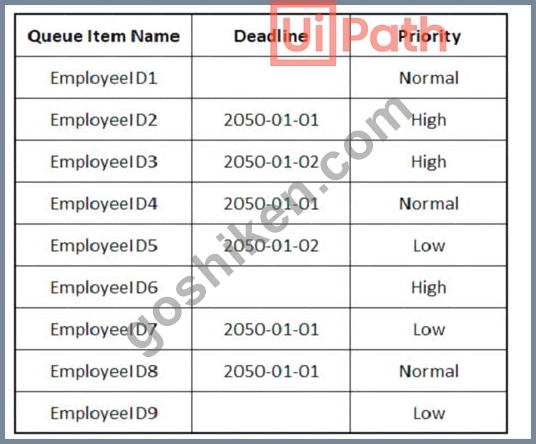
In what order should the Queue Items be processed by a single robot executing a Performer workflow?
正解:
解説: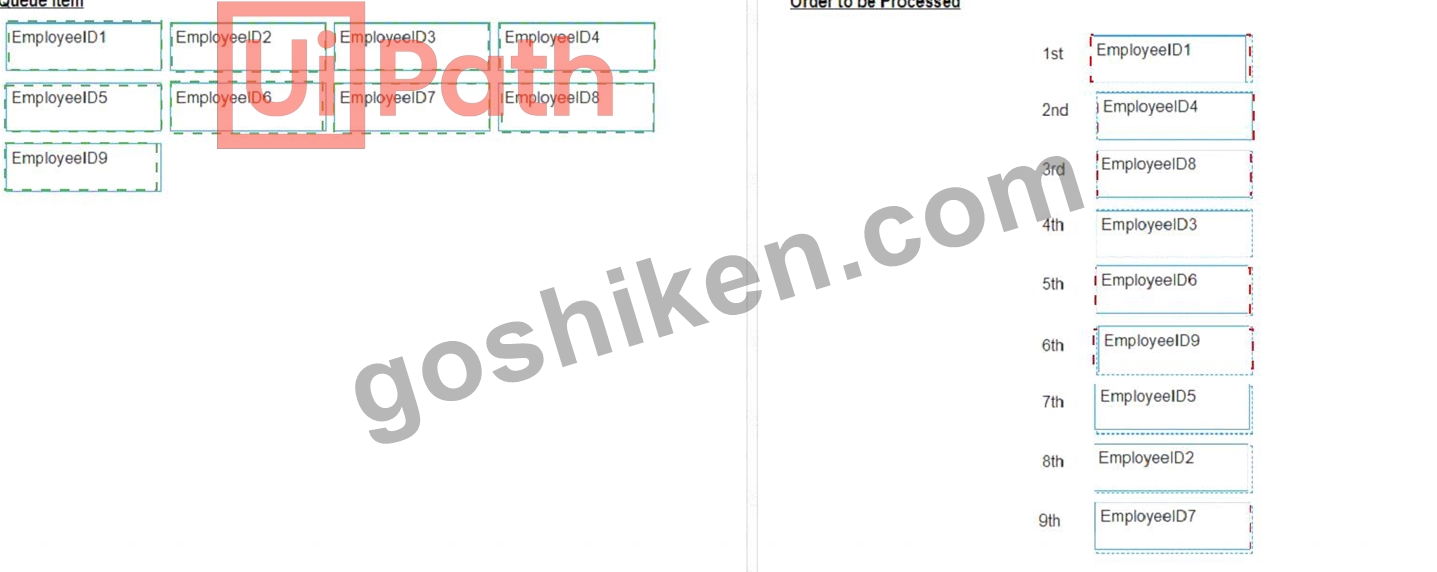
Explanation
The Queue Items should be processed by a single robot executing a Performer workflow in the following order:
EmployeeID1
EmployeeID4
EmployeeID8
EmployeeID3
EmployeeID6
EmployeeID9
EmployeeID5
EmployeeID2
EmployeeID7
A queue is a container that holds an unlimited number of items that can be processed by a robot1. A queue item can have a deadline and a priority, which affect the order in which the robot retrieves the items from the queue2. The Performer workflow is a part of the REFramework template that processes the queue items using the Get Transaction Item activity3. The order of queue execution is determined by the following rules4:
Items that have a deadline are processed first, in order of priority and according to the set deadline for items with the same priority.
Items that have no deadline are processed next, in order of priority and according to the rule First In, First Out for items with the same priority.
Based on these rules and the exhibit, the order of queue execution is as follows:
EmployeeID1 has the earliest deadline (2050-01-01) and high priority, so it is processed first.
EmployeeID4 has the same deadline as EmployeeID1, but normal priority, so it is processed second.
EmployeeID8 has the same deadline and priority as EmployeeID4, but it was added later to the queue, so it is processed third.
EmployeeID3 has the next earliest deadline (2050-01-02) and high priority, so it is processed fourth.
EmployeeID6 has the same deadline as EmployeeID3, but normal priority, so it is processed fifth.
EmployeeID9 has the same deadline and priority as EmployeeID6, but it was added later to the queue, so it is processed sixth.
EmployeeID5 has no deadline, but high priority, so it is processed seventh.
EmployeeID2 has no deadline and normal priority, so it is processed eighth.
EmployeeID7 has no deadline and low priority, so it is processed ninth.
References:
About Queues and Transactions documentation from UiPath
Processing Order documentation from UiPath
Performer documentation from UiPath
Order processing queue forum post from UiPath Community
質問 # 78
When should a static selector be used versus a dynamic selector'?
- A. When a standard selector contains a tag value that changes for each execution
- B. When all the attributes or tags remain the same for each execution
- C. When a standard selector contains an attribute value that changes for each execution
- D. When the selector needs to interact with different types of elements on the same page
正解:B
解説:
Explanation
A static selector should be used when all the attributes or tags remain the same for each execution. A static selector is a selector that has fixed values for the attributes or tags of the target element. A static selector can reliably identify the target element as long as the element does not change its properties or position on the screen. A static selector is suitable for simple and stable UI elements that have consistent and unique selectors1. For example, a static selector can be used to click on a button that has the same name and ID every time the automation runs.
References: Static Selectors and Selectors from UiPath documentation.
質問 # 79
In the Robotic Enterprise (RE) Framework, at which point should a developer log a clear message with the Logging Level set to "Information," adhering to the best practices for automating a production-level process?
- A. Whenever the robot encounters an error on a Queue Item.
- B. Whenever an argument or value is used.
- C. Whenever data is fetched from external sources.
- D. Whenever an exception is caught in a Catch block.
正解:D
解説:
Explanation
Logging Level "Information" is used to log general information about the process execution, such as the start and end of a transaction1. When an exception is caught in a Catch block, the developer should log a clear message with this level to indicate the type and source of the error, and the action taken to handle it2.
https://docs.uipath.com/studio/standalone/2023.4/user-guide/logging-levels
質問 # 80
A developer has created a variable of type List of Strings named "UsersList", and initialized it with an empty list: "UsersList = new List(Of String)".
What is printed in the log message after the following Invoke Code is executed?
- A. 0
- B. System Argument Exception is thrown
- C. 1
- D. Object reference not set to an instance exception is thrown
正解:C
解説:
Explanation
The code is adding two items to the list, but since the list is initialized as an empty list, the count will be 0.
References:
Data Manipulation with Lists and Dictionaries in Studio course, Lesson 2: Lists, Topic: Creating Lists How to initiate List<String[]>? forum post, Answer by @VishalS
質問 # 81
A developer is automating an invoice process for the finance department using a Dispatcher and Performer model with access to Orchestrator. New invoices are added to a shared folder each morning. Each invoice needs to be processed separately in the system, as a single unit of work. After each invoice is processed in the system, the system output ID must be emailed to the finance team email address.
How should the developer store the invoice data in Orchestrator?
- A. Upload individual invoice data and the finance team email address as Specific Data in Queue Items.
- B. Create an asset for each piece of invoice data as well as for the finance team email address.
- C. Upload individual invoice data as Specific Data in Queue Items and Create an asset for the finance team email address.
- D. Upload the finance team email address as Specific Data in Queue Items and Create an asset for each individual invoice data field.
正解:C
解説:
This is the best option because it follows the best practices for using queues and assets in Orchestrator. Queues are used to store and process multiple items of data that need to be processed separately, such as invoices.
Each invoice can be uploaded as a queue item with the invoice data as Specific Data, which can be accessed and manipulated by the automation process. Assets are used to store and share global information that is constant or rarely changes, such as the finance team email address. An asset can be created for the email address and retrieved by the automation process when needed. The other options are not optimal because they either use assets for data that is not global or constant, or they use queues for data that is not related to the items to be processed. References: About Queues and Transactions, About Assets
質問 # 82
The following table is stored in a variable called "dt".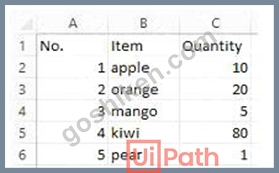
What will the value of the qty variable be after executing the Assign activity?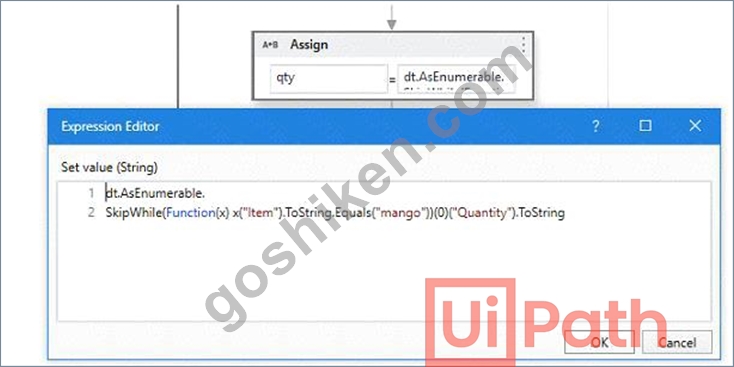
- A. null
- B. 0
- C. 1
- D. 2
正解:C
解説:
The Assign activity is used to assign a value to a variable. In this case, the variable is "qty". The value of the variable will be 80 after executing the Assign activity because the expression in the Assign activity is
"dt.AsEnumerable().Where(Function(x) x("Item").ToString.Equals("mango")).Select(Function(y) y("Quantity")).ToString". This expression is filtering the data table "dt" for rows where the "Item" column is equal to "mango" and then selecting the "Quantity" column from those rows. Since there is only one row in the data table where "Item" is equal to "mango", the value of the "Quantity" column in that row is 80. (UiPath Studio documentation) References:
[Assign - UiPath Activities].
質問 # 83
What are the primary functions of the UiPath Integration Service?
- A. Enables automation with UI components, manages API keys, kicks off automations with client-side triggers, provides curated events.
- B. Enables automation with API integration, manages connections with user-provided authentication, kicks off automations based on application-specific triggers, simplifies automation design with the help of third-party libraries.
- C. Enables automation with a library of connectors, manages connections easily with standardized authentication, kicks off automations with server-side triggers or events, provides curated activities and events, simplifies automation design.
- D. Automates Ul design, manages API connections, provides limited activities and events, simplifies automation design.
正解:C
解説:
Explanation
UiPath Integration Service is a new feature that allows developers to create and manage integrations with various applications and systems using UI and API automation. It offers a library of connectors that simplify the authentication and connection process, as well as activities and events that enable data exchange and automation triggering. It also supports server-side triggers that can start automations based on events from other systems. (UiPath Automation Developer study guide) References:
Introducing UiPath Integration Service
UiPath Integration Service
質問 # 84
......
UiPath-ADAv1問題集PDFで最速合格希望UiPath-ADAv1:https://www.goshiken.com/UiPath/UiPath-ADAv1-mondaishu.html
100% 高得点合格保証UiPath-ADAv1無制限256解答:https://drive.google.com/open?id=1ZAuClp1QPxbacBubg_Wqekdeeo_7n4vJ