

合格させるWatchGuard Network-Security-Essentials試験最速合格
準備Network-Security-Essentials問題解答でNetwork-Security-Essentials試験問題集
質問 # 33
When does a network host make an ARP request? (Select one.)
- A. To find the IP address of the default gateway
- B. To find the hostname associated with an IP address
- C. To find the IP address associated with a MAC address
- D. To find the IP address associated with a hostname
- E. To find the MAC address associated with an IP address
正解:E
解説:
The Address Resolution Protocol (ARP) is used to map an IP address to a physical machine (MAC) address on a local network. When a device wants to communicate with another device on the same local network, it uses an ARP request to discover the MAC address associated with a known IP address. The ARP process is essential for IP-based communication within the same network segment.
* Option Dis correct because ARP's primary function is to find the MAC address associated with an IP address.
* Other options mention IP addresses or hostnames, which would be resolved using other methods like DNS, not ARP.
質問 # 34
The Audit Trail report shows information about Firebox configuration changes. How can you makesure the Audit Trail report includes the names of the specific person that made each change? (Select one.)
- A. Install the SSO Client on each computer used by Firebox administrators
- B. Enable the Logging > AuditTrack feature
- C. Create unique device administrator accounts for each Firebox administrative user
- D. Configure your RADIUS server to send accounting messages to the Firebox
- E. Configure all Firebox administrators to use the Authentication Portal to log in to the Firebox
正解:C
解説:
To ensure that the Audit Trail report in Firebox includes the specific names of administrators making configuration changes, it is essential to have unique device administrator accounts. This setup allows each administrative action to be associated with a specific user, enabling detailed tracking of configuration modifications. By differentiating user accounts, the system can log the specific username associated with each change, fulfilling audit and compliance requirements.
質問 # 35
After you enable content inspection, your users cannot connect to the business-critical website www.example.
com/account.html hosted by a trusted partner. To try to resolve this issue, you added a Domain Name exception of www.example.com/account.html, but users still cannot connect to the website. What is the Domain Name exception format to add to the HTTP proxy to correctly resolve this issue? (Select two.)
- A. example.com/
- B. /example.com/
- C. www.example.com
- D. *.example.com
- E. /account.html
正解:C、D
解説:
When using domain exceptions to bypass content inspection for specific websites on a Firebox, the format is critical. For the domain www.example.com/account.html, two viable exception formats are:
* A. *.example.com: This wildcard format will include all subdomains of example.com, covering www.
example.com as well as any other subdomains like api.example.com. This format is useful when you need to exclude an entire domain and its subdomains from content inspection.
* D. www.example.com: This specifies the exact domain. Adding this as an exception will directly match www.example.com, making it suitable for bypassing content inspection on that specific subdomain.
Other formats, like /example.com/ or /account.html, do not match the required structure for domain name exceptions in the Firebox HTTP proxy settings.
質問 # 36
What are some advantages of BOVPN virtual interfaces (route-based VPN) over classic policy-based BOVPNs? (Select two.)
- A. Additional keep-alive options
- B. Increased BOVPN throughput
- C. Additional encryption options
- D. Supports VPN connectivity to cloud services
- E. More flexible routing options
正解:D、E
解説:
BOVPN virtual interfaces (route-based VPNs)offer several advantages over traditional policy-based BOVPNs:
* Supports VPN connectivity to cloud services (A): Route-based VPNs can more easily integrate with cloud environments, as they use routing rather than specific policies, making it possible to route traffic to various cloud services and manage cloud-based VPN connections.
* More flexible routing options (C): Route-based VPNs allow administrators to define more granular routing rules using standard IP routing tables. This flexibility supports complex network architectures and multiple routes for redundancy or load balancing.
These features make route-based VPNs more adaptable to modern network needs, particularly in hybrid and multi-cloud environments.
質問 # 37
Your users have no network connectivity on their computers in the 10.0.40.0/24 network. You investigate and discover the DHCP address pool for this network is exhausted, but there are no available IP addresses in the network to assign. Which of these options can you use to expand the IP address space of this network? (Select two.)
- A. Add 10.0.50.1/24 to the 10.0.40.1/24 network as a secondary network
- B. Bridge the 10.0.40.1/24 network across additional interfaces
- C. Change the IP address of the 10.0.40.1/24 network to 10.0.40.123/24
- D. Create a Dynamic NAT rule for traffic from the 10.0.40.1/24 network going to the 10.0.50.1/24 network
- E. Enable a wireless SSID for the 10.0.40.1/24 network
正解:A、B
解説:
* Adding a Secondary Network (10.0.50.1/24): By adding a secondary subnet (such as10.0.50.1/24) to the existing 10.0.40.1/24 network, you expand the IP address space, effectively increasing the number of available IP addresses for DHCP allocation.
* Bridging Across Additional Interfaces: Bridging the 10.0.40.1/24 network across multiple interfaces can also increase the available address pool by creating a larger logical network. This approach helps manage IP space across a broader range of devices without subnet fragmentation.
These methods provide scalable solutions to expand IP address availability within constrained network spaces.
質問 # 38
In Firebox System Manager, where can you perform each of these tasks?
正解:
解説:
Explanation:
Here are the correct answers based on the Firebox System Manager interface functions:
* See the routing table and interface statisticsanswer:Firebox System Manager - Status Report Explanation: The Status Report section in Firebox System Manager includes information on network routing and interface statistics, providing insights into network paths and interface performance.
* See a list of users connected to the Fireboxanswer:Firebox System Manager - Authentication List Explanation: The Authentication List displays all active user sessions connected to the Firebox, showing authenticated users and their session details.
* Learn the status of your IPS signature databaseanswer:Firebox System Manager - Subscription Services Explanation: Subscription Services in FSM gives information on the status of services like IPS, showing the update status and version of the signature database.
* Ping the source of a denied packetanswer:Firebox System Manager - Traffic Monitor Explanation: The Traffic Monitor tool allows administrators to track packet details and offers functionality to ping sources directly, aiding in network troubleshooting.
* Block all traffic for an IP addressanswer:Firebox System Manager - Blocked Sites List Explanation: The Blocked Sites List feature in FSM lets administrators add IP addresses to a blacklist, blocking all incoming and outgoing traffic for specified addresses.
These answers utilize standard Firebox management features for performing administrative and diagnostic tasks efficiently. Let me know if you need further assistance with Firebox System Manager capabilities.
質問 # 39
The Firebox can scan the contents of encrypted zip files with Gateway AntiVirus when HTTPS content inspection is enabled.
- A. False
- B. True
正解:A
解説:
The Firebox cannot scan the contents of encrypted zip files even if HTTPS content inspection is enabled.
HTTPS content inspection allows the Firebox to inspect encrypted HTTPS traffic by decrypting it. However, the content within encrypted zip files remains inaccessible to Gateway AntiVirus scanning because the encryption key for the zip file is not available to the Firebox. This limitation is consistent with standard network security practices, where encrypted files need to be decrypted with a known key before content scanning can occur.
質問 # 40
Match the "network server to the protocol and port it uses."
正解:
解説: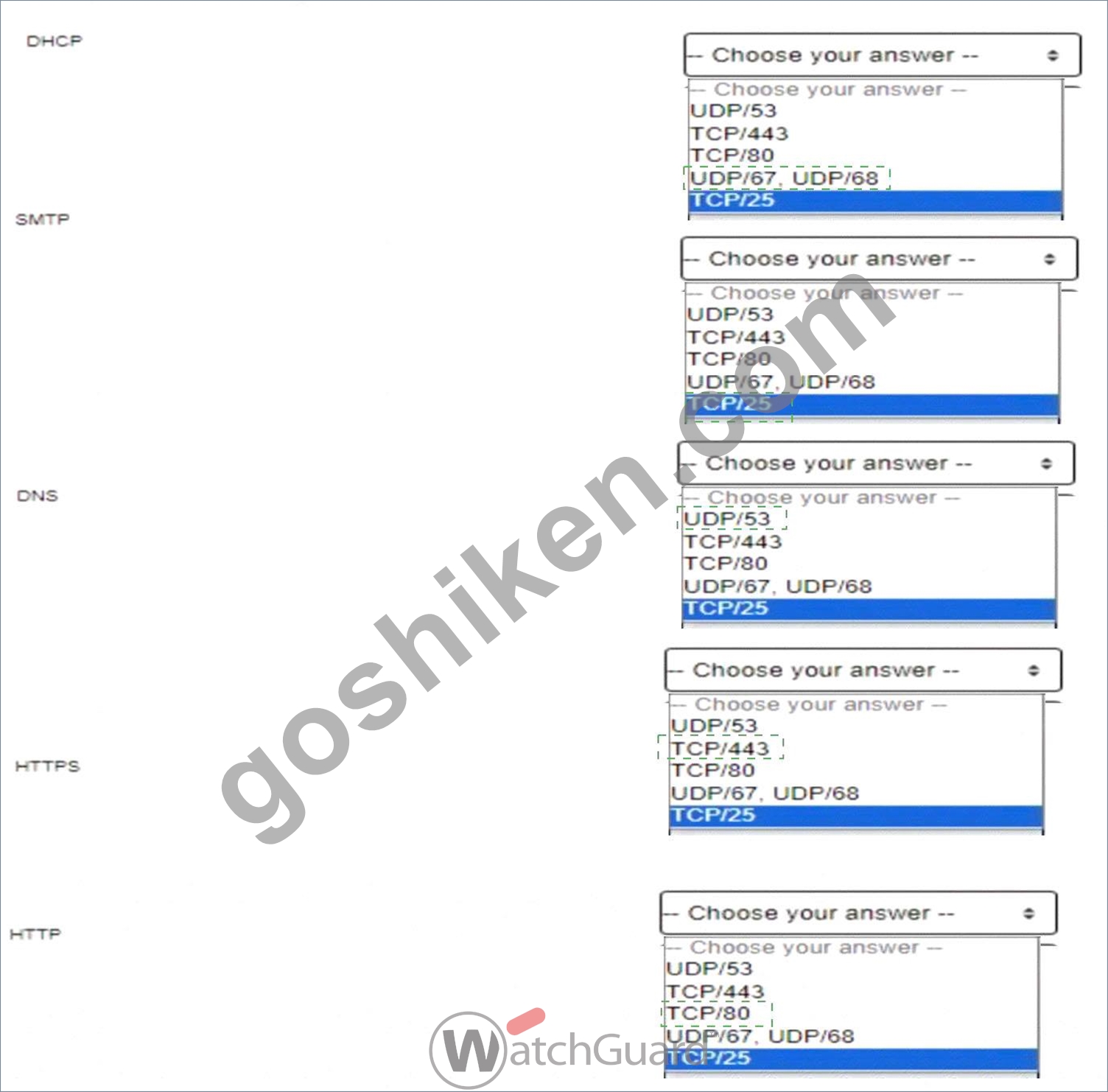
Explanation:
DHCP (Dynamic Host Configuration Protocol):DHCP operates over UDP ports 67 and 68. Port 67 is used by the DHCP server to listen for client requests, and port 68 is used by the DHCP client. This allows devices to automatically receive IP addresses and other network configuration details on a network, essential for automating IP management. [Referenced from multiple sources on network fundamentals] SMTP (Simple Mail Transfer Protocol):SMTP uses TCP port 25 for sending emails from client to server or between mail servers. SMTP is integral for email transmission, allowing efficient communication across mail servers within and outside organizational networks. [Referenced in standard protocols documentation in network management guides] DNS (Domain Name System):DNS typically runs on UDP port 53 for standard queries, with TCP/53 used for zone transfers and other larger requests. DNS is critical for resolving human-readable domain names into IP addresses, which allows users to connect to websites using easily remembered names rather than numerical IP addresses. [Foundational knowledge as detailed in network security and management resources] HTTPS (Hypertext Transfer Protocol Secure):HTTPS, an encrypted version of HTTP,operates on TCP port 443. It provides secure communication over the internet by encrypting data between the client and server using SSL/TLS, protecting data integrity and privacy. [Security essentials for network communications as found in secure web traffic documentation] HTTP (Hypertext Transfer Protocol):HTTP operates on TCP port 80 and is used for unencrypted web traffic. HTTP is the foundation of data exchange on the World Wide Web, supporting basic client-server interactions for retrieving resources from the web. [Basic networking knowledge referenced across multiple network essentials texts]
質問 # 41
When Mobile VPN is enabled, remote users receive the domain name and DNS servers from the Firebox Network Configuration by default.
- A. False
- B. True
正解:B
解説:
WhenMobile VPNis enabled on a Firebox, remote users receive network configuration settings, including domain nameandDNS server informationfrom the Firebox by default. This setupensures that remote users can resolve internal domain names and access network resources as though they were connected directly to the internal network. This functionality is essential for maintaining consistent user experience and connectivity while working remotely.
質問 # 42
Which of these is a valid host IP address in the subnet 10.0.1.0/24? (Select one.)
- A. 10.0.0.1/24
- B. 10.0.10.24/24
- C. 10.0.1.0/24
- D. 10.0.1.255/24
- E. 10.0.1.100/24
正解:E
解説:
The subnet 10.0.1.0/24 has an IP range from10.0.1.1 to 10.0.1.254. In a /24 subnet:
* The first address (10.0.1.0) is thenetwork addressand cannot be assigned to a host.
* The last address (10.0.1.255) is thebroadcast addressand also cannot be assigned to a host.
OptionC (10.0.1.100/24)falls within the valid range for host addresses in the 10.0.1.0/24 subnet, making it the correct answer.
* Option A(10.0.10.24) is in a different subnet (10.0.10.0/24).
* Option B(10.0.1.255) is the broadcast address.
* Option D(10.0.0.1) is in a different subnet (10.0.0.0/24).
* Option E(10.0.1.0) is the network address.
質問 # 43
If you have only one public IP address, can you use Static NAT to enable inbound connections to both an email server and a web server on the private network? (Select one.)
- A. No, you must assign a public IP address to each server
- B. Yes, if both servers are on different private subnets
- C. Yes, if both servers use different ports
- D. No, you must use Dynamic NAT to route inbound connections to more than one server
正解:C
解説:
With only one public IP address, you can still configure Static NAT to route connections to both an email server and a web server, as long as each service is accessed on a different port. For instance, HTTP/HTTPS traffic for the web server can use port 80/443, while the email server can use ports associated with email protocols (e.g., 25 for SMTP). Static NAT can direct incoming requests to different internal servers based on port, making this approach feasible.
質問 # 44
You have five public IP addresses available from your ISP. When you create a Static NAT action, you want to specify one of the public IP addresses for inbound traffic but do not see it in the IP address drop-down list.
How can you change the Firebox configuration to see additional public IP addresses in the Static NAT action?
(Select one.)
- A. Add secondary IP addresses to the external interface
- B. Add the IP addresses to the Dynamic NAT configuration
- C. Add the public IP addresses to the From field of the policy that uses the Static NAT action
- D. Enable the Set Source IP option in the policy
- E. Configure 1-to-1 NAT for your entire subnet
正解:A
解説:
To use additional public IP addresses in a Static NAT action, you need to add them as secondary IP addresses to the external interface on the Firebox. By adding these IPs as secondary addresses, they become selectable options in the Static NAT configuration, allowing inbound traffic to be routed based on specific public IPs allocated by the ISP.
質問 # 45
Match each type of NAT with the correct descriptor
正解:
解説:
Explanation:
Here are the correct answers for matching each NAT type with its descriptor:
* Changes incoming packets sent to a public IP address to different internal IP addresses based on the destination portanswer:Static NAT Explanation: Static NAT maps a public IP address to multiple internal IP addresses based on the port, allowing specific services or applications to be routed to various internal destinations.
* Allows a user on the trusted or optional network to connect to a public server that is on the same physical Firebox interface by its public IP address or domain nameanswer:NAT loopback Explanation: NAT loopback (or NAT reflection) allows internal users to access a public IP address or domain name that resolves to the same local network, making it appear as if they are connecting from outside the network.
* Conserves IP addresses and hides the internal topology of your networkanswer:Dynamic NAT Explanation: Dynamic NAT (or PAT - Port Address Translation) conserves public IP addresses by allowing multiple internal devices to share a single public IP address. This setup is commonly used for outbound internet connections from a private network.
* Changes all incoming and outgoing packets sent from one range of addresses to a different range of addressesanswer:1-to-1 NAT Explanation: 1-to-1 NAT maps each internal IP address to a unique public IP address, providing a one-to-one relationship. This type of NAT is often used for networks that require external access to specific internal resources.
質問 # 46
There is an Internet outage at your primary ISP, but the Internet connection from the Firebox has not failed over to your backup ISP. Both ISP connectors are correctly cabled and have active physical links. What could cause this problem? (Select two.)
- A. In the Multi-WAN settings, the Gradual Fallback option is enabled
- B. Link Monitor target for the backup ISP interface is not responding
- C. The Link Monitor target for the primary ISP interface is set to ping the default gateway, but the outage is further upstream
- D. In the Multi-WAN settings, the Immediate Fallback option is enabled
- E. The secondary IP addresses are not defined for the backup ISP interface
正解:B、C
解説:
* Link Monitor Target for Backup ISP: If the backup ISP's Link Monitor target is not responsive, the Firebox will not initiate a failover, as it interprets the backup connection as inactive or faulty.
* Primary ISP Link Monitor Configuration: When the Link Monitor for the primary ISP only checks the default gateway, it may not detect issues occurring further upstream. If the outage is beyond the gateway, failover will not activate because the monitor assumes the link is still valid.
These settings are critical to ensuring proper Multi-WAN failover behavior in case of ISP issues.
質問 # 47
If policies are automatically ordered, which of these policies has the highest precedence? (Select one.)
- A. HTTPS policy - From: Trusted To: Any-External
- B. HTTPS policy - From: User1@Firebox-DB To: Any-External
- C. Outgoing policy - From: Any-Trusted, Any-Optional To: Any-External
- D. HTTPS policy - From: Any-Trusted, Any-Optional To: Any-External
正解:B
解説:
When policies are automatically ordered, policies with more specific user-based criteria have higher precedence over general policies. In this scenario, an HTTPS policy for a specific user (e.g.,User1@Firebox- DB) would take precedence over policies that apply to broader groups or networks, such asAny-Trustedor Any-Optional. This ordering ensures that individual user rules are evaluated first before generic policies, providing finer access control.
質問 # 48
If the Firebox does not have a feature key installed, which of these statements are true? (Select three.)
- A. You cannot upgrade the Firebox
- B. You cannot configure subscription services
- C. You cannot save configuration changes to the Firebox
- D. You cannot run the Web Setup Wizard
- E. Only one user can connect to the Internet through the Firebox
正解:A、B、C
解説:
Without a feature key:
* Option A: Upgrades are restricted, as the device relies on the feature key to validate software entitlement.
* Option B: Subscription services like antivirus, IPS, or web filtering cannot be configured without the feature key, which activates these services.
* Option D: Configuration changes cannot be permanently saved to the Firebox without the feature key, limiting the device's functionality.
* Option C(Web Setup Wizard) andOption E(one user internet access) do not depend on the feature key and are not restricted in this scenario.
質問 # 49
You configured your Firebox interfaces and routes and want to verify the status of the routes and connected hosts. You found this information in Firebox System Manager > Status Report. What is true about the IPv4 routes and ARP table in this deployment? (Select one.)
- A. The MAC address for 172.16.1.20 is 00:50:56:b0:22:0f
- B. 10.0.20.53 can be reached through the vlan20 interface
- C. The Firebox is publicly reachable at 198.51.100.1 through the eth0 interface
- D. The MAC address for the default gateway that currently routes traffic is 00:50:56:b5:e5:42
- E. The Firebox cannot resolve a MAC address for 10.0.1.32
正解:C
解説:
Analyzing the routing table and ARP table in the provided image:
* Routing Table Analysis:
* The route 0.0.0.0 with a gateway of 198.51.100.1 on the eth0 interface suggests this is the default route for outbound traffic, indicating that the Firebox's public interface (eth0) is configured to route traffic through this gateway.
* This confirms that the Firebox is publicly reachable at the IP address 198.51.100.1.
* ARP Table Analysis:
* The ARP entry for the gateway IP 198.51.100.1 is not directly shown in the image but could typically be resolved to verify connectivity.
* Other options provided, such as MAC address validation, do not correspond with the current ARP entries shown in the image.
This setup indicates that the Firebox is accessible publicly on the eth0 interface using the IP 198.51.100.1, makingOption Athe correct answer.
質問 # 50
Which of the following management interfaces can provide real-time diagnostic information? (Select two.)
- A. Dimension
- B. Log and Report Server
- C. Policy Manager
- D. Fireware Web UI
- E. Firebox System Manager
正解:D、E
解説:
The Firebox System Manager (FSM) and Fireware Web UI are two key interfaces in Firebox devices for local management that offer real-time diagnostic information.
* Firebox System Manager (FSM): FSM provides a graphical interface that allows administrators to monitor traffic in real-time, view logs, and analyze performance metrics directly from the device. This interface includes specific tools such as Traffic Monitor and Subscription Services, which display current activity and status of security services, respectively. FSM is highly effective in immediate diagnostics due to its continuous update capabilities.
* Fireware Web UI: Fireware Web UI, another management interface available in Firebox, offers similar diagnostic functionalities but is accessible through a web browser. This interface is essential for remote diagnostics and provides real-time views on device status, traffic, and security service health.
The Web UI is particularly beneficial for quick access without needing specialized client software like FSM, making it convenient for on-the-go monitoring.
These two interfaces are central to Firebox management and are designed to streamline real-time monitoring and diagnostics, ensuring network health is visible and manageable at all times.
質問 # 51
......
リアルWatchGuard Network-Security-Essentials試験問題 [更新されたのは2025年]:https://www.goshiken.com/WatchGuard/Network-Security-Essentials-mondaishu.html
無料Network-Security-Essentials試験問題集には合格させるお手軽に試験合格:https://drive.google.com/open?id=1Wl3wYPI5VfXOZSZGZfL5FF1foqvejAsb