

[2025年03月14日] 最新をゲットせよ!Network-Security-Essentials認定練習テスト問題と試験問題集
リアルNetwork-Security-Essentials試験問題集解答で有効なNetwork-Security-Essentials問題集PDF
質問 # 16
Match each WatchGuard Subscription Service with its function.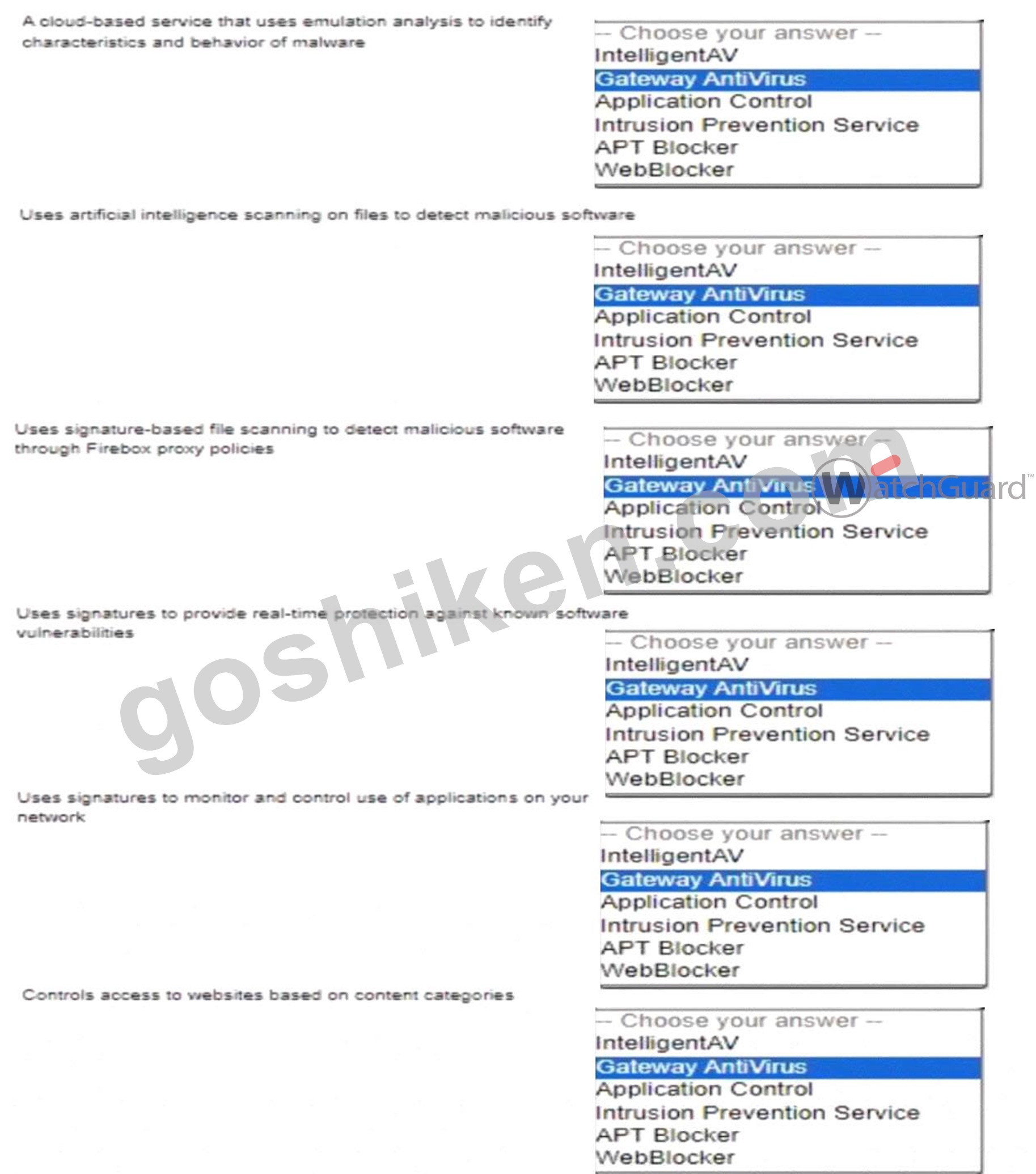
正解:
解説:
Explanation:
Here is the correct match for each WatchGuard Subscription Service and its function:
* A cloud-based service that uses emulation analysis to identify characteristics and behavior of malware : APT Blocker
* Uses artificial intelligence scanning on files to detect malicious software : IntelligentAV
* Uses signature-based file scanning to detect malicious software through Firebox proxy policies : Gateway AntiVirus
* Uses signatures to provide real-time protection against known software vulnerabilities : Intrusion Prevention Service
* Uses signatures to monitor and control use of applications on your network : Application Control
* Controls access to websites based on content categories : WebBlocker APT Blockeris a cloud-based, advanced threat detection service that performs behavioral analysis in a sandbox environment to identify sophisticated malware.
It focuses on identifying advanced persistent threats (APT) by observing their behavior in a controlled setting.
IntelligentAVleverages artificial intelligence to perform deep scanning and analysis of files to detect malware using predictive modeling techniques. This provides proactive protection by identifying previously unknown threats.
Gateway AntiVirusrelies on a signature-based detection mechanism to identify malware in real-time. It is used within Firebox's proxy policies to scan file transfers, ensuring files containing known malware are blocked.
Intrusion Prevention Service (IPS)scans network traffic against a database of known vulnerabilities to detect and prevent exploitation attempts in real time. It protects against network-based attacks targeting known vulnerabilities.
Application Controlhelps in monitoring, managing, and enforcing the use of applications across the network using a signature-based approach. It provides visibility and control over applications to enhance productivity and security.
WebBlockeris a content filtering service that restricts access to websites based on their content categories. It helps enforce web usage policies and block access to inappropriate or harmful content.
質問 # 17
What steps must you take to send log messages from a Firebox to WatchGuard Cloud? (Select two.)
- A. Define an Authentication Key that all your Fireboxes use to communicate with WatchGuard Cloud
- B. Use the WatchGuard Cloud Add Device wizard to add the Firebox to WatchGuard Cloud
- C. Configure Dimension to synchronize log messages with WatchGuard Cloud
- D. Add the FQDN of your WatchGuard Cloud account as a Log Server on the Firebox
- E. Enable WatchGuard Cloud in the Firebox configuration
正解:B、E
解説:
* Enable WatchGuard Cloud in Firebox Configuration: To send log messages to WatchGuard Cloud, you need to activate WatchGuard Cloud integration within the Firebox's configuration settings. This action prepares the device to communicate with WatchGuard Cloud and transfer log data.
* Use the WatchGuard Cloud Add Device Wizard: The Add Device wizard in WatchGuard Cloud is used to register and connect the Firebox to WatchGuard Cloud. This wizard guides administrators through the setup and ensures that the device is correctly configured to send logs and other data to the cloud.
These steps are required to establish connectivity and ensure that log messages are sent to WatchGuard Cloud.
Other options, such as adding an FQDN or configuring Dimension synchronization, are not necessary for this task.
質問 # 18
You configured a Firebox for a school environment. Students must have more restricted access than teachers, and unauthenticated users cannot have any Internet access. You added Student and Teacher groups to your proxy policies that handle web traffic. Based on the image below, this configuration can accomplish your goals.
- A. False
- B. True
正解:B
解説:
The image shows a configuration for a school environment with separateHTTPandHTTPS proxy policiesfor StudentsandTeachers. This separation allows for different levels of access control based on group membership, providing more restrictive access for students compared to teachers.
* Studentsare restricted by specific HTTP and HTTPS proxy policies, limiting their access to designated content and sites.
* Teachershave their own policies, which can be configured with more permissive rules.
* Unauthenticated users are not included in any policy, effectively blocking their internet access, as the firewall denies traffic not explicitly allowed by a policy.
This configuration meets the requirements by:
* Allowing teachers and students access as per their respective policies.
* Blocking unauthenticated users from internet access entirely.
質問 # 19
After you enable content inspection, your users cannot connect to the business-critical website www.example.
com/account.html hosted by a trusted partner. To try to resolve this issue, you added a Domain Name exception of www.example.com/account.html, but users still cannot connect to the website. What is the Domain Name exception format to add to the HTTP proxy to correctly resolve this issue? (Select two.)
- A. example.com/
- B. /example.com/
- C. *.example.com
- D. /account.html
- E. www.example.com
正解:C、E
解説:
When using domain exceptions to bypass content inspection for specific websites on a Firebox, the format is critical. For the domain www.example.com/account.html, two viable exception formats are:
* A. *.example.com: This wildcard format will include all subdomains of example.com, covering www.
example.com as well as any other subdomains like api.example.com. This format is useful when you need to exclude an entire domain and its subdomains from content inspection.
* D. www.example.com: This specifies the exact domain. Adding this as an exception will directly match www.example.com, making it suitable for bypassing content inspection on that specific subdomain.
Other formats, like /example.com/ or /account.html, do not match the required structure for domain name exceptions in the Firebox HTTP proxy settings.
質問 # 20
If the Firebox does not have a feature key installed, which of these statements are true? (Select three.)
- A. You cannot upgrade the Firebox
- B. You cannot configure subscription services
- C. You cannot save configuration changes to the Firebox
- D. Only one user can connect to the Internet through the Firebox
- E. You cannot run the Web Setup Wizard
正解:A、B、C
解説:
Without a feature key:
* Option A: Upgrades are restricted, as the device relies on the feature key to validate software entitlement.
* Option B: Subscription services like antivirus, IPS, or web filtering cannot be configured without the feature key, which activates these services.
* Option D: Configuration changes cannot be permanently saved to the Firebox without the feature key, limiting the device's functionality.
* Option C(Web Setup Wizard) andOption E(one user internet access) do not depend on the feature key and are not restricted in this scenario.
質問 # 21
There is an Internet outage at your primary ISP, but the Internet connection from the Firebox has not failed over to your backup ISP. Both ISP connectors are correctly cabled and have active physical links. What could cause this problem? (Select two.)
- A. In the Multi-WAN settings, the Gradual Fallback option is enabled
- B. In the Multi-WAN settings, the Immediate Fallback option is enabled
- C. The Link Monitor target for the primary ISP interface is set to ping the default gateway, but the outage is further upstream
- D. Link Monitor target for the backup ISP interface is not responding
- E. The secondary IP addresses are not defined for the backup ISP interface
正解:C、D
解説:
* Link Monitor Target for Backup ISP: If the backup ISP's Link Monitor target is not responsive, the Firebox will not initiate a failover, as it interprets the backup connection as inactive or faulty.
* Primary ISP Link Monitor Configuration: When the Link Monitor for the primary ISP only checks the default gateway, it may not detect issues occurring further upstream. If the outage is beyond the gateway, failover will not activate because the monitor assumes the link is still valid.
These settings are critical to ensuring proper Multi-WAN failover behavior in case of ISP issues.
質問 # 22
You routinely ship Fireboxes directly to remote offices without configuring them first. What is the zero-touch deployment method you can use to apply a configuration file after a Firebox arrives at a remote office? (Select one.)
- A. Dimension Command
- B. Firebox Deployment Manager
- C. Fireware Web UI
- D. WatchGuard System Manager
- E. RapidDeploy
正解:E
解説:
When shipping Fireboxes to remote offices without pre-configuration, theRapidDeployfeature is designed to facilitate zero-touch deployment. RapidDeploy enables network administrators to apply a pre-configured setup file after the device arrives at its destination.
* Process of RapidDeploy: Administrators can upload a configuration file to the WatchGuard Cloud or another accessible location, from which the Firebox downloads its initial configuration upon connection. This method ensures that even with remote deployment, the Firebox will automatically configure itself based on predefined settings, eliminating the need for manual on-site setup.
* Advantages: RapidDeploy streamlines setup for large-scale, geographically distributed environments where physical access may be limited. This feature is specifically useful for organizations seeking a scalable, efficient deployment process for devices in remote locations.
質問 # 23
If policies are automatically ordered, which of these policies has the highest precedence? (Select one.)
- A. HTTPS policy - From: User1@Firebox-DB To: Any-External
- B. Outgoing policy - From: Any-Trusted, Any-Optional To: Any-External
- C. HTTPS policy - From: Trusted To: Any-External
- D. HTTPS policy - From: Any-Trusted, Any-Optional To: Any-External
正解:A
解説:
When policies are automatically ordered, policies with more specific user-based criteria have higher precedence over general policies. In this scenario, an HTTPS policy for a specific user (e.g.,User1@Firebox- DB) would take precedence over policies that apply to broader groups or networks, such asAny-Trustedor Any-Optional. This ordering ensures that individual user rules are evaluated first before generic policies, providing finer access control.
質問 # 24
You configured your Firebox as a DHCP server and want to verify the status of the leased addresses. You found this information in Firebox System Manager > Status Report. What is true about DHCP leases in this deployment? (Select two.)
- A. The hostname Server1 is associated with the IP address 10.20.1.100
- B. 252 IP addresses are currently available in the address pool for the 10.0.1.0/24 network
- C. The MAC address for the host using 10.0.1.2 is 00:50:56:9a:75
- D. DHCP leases for the 10.20.1.0/24 network are valid for 24 hours
- E. DHCP leases for the 10.0.1.0/24 network are valid for 8 hours
正解:B、E
解説:
Analyzing the DHCP lease information from the provided image:
* Lease Duration for 10.0.1.0/24 Network:
* The lease for IP address 10.0.1.2 on interface eth1 starts at 2023/03/09 21:42:33 and ends at 2023
/03/10 05:42:33, showing a lease duration of 8 hours. Thus, DHCP leases for the 10.0.1.0/24 network are set to be valid for 8 hours.
* Available IP Addresses in 10.0.1.0/24 Pool:
* The summary indicates that 1 out of 253 IPs is leased for the 10.0.1.0/24 subnet, meaning 252 IPs remain available in the address pool.
These details confirm the correct answers:BandD.
Other options, such as MAC address and hostname associations, do not match the data provided in the image, making them incorrect choices. Let me know if you need further assistance analyzing DHCP configurations on Firebox devices.
質問 # 25
Which of the following management interfaces can provide real-time diagnostic information? (Select two.)
- A. Log and Report Server
- B. Fireware Web UI
- C. Policy Manager
- D. Firebox System Manager
- E. Dimension
正解:B、D
解説:
The Firebox System Manager (FSM) and Fireware Web UI are two key interfaces in Firebox devices for local management that offer real-time diagnostic information.
* Firebox System Manager (FSM): FSM provides a graphical interface that allows administrators to monitor traffic in real-time, view logs, and analyze performance metrics directly from the device. This interface includes specific tools such as Traffic Monitor and Subscription Services, which display current activity and status of security services, respectively. FSM is highly effective in immediate diagnostics due to its continuous update capabilities.
* Fireware Web UI: Fireware Web UI, another management interface available in Firebox, offers similar diagnostic functionalities but is accessible through a web browser. This interface is essential for remote diagnostics and provides real-time views on device status, traffic, and security service health.
The Web UI is particularly beneficial for quick access without needing specialized client software like FSM, making it convenient for on-the-go monitoring.
These two interfaces are central to Firebox management and are designed to streamline real-time monitoring and diagnostics, ensuring network health is visible and manageable at all times.
質問 # 26
Which of these statements are true for this log message? (Select three.)
- A. The connection used an HTTP Proxy
- B. The connection was denied
- C. Gateway AntiVirus detected a virus
- D. The connection used an HTTP Packet Filter
- E. Application Control detected the application as a virus
- F. The URL path matched the proxy content type restrictions
正解:A、B、C
解説:
Analyzing a typical Firebox log message for a denied connection with an associated virus detection involves recognizing multiple elements:
* HTTP Proxy Detection (C): If the connection utilized an HTTP proxy, this is typically noted in the log. Firebox's HTTP proxy is often used to inspect and manage web traffic, including scanning for malicious content.
* Gateway AntiVirus Detection (D): This service scans HTTP traffic for malware and will generate log messages if it identifies a virus. When a virus is detected, the action taken is generally to block the connection.
* Connection Denial (E): When a threat is detected (e.g., a virus via Gateway AntiVirus), Firebox policies are configured to deny the connection to prevent potential infection or data breaches. This is logged as a denied connection.
Other options, such as Application Control detecting a virus or the use of an HTTP Packet Filter, are not relevant in this context based on the function of HTTP proxies and Gateway AntiVirus in Firebox logs.
質問 # 27
You can add your Firebox to WatchGuard Cloud but continue to manage it locally. When you do this, what additional features does WatchGuard Cloud provide for your locally-managed Firebox? (Select two.)
- A. Unified event correlation and analysis
- B. Ability to schedule Firebox firmware updates
- C. Live status and access to reports
- D. Real-time network traffic data
- E. Automatic Firebox firmware updates
正解:B、C
解説:
When adding a Firebox to WatchGuard Cloud while maintaining local management:
* Option B: WatchGuard Cloud allows the scheduling of Firebox firmware updates, which provides flexibility in managing update timing without disrupting operations.
* Option E: It provides live status updates and reporting access, giving insights into device health and performance metrics for informed management decisions.
* Option A(Automatic firmware updates) is typically managed manually in a locally managed configuration.
* Option C(Real-time network traffic data) andOption D(Unified event correlation andanalysis) are advanced features that require full cloud management rather than hybrid (local/cloud) setup.
質問 # 28
If you have only one public IP address, can you use Static NAT to enable inbound connections to both an email server and a web server on the private network? (Select one.)
- A. No, you must use Dynamic NAT to route inbound connections to more than one server
- B. No, you must assign a public IP address to each server
- C. Yes, if both servers use different ports
- D. Yes, if both servers are on different private subnets
正解:C
解説:
With only one public IP address, you can still configure Static NAT to route connections to both an email server and a web server, as long as each service is accessed on a different port. For instance, HTTP/HTTPS traffic for the web server can use port 80/443, while the email server can use ports associated with email protocols (e.g., 25 for SMTP). Static NAT can direct incoming requests to different internal servers based on port, making this approach feasible.
質問 # 29
As you troubleshoot a Branch Office VPN tunnel, you see the log message below. Which settings can you modify in the BOVPN virtual interface configuration to resolve this issue? (Select one.)
- A. Phase 1 Settings
- B. VPN Routes
- C. Phase 2 Settings
- D. Gateway Settings
- E. BOVPN-Allow policies
正解:C
解説:
When troubleshooting a Branch Office VPN (BOVPN) tunnel, issues in thePhase 2 settingscan commonly cause connectivity problems. Adjusting settings such as the encryption and integrity algorithms, or setting correct lifetimes in Phase 2, may resolve compatibility or timeout issues with third-party VPN endpoints. This configuration ensures the two VPN endpoints can securely exchange data in alignment with each other's capabilities and settings.
質問 # 30
What is true about this log message? (Select three.)
- A. The Application Control service has identified the traffic as Gmail
- B. The traffic is allowed outbound through the Firebox
- C. The traffic is allowed inbound through the Firebox
- D. The HTTPS proxy identified a TLS v1.3 connection to the inbox.google.com SNI domain
- E. The Gateway AntiVirus service denied the email traffic because it matches the 18.254 virus signature
正解:A、B、D
解説:
Application Control Identifying Gmail Traffic: Application Control is capable of identifying and categorizing applications based on traffic patterns and signatures. In this case, it recognizes Gmail traffic, which is a typical function of Application Control for managing and monitoring web applications. This functionality allows administrators to monitor and control access to applications based on organizational policies.
HTTPS Proxy Identifies TLS v1.3 Connection: The HTTPS proxy in Firebox can inspect and manage encrypted traffic by recognizing details such as the Server Name Indication (SNI) field in TLS connections.
By identifying a TLS v1.3 connection to the inbox.google.com domain, the HTTPS proxy provides additional monitoring and control capabilities over encrypted connections.
Traffic Allowed Outbound Through the Firebox: Given that the log indicates outbound traffic, this confirms that the connection is permitted by the Firebox's policies for outbound traffic. Outbound traffic control is crucial for managing access to external resources and ensuring that only authorized traffic exits the network.
質問 # 31
You configured your Firebox interfaces and routes and want to verify the status of the routes and connected hosts. You found this information in Firebox System Manager > Status Report. What is true about the IPv4 routes and ARP table in this deployment? (Select one.)
- A. The Firebox cannot resolve a MAC address for 10.0.1.32
- B. 10.0.20.53 can be reached through the vlan20 interface
- C. The MAC address for the default gateway that currently routes traffic is 00:50:56:b5:e5:42
- D. The Firebox is publicly reachable at 198.51.100.1 through the eth0 interface
- E. The MAC address for 172.16.1.20 is 00:50:56:b0:22:0f
正解:D
解説:
Analyzing the routing table and ARP table in the provided image:
* Routing Table Analysis:
* The route 0.0.0.0 with a gateway of 198.51.100.1 on the eth0 interface suggests this is the default route for outbound traffic, indicating that the Firebox's public interface (eth0) is configured to route traffic through this gateway.
* This confirms that the Firebox is publicly reachable at the IP address 198.51.100.1.
* ARP Table Analysis:
* The ARP entry for the gateway IP 198.51.100.1 is not directly shown in the image but could typically be resolved to verify connectivity.
* Other options provided, such as MAC address validation, do not correspond with the current ARP entries shown in the image.
This setup indicates that the Firebox is accessible publicly on the eth0 interface using the IP 198.51.100.1, makingOption Athe correct answer.
質問 # 32
After you enable content inspection, your users see a certificate warning when they browse the Internet. What is one way to resolve this? (Select one.)
- A. Install the current Firebox Proxy Authority certificate on your user workstations
- B. Configure the HTTPS proxy policy to allow inbound traffic from your CA
- C. Configure a WebBlocker exception for your certificate server
- D. Import a trusted web server certificate to the Firebox
正解:A
解説:
When content inspection is enabled on a Firebox, it decrypts HTTPS traffic for inspection, which requires presenting its own certificate to the client devices. This often causes certificate warnings in web browsers because the certificate issued by the Firebox is not inherently trusted by the client browsers. To resolve this, you need to install the Firebox'sProxy Authority certificateon each user's workstation as a trusted certificate. This action will prevent browsers from displaying certificate warnings, as they will recognize the Firebox certificate as a trusted source for secure connections.
質問 # 33
A Firebox backup image includes certificates that were previously imported to the Firebox.
- A. False
- B. True
正解:B
解説:
A Firebox backup image indeed includes any certificates previously imported to the Firebox. This backup not only contains configurations and policies but also all associated certificates, ensuring that if a restoration is necessary, all security certificates will be restored alongside other settings. This feature is critical for maintaining the integrity and continuity of encrypted connections and secure communications across the Firebox environment.
質問 # 34
You want to create a branch office VPN virtual interface between a remote Firebox and your headquarters Firebox so the remote Firebox can send log data to a server at headquarters. For the log data to be sent from the remote Firebox over the VPN successfully, what BOVPN virtual interface setting must you configure?
(Select one.)
- A. Dead Peer Detection (DPD)
- B. Virtual IP addresses
- C. IKEv2 in the Phase 1 settings
- D. Perfect Forward Secrecy (PFS)
- E. An IPSec certificate, instead of a Pre-shared key
正解:B
解説:
To enable the remote Firebox to send log data to a server at headquarters through a Branch Office VPN (BOVPN) virtual interface, you must configureVirtual IP addresses. Virtual IPs enable devices on either end of the VPN tunnel to communicate as if they are on the same network, facilitating routing of log data from the remote Firebox to the log server located at headquarters.
Other options likeIPSec certificatesandIKEv2are not specifically required for this configuration, though they can enhance security.Dead Peer Detection (DPD)andPerfect Forward Secrecy (PFS)are useful for maintaining VPN stability and security but are not directly necessary for enabling log transmission.
質問 # 35
......
Network-Security-Essentials試験問題集でPDF問題とテストエンジン:https://www.goshiken.com/WatchGuard/Network-Security-Essentials-mondaishu.html
最新Network-Security-Essentials試験問題集には合格保証付きます:https://drive.google.com/open?id=1M9WQT3fm2ikDyQ9vijrElMtHDnp6IeSd