

オンライン2V0-41.23テストブレーン問題集とテストエンジン
リアルVMware 2V0-41.23試験問題集には正解72問題と解答があります
質問 # 36
Which Is the only supported mode In NSX Global Manager when using Federation?
- A. Proton
- B. Proxy
- C. Policy
- D. Controller
正解:C
解説:
NSX Global Manager is a feature of NSX that allows managing multiple NSX domains across different sites or clouds from a single pane of glass. NSX Global Manager supports Federation, which is a capability that enables synchronizing configuration and policy across multiple NSX domains. Federation has many benefits such as simplifying operations, improving resiliency, and enabling disaster recovery.
The only supported mode in NSX Global Manager when using Federation is Policy mode. Policy mode means that NSX Global Manager acts as a policy manager that defines and distributes global policies to local NSX managers in different domains. Policy mode also allows local NSX managers to have their own local policies that can override or merge with global policies.
質問 # 37
Which command is used to set the NSX Manager's logging-level to debug mode for troubleshooting?
- A. Set service nsx-manager logging-level debug
- B. Set service nsx-manager log-level debug
- C. Set service manager logging-level debug
- D. Set service manager log-level debug
正解:D
解説:
Explanation
According to the VMware NSX CLI Reference Guide2, this command sets the logging level of the NSX Manager service to debug mode, which provides more detailed information for troubleshooting purposes. The other commands are either incorrect or do not exist.
質問 # 38
Which TraceFlow traffic type should an NSX administrator use tor validating connectivity between App and DB virtual machines that reside on different segments?
- A. Broadcast
- B. Anycast
- C. Unicast
- D. Multicast
正解:C
解説:
Unicast is the traffic type that an NSX administrator should use for validating connectivity between App and DB virtual machines that reside on different segments. According to the VMware documentation1, unicast traffic is the traffic type that is used to send a packet from one source to one destination. Unicast traffic is the most common type of traffic in a network, and it is used for applications such as web browsing, email, file transfer, and so on2. To perform a traceflow with unicast traffic, the NSX administrator needs to specify the source and destination IP addresses, and optionally the protocol and related parameters1. The traceflow will show the path of the packet across the network and any observations or errors along the way3. The other options are incorrect because they are not suitable for validating connectivity between two specific virtual machines. Multicast traffic is the traffic type that is used to send a packet from one source to multiple destinations simultaneously2. Multicast traffic is used for applications such as video streaming, online gaming, and group communication4. To perform a traceflow with multicast traffic, the NSX administrator needs to specify the source IP address and the destination multicast IP address1. Broadcast traffic is the traffic type that is used to send a packet from one source to all devices on the same subnet2. Broadcast traffic is used for applications such as ARP, DHCP, and network discovery. To perform a traceflow with broadcast traffic, the NSX administrator needs to specify the source IP address and the destination MAC address as FF:FF:FF:FF:FF:FF1. Anycast traffic is not a valid option, as it is not supported by NSX Traceflow. Anycast traffic is a traffic type that is used to send a packet from one source to the nearest or best destination among a group of devices that share the same IP address. Anycast traffic is used for applications such as DNS, CDN, and load balancing.
質問 # 39
Sort the rule processing steps of the Distributed Firewall. Order responses from left to right.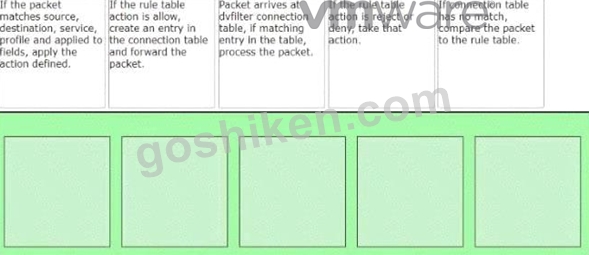
正解:
解説: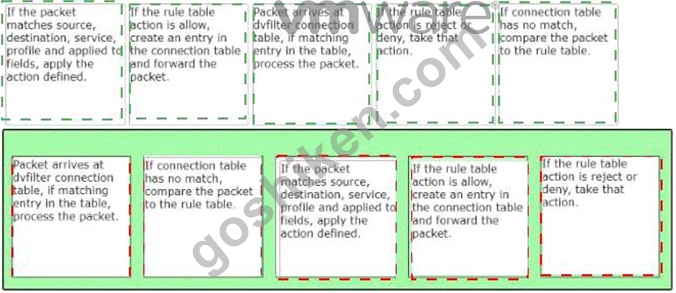
Explanation
The correct order of the rule processing steps of the Distributed Firewall is as follows:
Packet arrives at vfilter connection table. If matching entry in the table, process the packet.
If connection table has no match, compare the packet to the rule table.
If the packet matches source, destination, service, profile and applied to fields, apply the action defined.
If the rule table action is allow, create an entry in the connection table and forward the packet.
If the rule table action is reject or deny, take that action.
This order is based on the description of how the Distributed Firewall works in the web search results1. The first step is to check if there is an existing connection entry for the packet in the vfilter connection table, which is a cache of flow entries for rules with an allow action. If there is a match, the packet is processed according to the connection entry. If there is no match, the packet is compared to the rule table, which contains all the security policy rules. The rules are evaluated from top to bottom until a match is found. The match criteria include source, destination, service, profile and applied to fields. The action defined by the matching rule is applied to the packet. The action can be allow, reject or deny. If the action is allow, a new connection entry is created for the packet and the packet is forwarded to its destination. If the action is reject or deny, the packet is dropped and an ICMP message or a TCP reset message is sent back to the source.
質問 # 40
A company security policy requires all users to log Into applications using a centralized authentication system.
Which two authentication, authorization, and accounting (AAA) systems are available when Integrating NSX with VMware Identity Manager? (Choose two.)
- A. Keyoen Enterprise
- B. RADII 2.0
- C. LDAP and OpenLDAP based on Active Directory (AD)
- D. RSA SecurelD
- E. SecureDAP
正解:C、D
解説:
Explanation
NSX supports two types of authentication, authorization, and accounting (AAA) systems when integrating with VMware Identity Manager: RSA SecurID and LDAP and OpenLDAP based on Active Directory (AD).
RSA SecurID is a two-factor authentication system that uses a token-based approach to verify the identity of users. LDAP and OpenLDAP based on AD are directory services that store and manage user information and credentials. Both systems can be used to provide centralized authentication for users who want to access applications in an NSX environment .
質問 # 41
How is the RouterLink port created between a Tier-1 Gateway and Tler-0 Gateway?
- A. Automatically created when Tier-t Is connected with Tier-0 from NSX UI.
- B. Manually create a Logical Switch and connect to bother Tler-1 and Tier-0 Gateways.
- C. Manually create a Segment and connect to both Titrr-1 and Tier-0 Gateways.
- D. Automatically created when Tler-1 is created.
正解:A
解説:
Explanation
According to the VMware NSX 4.x Professional documents and tutorials, a RouterLink port is a logical port that connects a Tier-1 gateway to a Tier-0 gateway. This port is automatically created when a Tier-1 gateway is associated with a Tier-0 gateway from the NSX UI or API. The RouterLink port enables routing between the two gateways and carries all the routing protocols and traffic. There is no need to manually create a logical switch or segment for this purpose1.
質問 # 42
Which command Is used to test management connectivity from a transport node to NSX Manager?
- A.

- B.

- C.

- D.

正解:A
解説:
Explanation
According to the web search results, the command that is used to test management connectivity from a transport node to NSX Manager is get managers. This command displays the status, IP address, and thumbprint of the NSX Manager that the transport node is connected to. It also shows the connection state, which can be UP or DOWN. If the connection state is DOWN, it means that there is a problem with the management connectivity .
質問 # 43
What must be configured on Transport Nodes for encapsulation and decapsulation of Geneve protocol?
- A. VXIAN
- B. UDP
- C. STT
- D. TEP
正解:D
解説:
According to the VMware NSX Documentation, TEP stands for Tunnel End Point and is a logical interface that must be configured on transport nodes for encapsulation and decapsulation of Geneve protocol. Geneve is a tunneling protocol that encapsulates the original packet with an outer header that contains metadata such as the virtual network identifier (VNI) and the transport node IP address. TEPs are responsible for adding and removing the Geneve header as the packet traverses the overlay network.
質問 # 44
Which NSX CLI command is used to change the authentication policy for local users?
- A. Set cli-timeout
- B. Get auth-policy minimum-password-length
- C. Set auth-policy
- D. Set hardening- policy
正解:C
解説:
According to the VMware NSX Documentation4, the set auth-policy command is used to change the authentication policy settings for local users, such as password length, lockout period, and maximum authentication failures. The other commands are either used to view the authentication policy settings (B), change the CLI session timeout (A), or change the hardening policy settings .
質問 # 45
When configuring OSPF on a Tler-0 Gateway, which three of the following must match in order to establish a neighbor relationship with an upstream router? (Choose three.)
- A. Subnet mask
- B. Naming convention
- C. MTU of the Uplink
- D. Address of the neighbor
- E. Protocol and Port
- F. Area ID
正解:A、C、F
解説:
ccording to the VMware NSX Documentation, these are the three parameters that must match in order to establish an OSPF neighbor relationship with an upstream router on a tier-0 gateway:
MTU of the Uplink: The maximum transmission unit (MTU) of the uplink interface must match the MTU of the upstream router interface. Otherwise, OSPF packets may be fragmented or dropped, causing neighbor adjacency issues.
Subnet mask: The subnet mask of the uplink interface must match the subnet mask of the upstream router interface. Otherwise, OSPF packets may not reach the correct destination or be rejected by the upstream router.
Area ID: The area ID of the uplink interface must match the area ID of the upstream router interface. Otherwise, OSPF packets may be ignored or discarded by the upstream router.
質問 # 46
A company security policy requires all users to log Into applications using a centralized authentication system.
Which two authentication, authorization, and accounting (AAA) systems are available when Integrating NSX with VMware Identity Manager? (Choose two.)
- A. Keyoen Enterprise
- B. RADII 2.0
- C. LDAP and OpenLDAP based on Active Directory (AD)
- D. RSA SecurelD
- E. SecureDAP
正解:C、D
解説:
NSX supports two types of authentication, authorization, and accounting (AAA) systems when integrating with VMware Identity Manager: RSA SecurID and LDAP and OpenLDAP based on Active Directory (AD). RSA SecurID is a two-factor authentication system that uses a token-based approach to verify the identity of users. LDAP and OpenLDAP based on AD are directory services that store and manage user information and credentials. Both systems can be used to provide centralized authentication for users who want to access applications in an NSX environment .
質問 # 47
NSX improves the security of today's modern workloads by preventing lateral movement, which feature of NSX can be used to achieve this?
- A. Edge Firewalling
- B. Network Segmentation
- C. Dynamic Routing
- D. Virtual Security Zones
正解:B
解説:
Explanation
According to the web search results, network segmentation is a feature of NSX that improves the security of today's modern workloads by preventing lateral movement. Lateral movement is a technique used by attackers to move from one compromised system to another within a network, exploiting vulnerabilities or credentials .
Network segmentation prevents lateral movement by dividing a network into smaller segments or zones, each with its own security policies and controls. This way, if one segment is compromised, the attacker cannot access other segments or resources . NSX enables network segmentation by using micro-segmentation, which applies granular firewall rules at the virtual machine level, regardless of the physical network topology .
質問 # 48
Refer to the exhibit.
An administrator would like to change the private IP address of the NAT VM I72.l6.101.il to a public address of 80.80.80.1 as the packets leave the NAT-Segment network.
Which type of NAT solution should be implemented to achieve this?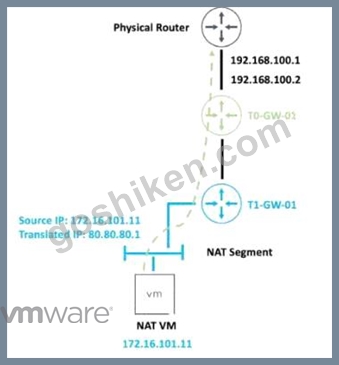
- A. SNAT
- B. Reflexive NAT
- C. DNAT
- D. NAT64
正解:A
解説:
Explanation
SNAT stands for Source Network Address Translation. It is a type of NAT that translates the source IP address of outgoing packets from a private address to a public address. SNAT is used to allow hosts in a private network to access the internet or other public networks1 In the exhibit, the administrator wants to change the private IP address of the NAT VM 172.16.101.11 to a public address of 80.80.80.1 as the packets leave the NAT-Segment network. This is an example of SNAT, as the source IP address is modified before the packets are sent to an external network.
According to the VMware NSX 4.x Professional Exam Guide, SNAT is one of the topics covered in the exam objectives2 To learn more about SNAT and how to configure it in VMware NSX, you can refer to the following resources:
* VMware NSX Documentation: NAT 3
* VMware NSX 4.x Professional: NAT Configuration 4
* VMware NSX 4.x Professional: NAT Troubleshooting 5
質問 # 49
Which three NSX Edge components are used for North-South Malware Prevention? (Choose three.)
- A. Thin Agent
- B. IDS/IPS
- C. Security Hub
- D. Reputation Service
- E. RAPID
- F. Security Analyzer
正解:B、D、E
解説:
Explanation
B: RAPID. This is correct. RAPID stands for Real-time Anti-malware Protection with Intelligent Detection. It is a component of the NSX Edge node that provides malware prevention for the north-south traffic. RAPID extracts files from the network traffic and analyzes them for malicious behavior using hash-based detection, local analysis, and cloud analysis techniques1 D: IDS/IPS. This is correct. IDS/IPS stands for Intrusion Detection and Prevention System. It is a component of the NSX Edge node that provides intrusion detection and prevention for the north-south traffic. IDS/IPS monitors the network traffic and compares it against a known set of signatures that specify patterns for different types of network intrusions. IDS/IPS can generate alerts or block the traffic based on the matching signatures and the configured actions2 F: Reputation Service. This is correct. Reputation Service is a component of the NSX Edge node that provides reputation-based filtering for the north-south traffic. Reputation Service uses a cloud-based database of known malicious IP addresses and domains to block or allow the traffic based on the reputation score of the source or destination. Reputation Service can also integrate with third-party reputation providers to enhance the security coverage3 A: Thin Agent. This is incorrect. Thin Agent is not a component of the NSX Edge node, but rather a component of the NSX Guest Introspection platform that runs on the virtual machine endpoints in the distributed east-west traffic. Thin Agent enables communication between the virtual machines and the NSX Manager, and facilitates malware prevention and intrusion detection on the host level.
C: Security Hub. This is incorrect. Security Hub is not a component of the NSX Edge node, but rather a component of the VMware Cloud Services platform that provides a unified view of security posture across multiple cloud environments. Security Hub integrates with NSX Advanced Threat Prevention to collect and display security events, alerts, and recommendations from NSX IDS/IPS and NSX Malware Prevention features.
E: Security Analyzer. This is incorrect. Security Analyzer is not a real product name or component name related to NSX Edge or NSX Advanced Threat Prevention. It is a fictional name that does not exist in the VMware portfolio.
To learn more about NSX Edge components for North-South Malware Prevention, you can refer to the following resources:
VMware NSX Documentation: Overview of NSX IDS/IPS and NSX Malware Prevention 2 VMware NSX Documentation: Configure North-South Malware Prevention 1 VMware NSX Documentation: Configure North-South Intrusion Detection and Prevention VMware NSX Documentation: Configure North-South Reputation-Based Filtering 3
質問 # 50
Refer to the exhibit.
Which two items must be configured to enable OSPF for the Tler-0 Gateway in the Image? Mark your answers by clicking twice on the image.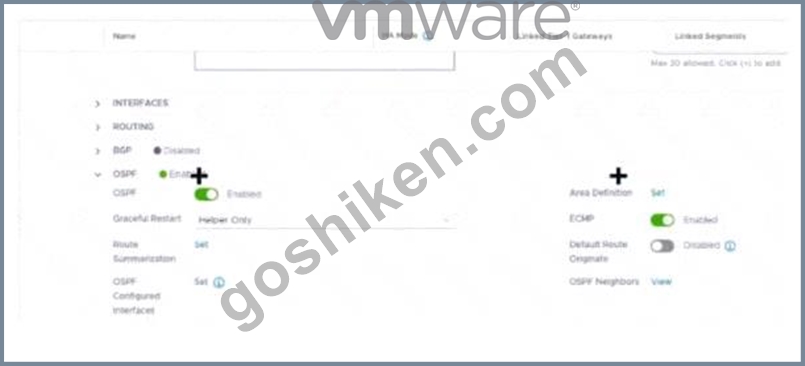
正解:
解説: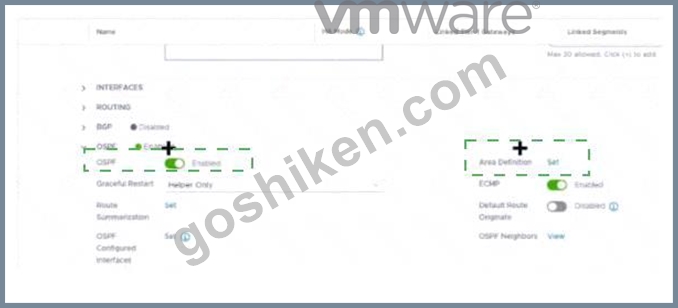
Explanation
The correct answer is to enable the OSPF toggle and to add an Area Definition for the Tier-0 gateway in the image. These two items are required to configure OSPF on the Tier-0 gateway, as explained in the web search results123.
To mark your answers by clicking twice on the image, you can double-click on the toggle switch next to OSPF to turn it on. The switch should change from gray to blue, indicating that the option is enabled. Then, you can double-click on the Set button next to Area Definition to add an area definition. A pop-up window should appear where you can specify the area ID and type.
1. Click the OSPF toggle to enable OSPF 2. In the Area Definition field, click Set to add an area definition
https://docs.vmware.com/en/VMware-NSX-T-Data-Center/3.2/administration/GUID-5BEC626C-5312-467D-B8
質問 # 51
What is the VMware recommended way to deploy a virtual NSX Edge Node?
- A. Through the NSXUI
- B. Through the vSphere Web Client
- C. Through the OVF command line tool
- D. Through automated or Interactive mode using an ISO
正解:A
解説:
Explanation
Through the NSX UI. According to the VMware NSX Documentation2, you can deploy NSX Edge nodes as virtual appliances through the NSX UI by clicking Add Edge Node and providing the required information.
The other options are either outdated or not applicable for virtual NSX Edge nodes.
https://docs.vmware.com/en/VMware-NSX/4.1/installation/GUID-E9A01C68-93E7-4140-B306-19CD6806199F
質問 # 52
An NSX administrator is troubleshooting a connectivity issue with virtual machines running on an FSXi transport node. Which feature in the NSX Ul shows the mapping between the virtual NIC and the host's physical adapter?
- A. Port Mirroring
- B. IPFIX
- C. Activity Monitoring
- D. Switch Visualization
正解:D
解説:
Explanation
According to the VMware NSX Documentation, Switch Visualization is a feature in the NSX UI that shows the mapping between the virtual NIC and the host's physical adapter for virtual machines running on an ESXi transport node. You can use Switch Visualization to view details such as port ID, MAC address, VLAN ID, IP address, MTU, port state, port speed, port type, and port group for each virtual NIC and physical adapter.
質問 # 53
An administrator needs to download the support bundle for NSX Manager. Where does the administrator download the log bundle from?
- A. System > Settings > Support Bundle
- B. System > Utilities > Tools
- C. System > Support Bundle
- D. System > Settings
正解:C
解説:
Explanation
According to the VMware NSX Documentation, this is where you can download the support bundle for NSX Manager from the NSX UI:
System > Support Bundle: This option allows you to download a support bundle that contains logs, configuration files, and diagnostic information from your NSX Manager node and cluster. You can use this option to troubleshoot issues or provide information to VMware support.
https://docs.vmware.com/en/VMware-vSphere/7.0/vmware-vsphere-with-tanzu/GUID-794C691E-B950-4838-97
質問 # 54
......
VMware 2V0-41.23 認定試験の出題範囲:
| トピック | 出題範囲 |
|---|---|
| トピック 1 |
|
| トピック 2 |
|
| トピック 3 |
|
| トピック 4 |
|
| トピック 5 |
|
| トピック 6 |
|
| トピック 7 |
|
| トピック 8 |
|
有効な2V0-41.23テスト解答とVMware 2V0-41.23試験PDF:https://www.goshiken.com/VMware/2V0-41.23-mondaishu.html
VMware 2V0-41.23認定リアル2024年最新の模擬試験:https://drive.google.com/open?id=1j4jyPz2D3FsTFAx6kod-RdJaJFze5Z5d