

合格させちゃうVCP-NV 2023 2V0-41.23試験簡単かつ正確なPDF問題 [2024年03月11日]
2V0-41.23認証試験問題集解答を提供しています
VMware 2V0-41.23 認定試験の出題範囲:
| トピック | 出題範囲 |
|---|---|
| トピック 1 |
|
| トピック 2 |
|
| トピック 3 |
|
| トピック 4 |
|
| トピック 5 |
|
| トピック 6 |
|
| トピック 7 |
|
| トピック 8 |
|
| トピック 9 |
|
| トピック 10 |
|
| トピック 11 |
|
| トピック 12 |
|
| トピック 13 |
|
| トピック 14 |
|
質問 # 48
An administrator wants to validate the BGP connection status between the Tier-O Gateway and the upstream physical router.
What sequence of commands could be used to check this status on NSX Edge node?
- A. show logical-routers
get vrf
show ip route bgp - B. get gateways
vrf <number>
get bgp neighbor - C. enable <LR-D>
get vrf <ID>
show bgp neighbor - D. set vrf <ID>
show logical-routers
show <LR-D> bgp
正解:B
解説:
Explanation
The sequence of commands that could be used to check the BGP connection status between the Tier-O Gateway and the upstream physical router on NSX Edge node is get gateways, vrf <number>, get bgp neighbor. These commands can be executed on the NSX Edge node CLI after logging in as admin6. The first command, get gateways, displays the list of logical routers (gateways) configured on the Edge node, along with their IDs and VRF numbers7. The second command, vrf <number>, switches to the VRF context of the desired Tier-O Gateway, where <number> is the VRF number obtained from the previous command7. The third command, get bgp neighbor, displays the BGP neighbor summary for the selected VRF, including the neighbor IP address, AS number, state, uptime, and prefixes received8. The other options are incorrect because they either use invalid or incomplete commands or do not switch to the correct VRF context. References: NSX-T Command-Line Interface Reference, NSX Edge Node CLI Commands, Troubleshooting BGP on NSX-T Edge Nodes
質問 # 49
Which VPN type must be configured before enabling a L2VPN?
- A. Route-based IPSec VPN
- B. Policy based IPSec VPN
- C. SSL-bosed IPSec VPN
- D. Port-based IPSec VPN
正解:A
解説:
According to the VMware NSX Documentation, this VPN type must be configured before enabling a L2VPN. L2VPN stands for Layer 2 VPN and is a feature that allows you to extend your layer 2 network across different sites using an IPSec tunnel. Route-based IPSec VPN is a VPN type that uses logical router ports to establish IPSec tunnels between sites.
質問 # 50
Which three selections are capabilities of Network Topology? (Choose three.)
- A. Display how the different NSX components are interconnected.
- B. Display how the Physical components ate interconnected.
- C. Display the uplink configured on the Tier-0 Gateways.
- D. Display the uplinks configured on the Tier-1 Gateways.
- E. Display the VMs connected to Segments.
正解:A、C、E
解説:
According to the VMware NSX Documentation, these are three of the capabilities of Network Topology, which is a graphical representation of your network infrastructure in NSX:
Display how the different NSX components are interconnected: You can use Network Topology to view how your segments, gateways, routers, firewalls, load balancers, VPNs, and other NSX components are connected and configured in your network.
Display the uplink configured on the Tier-0 Gateways: You can use Network Topology to view the uplink interface and segment that connect your tier-0 gateways to your physical network. You can also view the VLAN ID and IP address of the uplink interface.
Display the VMs connected to Segments: You can use Network Topology to view the VMs that are attached to your segments. You can also view the IP address and MAC address of each VM.
質問 # 51
A company Is deploying NSX micro-segmentation in their vSphere environment to secure a simple application composed of web. app, and database tiers.
The naming convention will be:
* WKS-WEB-SRV-XXX
* WKY-APP-SRR-XXX
* WKI-DB-SRR-XXX
What is the optimal way to group them to enforce security policies from NSX?
- A. Group all by means of tags membership.
- B. Do a service insertion to accomplish the task.
- C. Create an Ethernet based security policy.
- D. Use Edge as a firewall between tiers.
正解:A
解説:
The answer is C. Group all by means of tags membership.
Tags are metadata that can be applied to physical servers, virtual machines, logical ports, and logical segments in NSX. Tags can be used for dynamic security group membership, which allows for granular and flexible enforcement of security policies based on various criteria1 In the scenario, the company is deploying NSX micro-segmentation to secure a simple application composed of web, app, and database tiers. The naming convention will be:
WKS-WEB-SRV-XXX
WKY-APP-SRR-XXX
WKI-DB-SRR-XXX
The optimal way to group them to enforce security policies from NSX is to use tags membership. For example, the company can create three tags: Web, App, and DB, and assign them to the corresponding VMs based on their names. Then, the company can create three security groups: Web-SG, App-SG, and DB-SG, and use the tags as the membership criteria. Finally, the company can create and apply security policies to the security groups based on the desired rules and actions2 Using tags membership has several advantages over the other options:
It is more scalable and dynamic than using Edge as a firewall between tiers. Edge firewall is a centralized solution that can create bottlenecks and performance issues when handling large amounts of traffic3 It is more simple and efficient than doing a service insertion to accomplish the task. Service insertion is a feature that allows for integrating third-party services with NSX, such as antivirus or intrusion prevention systems. Service insertion is not necessary for basic micro-segmentation and can introduce additional complexity and overhead.
It is more flexible and granular than creating an Ethernet based security policy. Ethernet based security policy is a type of policy that uses MAC addresses as the source or destination criteria. Ethernet based security policy is limited by the scope of layer 2 domains and does not support logical constructs such as segments or groups.
To learn more about tags membership and how to use it for micro-segmentation in NSX, you can refer to the following resources:
VMware NSX Documentation: Security Tag 1
VMware NSX Micro-segmentation Day 1: Chapter 4 - Security Policy Design 2 VMware NSX 4.x Professional: Security Groups VMware NSX 4.x Professional: Security Policies
質問 # 52
Which command Is used to test management connectivity from a transport node to NSX Manager?
- A. esxcli network ip connection list | grep 1235
- B. esxcli network ip connection list | grep 1234
- C. esxcli network connection list | grep 1234
- D. esxcli network connection list | grep 1235
正解:B
質問 # 53
Which three NSX Edge components are used for North-South Malware Prevention? (Choose three.)
- A. Security Hub
- B. Security Analyzer
- C. RAPID
- D. Thin Agent
- E. IDS/IPS
- F. Reputation Service
正解:C、E、F
解説:
The answer is B, D, and F.
B) RAPID. This is correct. RAPID stands for Real-time Anti-malware Protection with Intelligent Detection. It is a component of the NSX Edge node that provides malware prevention for the north-south traffic. RAPID extracts files from the network traffic and analyzes them for malicious behavior using hash-based detection, local analysis, and cloud analysis techniques1 D) IDS/IPS. This is correct. IDS/IPS stands for Intrusion Detection and Prevention System. It is a component of the NSX Edge node that provides intrusion detection and prevention for the north-south traffic. IDS/IPS monitors the network traffic and compares it against a known set of signatures that specify patterns for different types of network intrusions. IDS/IPS can generate alerts or block the traffic based on the matching signatures and the configured actions2 F) Reputation Service. This is correct. Reputation Service is a component of the NSX Edge node that provides reputation-based filtering for the north-south traffic. Reputation Service uses a cloud-based database of known malicious IP addresses and domains to block or allow the traffic based on the reputation score of the source or destination. Reputation Service can also integrate with third-party reputation providers to enhance the security coverage3 A) Thin Agent. This is incorrect. Thin Agent is not a component of the NSX Edge node, but rather a component of the NSX Guest Introspection platform that runs on the virtual machine endpoints in the distributed east-west traffic. Thin Agent enables communication between the virtual machines and the NSX Manager, and facilitates malware prevention and intrusion detection on the host level.
C) Security Hub. This is incorrect. Security Hub is not a component of the NSX Edge node, but rather a component of the VMware Cloud Services platform that provides a unified view of security posture across multiple cloud environments. Security Hub integrates with NSX Advanced Threat Prevention to collect and display security events, alerts, and recommendations from NSX IDS/IPS and NSX Malware Prevention features.
E) Security Analyzer. This is incorrect. Security Analyzer is not a real product name or component name related to NSX Edge or NSX Advanced Threat Prevention. It is a fictional name that does not exist in the VMware portfolio.
To learn more about NSX Edge components for North-South Malware Prevention, you can refer to the following resources:
VMware NSX Documentation: Overview of NSX IDS/IPS and NSX Malware Prevention 2 VMware NSX Documentation: Configure North-South Malware Prevention 1 VMware NSX Documentation: Configure North-South Intrusion Detection and Prevention
質問 # 54
Which three data collection sources are used by NSX Network Detection and Response to create correlations/Intrusion campaigns? (Choose three.)
- A. Files and anti-malware (lie events from the NSX Edge nodes and the Security Analyzer
- B. Distributed Firewall flow data from the ESXi hosts
- C. IDS/IPS events from the ESXi hosts and NSX Edge nodes
- D. Suspicious Traffic Detection events from NSX Intelligence
- E. East-West anti-malware events from the ESXi hosts
正解:A、C、D
解説:
The correct answers are A. Files and anti-malware (file) events from the NSX Edge nodes and the Security Analyzer, D. IDS/IPS events from the ESXi hosts and NSX Edge nodes, and E. Suspicious Traffic Detection events from NSX Intelligence. According to the VMware NSX Documentation3, these are the three data collection sources that are used by NSX Network Detection and Response to create correlations/intrusion campaigns.
The other options are incorrect or not supported by NSX Network Detection and Response. East-West anti-malware events from the ESXi hosts are not collected by NSX Network Detection and Response3. Distributed Firewall flow data from the ESXi hosts are not used for correlation/intrusion campaigns by NSX Network Detection and Response3.
質問 # 55
Which two of the following are used to configure Distributed Firewall on VDS? (Choose two.)
- A. NSX UI
- B. NSX CU
- C. vCenter API
- D. NSX API
- E. vSphere API
正解:A、D
解説:
According to the VMware NSX Documentation, these are two of the ways that you can use to configure Distributed Firewall on VDS:
NSX API: This is a RESTful API that allows you to programmatically configure and manage Distributed Firewall on VDS using HTTP methods and JSON payloads. You can use tools such as Postman or curl to send API requests to the NSX Manager node.
NSX UI: This is a graphical user interface that allows you to configure and manage Distributed Firewall on VDS using menus, tabs, buttons, and forms. You can access the NSX UI by logging in to the NSX Manager node using a web browser.
質問 # 56
Refer to the exhibit.
An administrator configured NSX Advanced Load Balancer to load balance the production web server traffic, but the end users are unable to access the production website by using the VIP address.
Which of the following Tier-1 gateway route advertisement settings needs to be enabled to resolve the problem? Mark the correct answer by clicking on the image.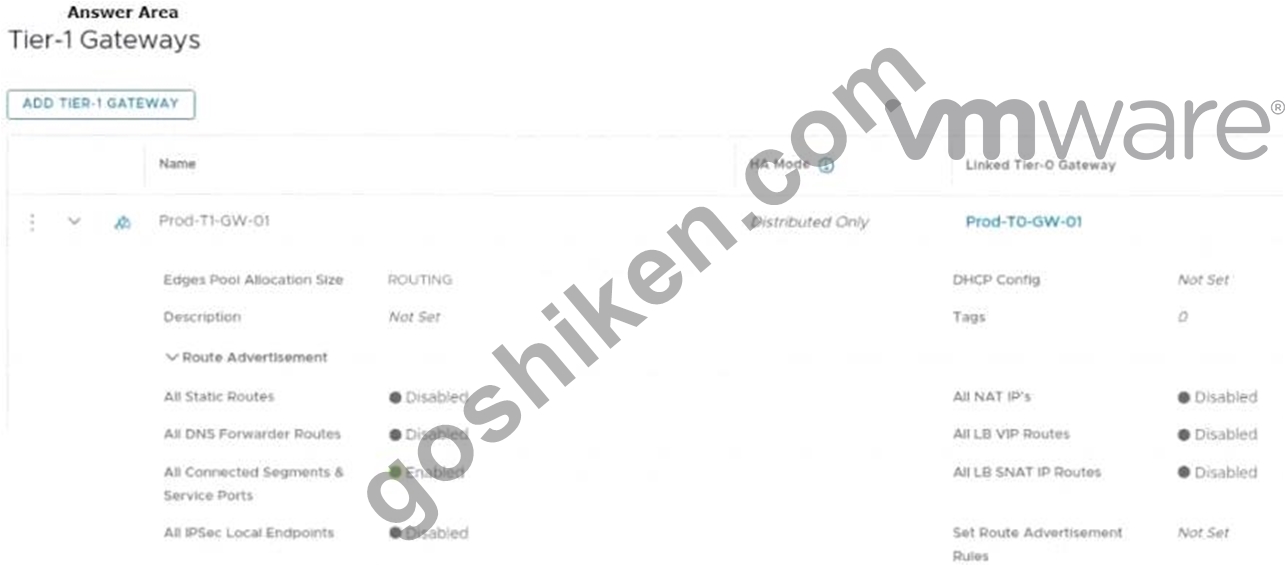
正解:
解説: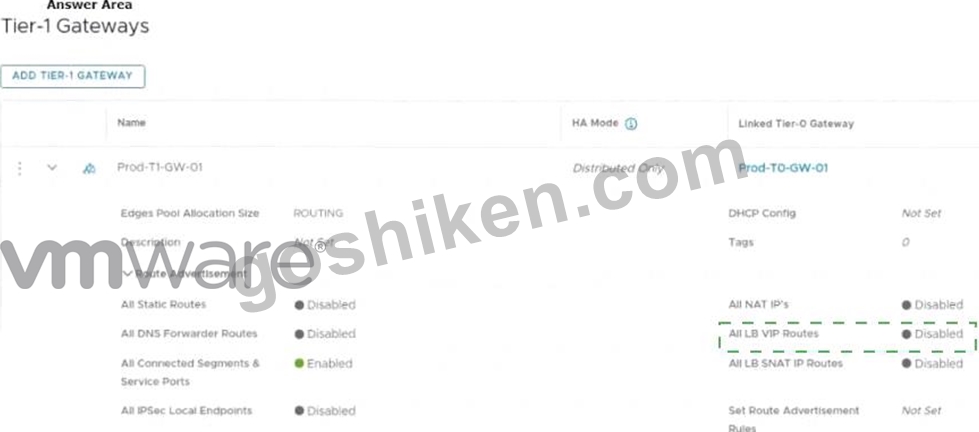
Explanation
The correct answer is to enable the option All LB VIP Routes on the Tier-1 gateway route advertisement settings. This option allows the Tier-1 gateway to advertise the NSX Advanced Load Balancer LB VIP routes to the Tier-0 gateway and other peer routers, so that the end users can reach the production website by using the VIP address1. The other options are not relevant for this scenario.
To mark the correct answer by clicking on the image, you can click on the toggle switch next to All LB VIP Routes to turn it on. The switch should change from gray to blue, indicating that the option is enabled. See the image below for reference:
質問 # 57
Which of the following settings must be configured in an NSX environment before enabling stateful active-active SNAT?
- A. An Interface Group for the NSX Edge uplinks
- B. Tier-1 gateway in active-standby mode
- C. A Punting Traffic Group for the NSX Edge uplinks
- D. Tier-1 gateway in distributed only mode
正解:A
解説:
Explanation
To enable stateful active-active SNAT on a Tier-0 or Tier-1 gateway, you must configure an Interface Group for the NSX Edge uplinks. An Interface Group is a logical grouping of NSX Edge interfaces that belong to the same failure domain. A failure domain is a set of NSX Edge nodes that share the same physical network infrastructure and are subject to the same network failures. By configuring an Interface Group, you can ensure that the stateful services are distributed across different failure domains and can recover from network failures1
質問 # 58
What are the four types of role-based access control (RBAC) permissions? (Choose four.)
- A. Auditor
- B. Full access
- C. Read
- D. None
- E. Network Admin
- F. Enterprise Admin
- G. Execute
正解:B、C、D、G
解説:
Explanation
The four types of role-based access control (RBAC) permissions are Read, None, Full access, and Execute1.
Read permission allows the user to view the configuration and status of the system. None permission denies any access to the system. Full access permission grants all permissions including Create, Read, Update, and Delete (CRUD). Execute permission includes Read and Update permissions1. Auditor, Enterprise Admin, and Network Admin are not types of permissions, but types of roles that have different sets of permissions. References: NSX Features There are four types of permissions. Included in the list are the abbreviations for the permissions that are used in the Roles and Permissions and Roles and Permissions for Manager Mode tables.
Full access (FA) - All permissions including Create, Read, Update, and Delete Execute (E) - Includes Read and Update Read (R) None NSX-T Data Center has the following built-in roles. Role names in the UI can be different in the API.
In NSX-T Data Center, if you have permission, you can clone an existing role, add a new role, edit newly created roles, or delete newly created roles.
Role-Based Access Control (vmware.com)
質問 # 59
Refer to the exhibit.
An administrator configured NSX Advanced Load Balancer to load balance the production web server traffic, but the end users are unable to access the production website by using the VIP address.
Which of the following Tier-1 gateway route advertisement settings needs to be enabled to resolve the problem? Mark the correct answer by clicking on the image.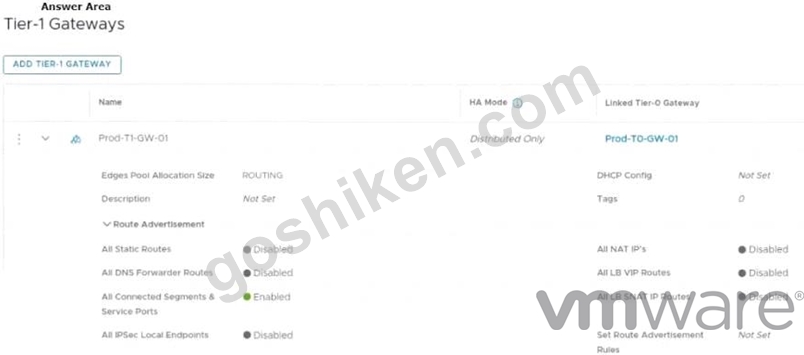
正解:
解説: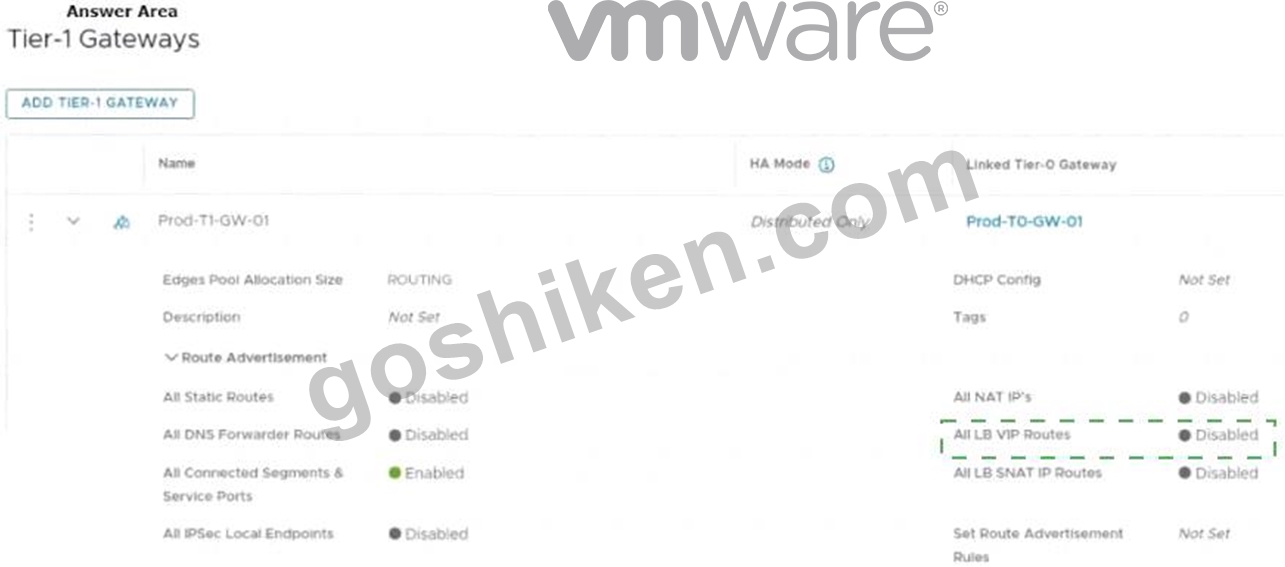
Explanation
The correct answer is to enable the option All LB VIP Routes on the Tier-1 gateway route advertisement settings. This option allows the Tier-1 gateway to advertise the NSX Advanced Load Balancer LB VIP routes to the Tier-0 gateway and other peer routers, so that the end users can reach the production website by using the VIP address1. The other options are not relevant for this scenario.
To mark the correct answer by clicking on the image, you can click on the toggle switch next to All LB VIP Routes to turn it on. The switch should change from gray to blue, indicating that the option is enabled. See the image below for reference:
質問 # 60
Which statement is true about an alarm in a Suppressed state?
- A. An alarm can be suppressed for a specific duration in hours.
- B. An alarm can be suppressed for a specific duration in minutes.
- C. An alarm can be suppressed for a specific duration in days.
- D. An alarm can be suppressed for a specific duration in seconds.
正解:A
解説:
Explanation
The answer is D. An alarm can be suppressed for a specific duration in hours.
According to the VMware NSX documentation, an alarm can be in one of the following states: Open, Acknowledged, Suppressed, or Resolved12 An alarm in a Suppressed state means that the status reporting for this alarm has been disabled by the user for a user-specified duration12 When a user moves an alarm into a Suppressed state, they are prompted to specify the duration in hours. After the specified duration passes, the alarm state reverts to Open. However, if the system determines the condition has been corrected, the alarm state changes to Resolved13 To learn more about how to manage alarm states in NSX, you can refer to the following resources:
* VMware NSX Documentation: Managing Alarm States 1
* VMware NSX Documentation: View Alarm Information 2
* VMware NSX Intelligence Documentation: Manage NSX Intelligence Alarm States 3
質問 # 61
Where does an administrator configure the VLANs used In VRF Lite? (Choose two.)
- A. segment connected to the Tler-1 gateway
- B. uplink interface of the default Tier-0 gateway
- C. downlink interface of the default Tier-0 gateway
- D. uplink Interface of the VRF gateway
- E. uplink trunk segment
正解:D、E
解説:
According to the VMware NSX Documentation, these are the two places where you need to configure the VLANs used in VRF Lite:
Uplink trunk segment: This is a segment that connects a tier-0 gateway to a physical network using multiple VLAN tags. You need to configure the VLAN IDs for each VRF on this segment.
Uplink interface of the VRF gateway: This is an interface that connects a VRF gateway to an uplink trunk segment using a specific VLAN tag. You need to configure the VLAN ID for each VRF on this interface.
質問 # 62
What are two functions of the Service Engines in NSX Advanced Load Balancer? (Choose two.)
- A. It provides a user interface to perform configuration and management tasks.
- B. It deploys web servers to perform load-balancing operations.
- C. It collects real-time analytics from application traffic flows.
- D. It stores the configuration and policies related to load-balancing services.
- E. It performs application load-balancing operations.
正解:C、E
質問 # 63
Where in the NSX UI would an administrator set the time attribute for a time-based Gateway Firewall rule?
- A. The option to set time based rule is a field in the rule Itself.
- B. There Is no option in the NSX UI. It must be done via command line interface.
- C. The option to set time-based rule is a clock Icon in the rule.
- D. The option to set time-based rule is a clock Icon in the policy.
正解:D
解説:
According to the VMware documentation1, the clock icon appears on the firewall policy section that you want to have a time window. By clicking the clock icon, you can create or select a time window that applies to all the rules in that policy section. The other options are incorrect because they either do not exist or are not related to the time-based rule feature. There is no option to set a time-based rule in the rule itself, as it is a policy-level setting. There is also an option to set a time-based rule in the NSX UI, so it does not require using the command line interface.
質問 # 64
When running nsxcli on an ESXi host, which command will show the Replication mode?
- A. get logical-switch status
- B. get logical-switch <Local-Switch-UUID> status
- C. get logical-switches
- D. get logical-switch <Logical-Switch-UUID>
正解:C
解説:
Explanation
https://vdc-download.vmware.com/vmwb-repository/dcr-public/c3fd9cef-6b2b-4772-93be-3fe60ce064a1/1f67b9
質問 # 65
Match the NSX Intelligence recommendations with their correct purpose.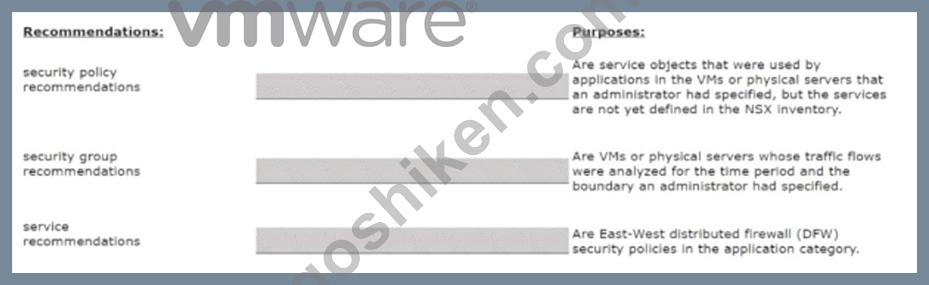
正解:
解説: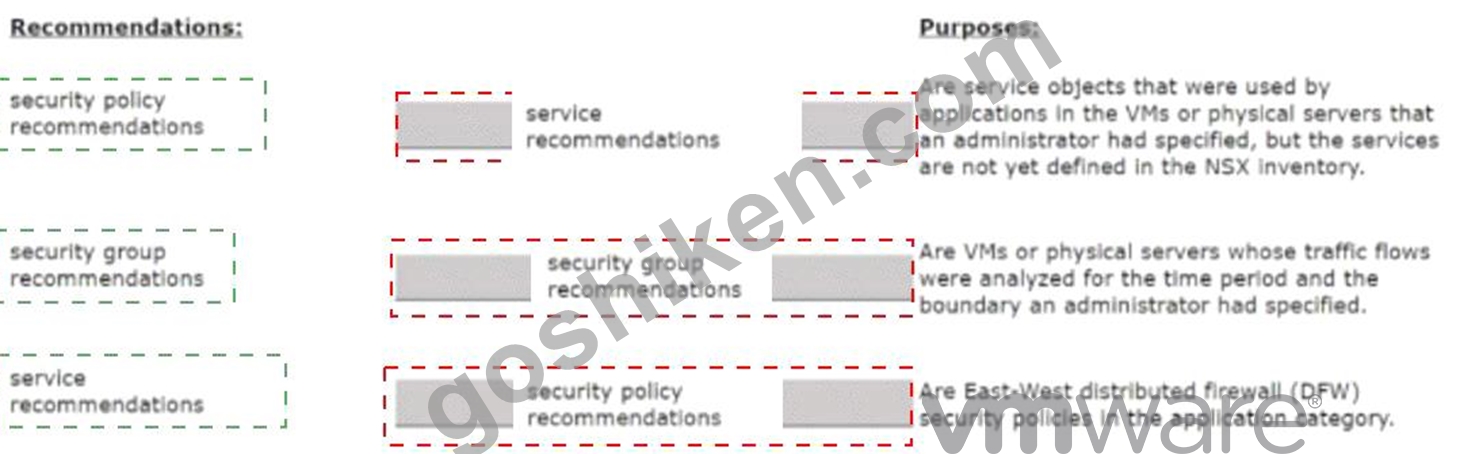
Explanation
Security policy recommendations: Are East-West distributed firewall (DFW) security policies in the application category12.
Security group recommendations: Are VMs or physical servers whose traffic flows were analyzed for the time period and the boundary you had specified12.
Service recommendations: Are service objects that were used by applications in the VMs or physical servers that you had specified, but the services are not yet defined in the NSX inventory12.
https://docs.vmware.com/en/VMware-NSX-Intelligence/4.1/user-guide/GUID-BA3B0D67-4AA8-439E-A845-4
質問 # 66
......
検証済みで更新された2V0-41.23問題集と解答で100%一発合格保証の問題集:https://drive.google.com/open?id=1htbIhb3fYul5lEqtPUmfWw0uRXB1oX6Y
更新された2V0-41.23試験練習テスト問題:https://www.goshiken.com/VMware/2V0-41.23-mondaishu.html