

2V0-41.23問題集最新の2024年08月17日練習テスト109リアル解答があります
2024年最新の100%試験高合格率2V0-41.23問題集PDF
質問 # 32
What are four NSX built-in role-based access control (RBAC) roles? (Choose four.)
- A. None
- B. Full Access
- C. Network Admin
- D. Read
- E. LB Operator
- F. Enterprise Admin
- G. Auditor
正解:C、E、F、G
解説:
https://docs.vmware.com/en/VMware-NSX/4.1/administration/GUID-26C44DE8-1854-4B06-B6DA-A2FD426CDF44.html
質問 # 33
Which Is the only supported mode In NSX Global Manager when using Federation?
- A. Controller
- B. Proton
- C. Policy
- D. Proxy
正解:C
解説:
NSX Global Manager is a feature of NSX that allows managing multiple NSX domains across different sites or clouds from a single pane of glass. NSX Global Manager supports Federation, which is a capability that enables synchronizing configuration and policy across multiple NSX domains. Federation has many benefits such as simplifying operations, improving resiliency, and enabling disaster recovery.
The only supported mode in NSX Global Manager when using Federation is Policy mode. Policy mode means that NSX Global Manager acts as a policy manager that defines and distributes global policies to local NSX managers in different domains. Policy mode also allows local NSX managers to have their own local policies that can override or merge with global policies.
https://docs.vmware.com/en/VMware-NSX/4.0/administration/GUID-29998FC5-C1AB-40BC-B669-6E8E9937F
質問 # 34
An administrator needs to download the support bundle for NSX Manager. Where does the administrator download the log bundle from?
- A. System > Support Bundle
- B. System > Settings
- C. System > Utilities > Tools
- D. System > Settings > Support Bundle
正解:A
解説:
Explanation
According to the VMware NSX Documentation, this is where you can download the support bundle for NSX Manager from the NSX UI:
System > Support Bundle: This option allows you to download a support bundle that contains logs, configuration files, and diagnostic information from your NSX Manager node and cluster. You can use this option to troubleshoot issues or provide information to VMware support.
https://docs.vmware.com/en/VMware-vSphere/7.0/vmware-vsphere-with-tanzu/GUID-794C691E-B950-4838-97
質問 # 35
In which VPN type are the Virtual Tunnel interfaces (VTI) used?
- A. Policy & Route based VPNs
- B. SSL-based VPN
- C. Route-based VPN
- D. Route & SSL based VPNs
正解:C
解説:
Explanation
Route-based VPN is a VPN type that uses Virtual Tunnel interfaces (VTI) to establish IPSec tunnels between an NSX Edge node and remote sites2. A VTI is a logical interface that is assigned an IP address and is associated with a physical or virtual interface. The VTI acts as an end point of the IPSec tunnel and routes traffic between the NSX Edge node and the remote site2. Route & SSL based VPNs, Policy & Route based VPNs, and SSL-based VPN are not VPN types that use VTI. References: Virtual Private Network (VPN)
質問 # 36
What can the administrator use to identify overlay segments in an NSX environment if troubleshooting is required?
- A. VIAN ID
- B. Segment ID
- C. Geneve ID
- D. VNI ID
正解:D
解説:
Explanation
According to the VMware NSX Documentation1, a segment is mapped to a unique Geneve segment that is distributed across the ESXi hosts in a transport zone. The Geneve segment uses a virtual network identifier (VNI) as an overlay network identifier. The VNI ID can be used to identify overlay segments in an NSX environment if troubleshooting is required.
質問 # 37
Drag and Drop Question
Refer to the exhibits. Drag and drop the NSX graphic element icons on the left found in an NSX Intelligence visualization graph to its correct description on the right.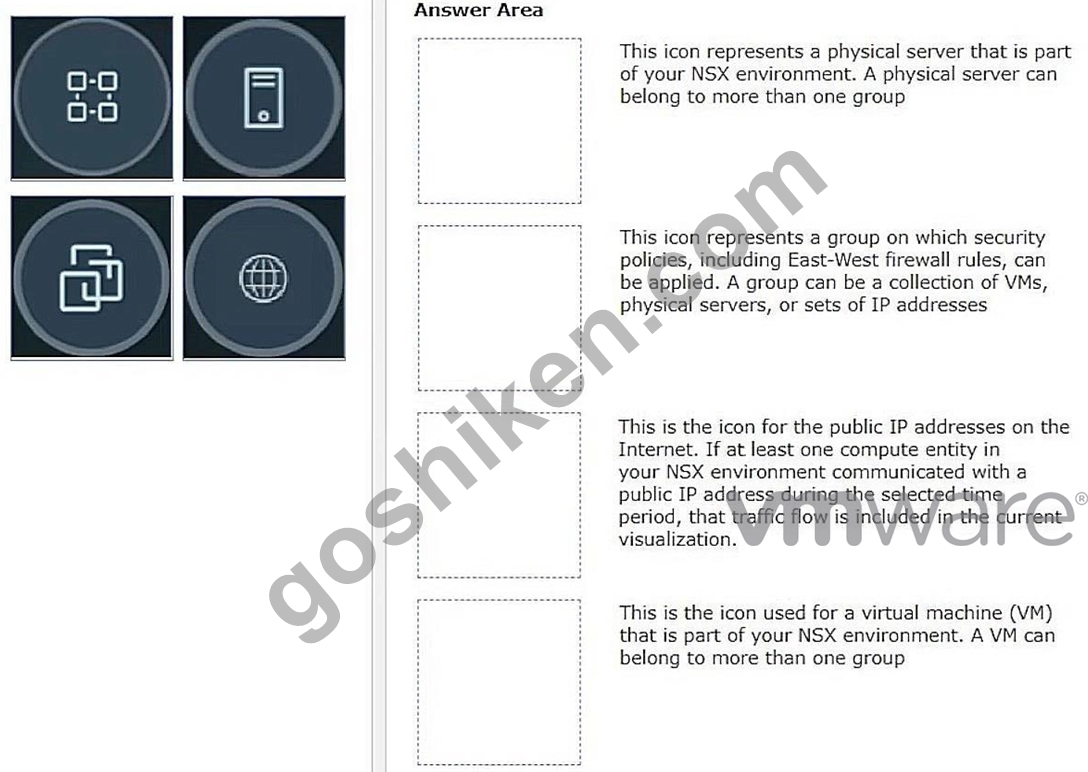
正解:
解説: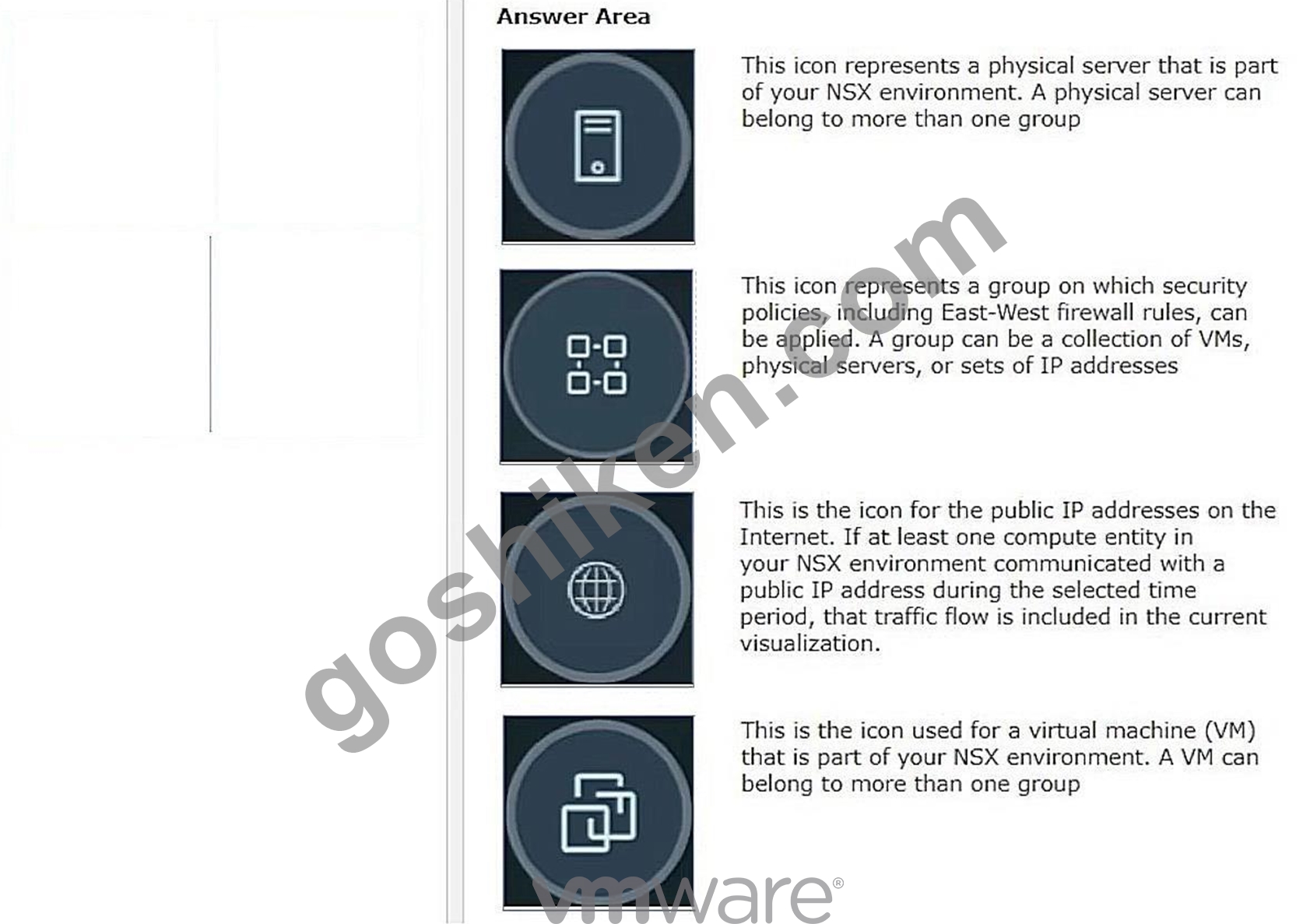
質問 # 38
Which three security features are dependent on the NSX Application Platform? (Choose three.)
- A. NSX Firewall
- B. NSX Malware Prevention
- C. NSX Intelligence
- D. NSX TLS Inspection
- E. NSX Network Detection and Response
- F. NSX Distributed IDS/IPS
正解:A、E、F
解説:
Explanation
According to the VMware NSX Documentation, these are three of the security features that are dependent on the NSX Application Platform:
* NSX Firewall: This feature provides distributed firewalling and micro-segmentation capabilities for network and application security. It allows you to create and enforce granular firewall rules based on
* various criteria such as identity, context, or tags.
* NSX Distributed IDS/IPS: This feature provides distributed intrusion detection and prevention capabilities for network and application security. It allows you to detect and block malicious traffic based on signatures, behaviors, or anomalies.
* NSX Network Detection and Response: This feature provides advanced threat detection and response capabilities for network and application security. It includes features such as Distributed Intrusion Detection and Prevention (IDS/IPS), Web Reputation Analysis, File and Process Analysis, and NSX Advanced Threat Prevention.
質問 # 39
Which two of the following features are supported for the Standard NSX Application Platform Deployment?
(Choose two.)
- A. NSX Malware Prevention Metrics
- B. NSX Intelligence
- C. NSX Intrinsic Security
- D. NSX Intrusion Detection and Prevention
- E. NSX Network Detection and Response
正解:A、E
解説:
Explanation
The NSX Application Platform Deployment features are divided into three form factors: Evaluation, Standard, and Advanced. Each form factor determines which NSX features can be activated or installed on the platform1. The Evaluation form factor supports only NSX Intelligence, which provides network visibility and analytics for NSX-T environments2. The Standard form factor supports both NSX Intelligence and NSX Network Detection and Response, which provides network threat detection and response capabilities for NSX-T environments3. The Advanced form factor supports all four features: NSX Intelligence, NSX Network Detection and Response, NSX Malware Prevention, and NSX Metrics1.
https://docs.vmware.com/en/VMware-NSX-T-Data-Center/3.2/nsx-application-platform/GUID-85CD2728-8081
質問 # 40
Which CLI command is used for packet capture on the ESXi Node?
- A. set capture
- B. pktcap-uw
- C. debug
- D. tcpdump
正解:B
解説:
Explanation
According to the VMware Knowledge Base, this CLI command is used for packet capture on the ESXi node.
pktcap-uw stands for Packet Capture User World and is a tool that allows you to capture packets from various points in the network stack of an ESXi host. You can use this tool to troubleshoot network issues or analyze traffic flows.
The other options are either incorrect or not available for this task. tcpdump is not a valid CLI command for packet capture on the ESXi node, as it is a tool that runs on Linux systems, not on ESXi hosts. debug is not a valid CLI command for packet capture on the ESXi node, as it is a generic term that describes the process of finding and fixing errors, not a specific tool or command. set capture is not a valid CLI command for packet capture on the ESXi node, as it does not exist in the ESXi CLI.
https://kb.vmware.com/s/article/2051814
質問 # 41
Which command is used to set the NSX Manager's logging-level to debug mode for troubleshooting?
- A. set service manager logging-level debug
- B. set service nsx-manager log-level debug
- C. set service nsx-manager logging-level debug
- D. set service manager log-level debug
正解:A
解説:
The CLI command to set the log level of the NSX Manager to debug mode is set service manager logging-level debug. This command can be used when the NSX UI is inaccessible or when troubleshooting issues with the NSX Manager. The other commands are incorrect because they either use a wrong syntax or a wrong service name. The NSX Manager service name is manager, not nsx-manager. The log level parameter is logging-level, not log-level.
質問 # 42
A customer is preparing to deploy a VMware Kubernetes solution in an NSX environment.
What is the minimum MTU size for the UPLINK profile?
- A. 0
- B. 1
- C. 2
- D. 3
正解:B
解説:
Explanation
The minimum MTU size for the UPLINK profile is 1700 bytes. This is because the UPLINK profile is used to configure the physical NICs that connect to the NSX-T overlay network. The overlay network uses geneve encapsulation, which adds an overhead of 54 bytes to the original packet. Therefore, to support a standard MTU of 1500 bytes for the inner packet, the outer packet must have an MTU of at least 1554 bytes. However, VMware recommends adding an extra buffer of 146 bytes to account for possible additional headers or VLAN tags. Therefore, the minimum MTU size for the UPLINK profile is 1700 bytes (1554 + 146). References: :
VMware NSX-T Data Center Installation Guide, page 23. : VMware NSX-T Data Center Administration Guide, page 102. : VMware NSX-T Data Center Installation Guide, page 24.
https://nsx.techzone.vmware.com/resource/nsx-reference-design-guide#a-31-the-nsx-virtual-switch
質問 # 43
What needs to be configured on a Tler-0 Gateway lo make NSX Edge Services available to a VM on a VLAN-backed logical switch?
- A. Downlink Interface
- B. Loopback Router Port
- C. VLAN Uplink
- D. Service Interface
正解:C
解説:
Explanation
According to the VMware NSX Documentation, a VLAN uplink is required on a tier-0 gateway to make NSX Edge Services available to a VM on a VLAN-backed logical switch. A VLAN uplink connects a tier-0 gateway to a physical network using VLAN tags. A VLAN uplink can also provide north-south connectivity for overlay segments that are attached to a tier-0 gateway.
質問 # 44
Which two choices are use cases for Distributed Intrusion Detection? (Choose two.)
- A. Identify risk and reputation of accessed websites.
- B. Identify security vulnerabilities in the workloads.
- C. Gain Insight about micro-segmentation traffic flows.
- D. Quarantine workloads based on vulnerabilities.
- E. Use agentless antivirus with Guest Introspection.
正解:B、D
解説:
Explanation
According to the VMware NSX Documentation, these are two of the use cases for Distributed Intrusion Detection, which is a feature of NSX Network Detection and Response:
* Quarantine workloads based on vulnerabilities: You can use Distributed Intrusion Detection to detect vulnerabilities in your workloads and apply quarantine actions to isolate them from the network until they are remediated.
* Identify security vulnerabilities in the workloads: You can use Distributed Intrusion Detection to scan your workloads for known vulnerabilities and generate reports that show the severity, impact, and remediation steps for each vulnerability.
質問 # 45
Which two statements are true for IPSec VPN? (Choose two.)
- A. Dynamic routing Is supported for any IPSec mode In NSX.
- B. IPSec VPNs use the DPDK accelerated performance library.
- C. IPSec VPN services can be configured at Tler-0 and Tler-1 gateways.
- D. VPNs can be configured on the command line Interface on the NSX manager.
正解:B、C
解説:
Explanation
According to the VMware NSX 4.x Professional documents and tutorials, IPSec VPN secures traffic flowing between two networks connected over a public network through IPSec gateways called endpoints. NSX Edge supports a policy-based or a route-based IPSec VPN. Beginning with NSX-T Data Center 2.5, IPSec VPN services are supported on both Tier-0 and Tier-1 gateways1. NSX Edge also leverages the DPDK accelerated performance library to optimize the performance of IPSec VPN2.
質問 # 46
Which two statements are true about IDS Signatures? (Choose two.)
- A. An IDS signature contains data used to identify known exploits and vulnerabilities.
- B. Users can upload their own IDS signature definitions.
- C. IDS signatures can be High Risk, Suspicious, Low Risk and Trustworthy.
- D. An IDS signature contains data used to identify the creator of known exploits and vulnerabilities.
- E. An IDS signature contains a set of instructions that determine which traffic is analyzed.
正解:A、E
解説:
Explanation
According to the Network Bachelor article1, an IDS signature contains data used to identify an attacker's attempt to exploit a known vulnerability in both the operating system and applications. This implies that statement B is true. According to the VMware NSX Documentation2, IDS/IPS Profiles are used to group signatures, which can then be applied to select applications and traffic. This implies that statement E is true. Statement A is false because users cannot upload their own IDS signature definitions, they have to use the ones provided by VMware or Trustwave3. Statement C is false because an IDS signature does not contain data used to identify the creator of known exploits and vulnerabilities, only the exploits and vulnerabilities themselves. Statement D is false because IDS signatures are classified into one of the following severity categories: Critical, High, Medium, Low, or Informational1.
質問 # 47
......
VMware 2V0-41.23 認定試験の出題範囲:
| トピック | 出題範囲 |
|---|---|
| トピック 1 |
|
| トピック 2 |
|
| トピック 3 |
|
検証済み2V0-41.23問題集と解答100%合格はGoShiken:https://www.goshiken.com/VMware/2V0-41.23-mondaishu.html
合格試験完全版合格させる 2V0-41.23問題集109解答:https://drive.google.com/open?id=1lxZy3VFzgyhHJ2apZWxl-YyHLfp2WN_b